Use the LEFT/RIGHT arrow keys on the keyboard to navigate to the Boot tab.
Use the UP/DOWN arrow keys on the keyboard to navigate to Boot Option #1 under FIXED BOOT
ORDER Priorities then hit Enter.
Use the UP/DOWN arrow keys to navigate to Hard Disk (INTEL SDD...).
Press Enter then F4 to save these settings.
Select Yes in the Save & Exit Setup prompt and click Enter to permanently boot from the hard drive.
It might be necessary to restart the computer to apply these changes.
After reboot, if ISW does not automatically initiate, click CTRL+Shift+F3. This will bring up kiosk mode.
Click “GNMKSW” to initiate ISW.
Shut down the instrument using ISW.
Set breaker switch to OFF position and unplug main power.
Note: Prior to installing ANY Tower, the main power should be OFF. Turning the power off will ensure the
Tower connections to the Base power distribution board do not arc.
Tower Installation
Remove the Tower from the shipping container and examine for signs of physical damage or loose
connections. Report any damage to technical support with images and serial numbers of effected
equipment.
Remove tape from the leveling feet
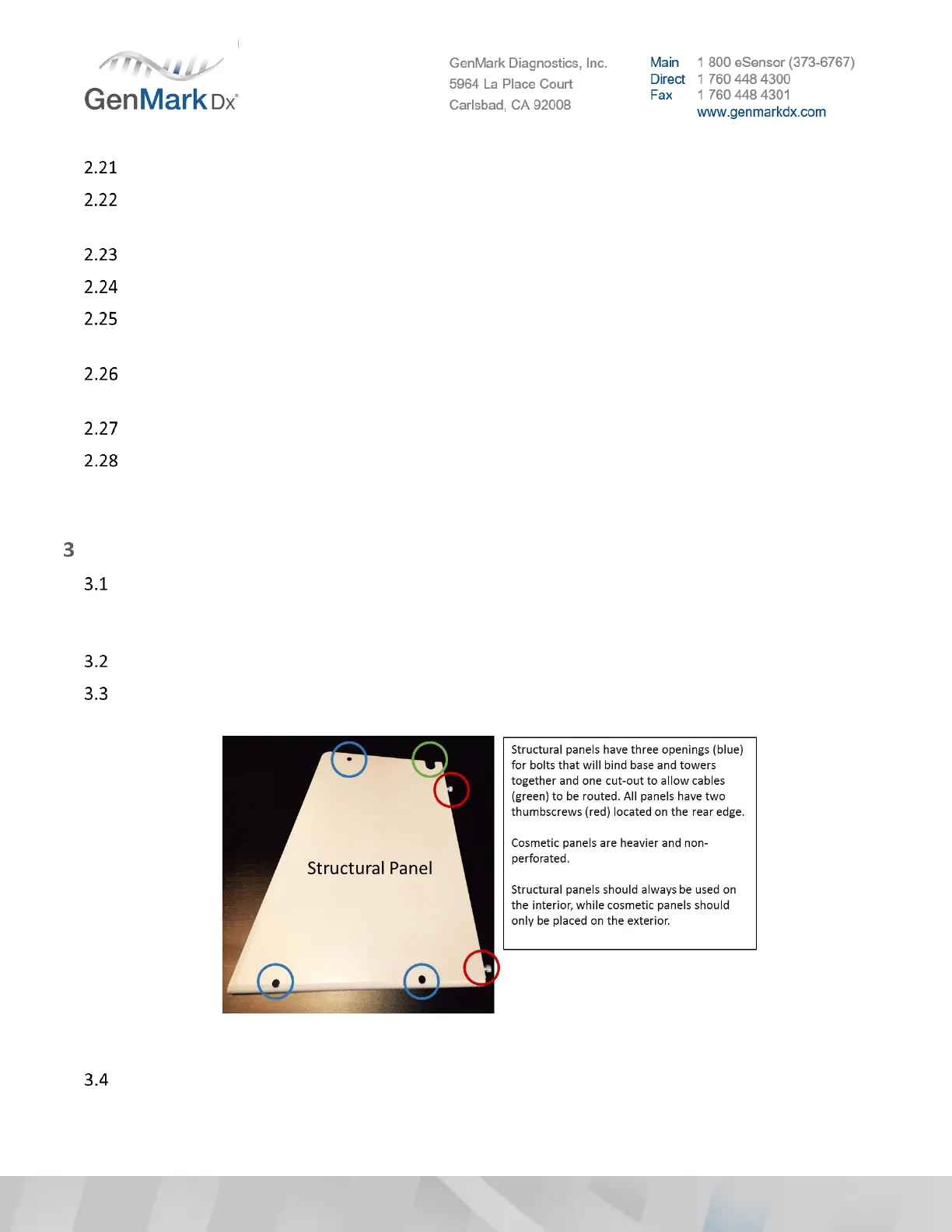
Remove exterior structural panels from the Tower(s) by loosening the rear thumb screws so they can
be replaced with cosmetic panels later.
Figure 3 Structural Side Panel
Remove tower fascia to inspect (wiggle) the sliders.


 To Next Page
 Loading...
