EasyManua.ls Logo

Germfree BZ Series - User Manual

Germfree BZ Series
53 pages
Print Icon
To Next Page IconTo Next Page
Loading...
Germfree - Horizontal Laminar Flow Workstation User Manual - v2.0 - 02/03/21 - RMH
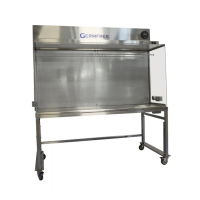
Horizontal Laminar Flow Workstation
User Manual

Questions and Answers

  • M
    Mary FrostAug 2, 2025
    What to do if there is no air circulation in my Germfree Desktop?
    • K
      Kathryn MartinAug 2, 2025
      If you notice no air circulation in your Germfree Desktop, there might be several reasons. First, check the motor blower control. Second, examine the control panel for a blown circuit breaker. Finally, a break in the electrical wiring could be the cause; in this case, use the electrical diagram to check the wiring connections.
  • C
    Cole SilvaAug 6, 2025
    What to do if the air supply is inoperative in my Germfree Desktop?
    • R
      Ryan WilliamsAug 6, 2025
      If the air supply is inoperative in your Germfree Desktop, first check if the main switch is off. Ensure the plug is properly inserted into the electrical outlet and that the blue light switch is turned on.
  • R
    Rebecca RodriguezAug 11, 2025
    What causes low velocity air in my Germfree Desktop?
    • J
      John HooverAug 11, 2025
      Low air velocity in your Germfree Desktop can stem from several issues. It could be due to an obstruction in the plenum, so check for and remove any obstructions. A leak between the blower and plenum could also be the cause.
  • D
    Daniel AllenAug 15, 2025
    Why is there exhaust air imbalance in my Germfree Desktop?
    • L
      lisacastilloAug 15, 2025
      Exhaust air imbalance in your Germfree Desktop can occur due to several reasons. It might be due to an obstruction of the plenum, so remove any obstructions. Another cause may be a leak between the blower and plenum.
  • D
    David GarrisonAug 19, 2025
    What causes high velocity air in my Germfree Desktop?
    • J
      Jeffrey RamosAug 19, 2025
      High air velocity in your Germfree Desktop can be caused by a few things. Check for and remove any obstruction of the exhaust air outlet.
  • K
    kathy93Aug 25, 2025
    How to fix excessive blower vibration in my Germfree Desktop?
    • K
      kjenkinsAug 25, 2025
      Excessive blower vibration in your Germfree Desktop is typically caused by foreign matter in the blower squirrel cage. Remove any foreign objects like paper or paper clips to resolve this issue.
  • A
    Alexa RobinsonAug 27, 2025
    How to resolve non-laminar airflow in Germfree Desktop?
    • K
      Kimberly HerreraAug 28, 2025
      Non-laminar airflow in your Germfree Desktop can be caused by a large object obstructing airflow. Remove any items that might be blocking the air.

Summary

Introduction

Installation

Features

Airflow

Airflow Diagram

Maintenance

Prefilters

Information on inspection, replacement, and logging of prefilters.

HEPA Filters

Guidance on HEPA filter lifespan, replacement, and integrity testing.

Motor Blower

Details on motor blower characteristics and power connection requirements.

Filter Diffuser

Acrylic Top and Sides

Optional Equipment

Troubleshooting

Certification; Testing Expectations

Installation Instructions

Stand Assembly

Step-by-step guide for assembling the workstation stand.

Parts List

Service Log

Quality Statement

Our Company

Germfrees Mission

Appendix A Line Drawings

Appendix B Wiring Diagrams

Appendix C Sensocon User Manual

Sensocon Introduction

Sensocon Model Number Configuration

Guide to configuring the model number for the Sensocon controller.

Sensocon Specifications

Technical details including pressure range, media compatibility, and temperature.

Sensocon Dimensional Drawings

Sensocon Mounting

Sensocon Surface Mounting

Sensocon Flush Mounting with Weather Proof Cover

Sensocon Pressure Connections

Sensocon Electrical Connections

Sensocon Display Overview

Sensocon Key Function

Sensocon Menu Structure

Sensocon Main Menu Parameters

Describes parameters available in the Sensocon Main Menu.

Sensocon Set-up Menu Parameters

Details parameters configurable in the Sensocon Set-up Menu.

Sensocon Set-Up Menu Details

Sensocon Actuation and Set Point Settings

Sensocon Actuation Types

Explains direct vs. reverse actuation for relays based on pressure changes.

Sensocon Set Point Delay

Defines the minimum time before a set point change affects switch state.

Sensocon Alarm Types

Describes high, low, and high/low alarm configurations for the controller.

Sensocon Alarm Reset

Configuration options for automatically or manually resetting alarms.

Sensocon Secure Menu

Sensocon Zero and Span Calibration

Procedures for recalibrating the zero and span of the Sensocon controller.

Sensocon Security Access Control

How to set security codes to restrict access to menus.

Sensocon Factory Default Reset

Restoring the Sensocon controller to its original factory settings.

Sensocon Moving Program Variables

Sensocon Opti-Link

Sensocon Limited Warranty

Germfree BZ Series Specifications

General IconGeneral
LightingLED
ClassClass II
Airflow100% Exhaust
ConstructionStainless Steel
Sash TypeVertical
CertificationsNSF/ANSI 49, EN 12469