
 Need help?
Do you have a question about the Getein Biotech Getein1100 and is the answer not in the manual?
Specifies the analyzer's purpose for in vitro diagnostic analysis of human samples.
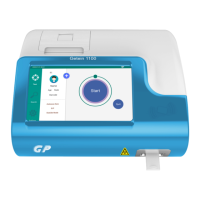
Details the Getein1100's function in measuring biomarker concentration.
Explains the analyzer's measurement methodology and test execution overview.
Provides a reference for icons used in the user manual and their meanings.
Process of checking analyzer and accessories against the packing list.
Description of the Getein1100's internal systems and components.
Explanation of the analyzer's main user interface sections.
Presents basic parameters, performance indexes, and technical specifications.
Details environmental and space requirements for analyzer installation.
Instructions for basic setup procedures like loading paper and power connection.
Confirms readiness, powers on analyzer, and explains test interface navigation.
Ensures measurement accuracy by calibrating with the SD card.
Steps for performing sample detection, auto-recognition, and result display.
Methods for searching, deleting results, and viewing test reports.
Configures serial port, communication mode, and timeout settings.
Manages auto print status and performs print tests.
Configures sample type and test modes.
Displays reaction times imported from SD card for different tests.
Allows adjustment of screen saver, language, date/time, and factory reset.
Checks analyzer version, serial number, and compatible item count.
Access for engineers to enter debug password for advanced diagnostics.
Instructions for waking the analyzer and shutting it down.
Guidelines for proper disposal of medical and industrial waste.
Introduces the GP Information Management Software functions.
Details the software name, model, and version.
Specifies hardware and software requirements for the management software.
Instructions for installing the GP Information Management Software.
Routine maintenance tasks for the analyzer, including dedusting and calibration.
Important guidelines and recommendations for analyzer operation and care.
Identifies common errors, their causes, and provides solutions.
Information about the copyright holder and document details.
Disclaimers regarding the manual's use and Getein's responsibility.
Details Getein's responsibilities for instrument safety, reliability, and support.
Information on the expected lifespan of the Getein1100 analyzer.
 General
| Brand | Getein Biotech |
|---|---|
| Model | Getein1100 |
| Category | Measuring Instruments |
| Language | English |

 To Next Page