-2-
Disposal of Electrical Waste
All electrical waste should be
disposed of in compliance with
current WEEE regulations.
Caution
The products must be installed by qualified electricians. All and
any electrical connections of the time relay shall comply with
the appropriate safety standards.
Dimensions(mm)
36max
67.5
8282
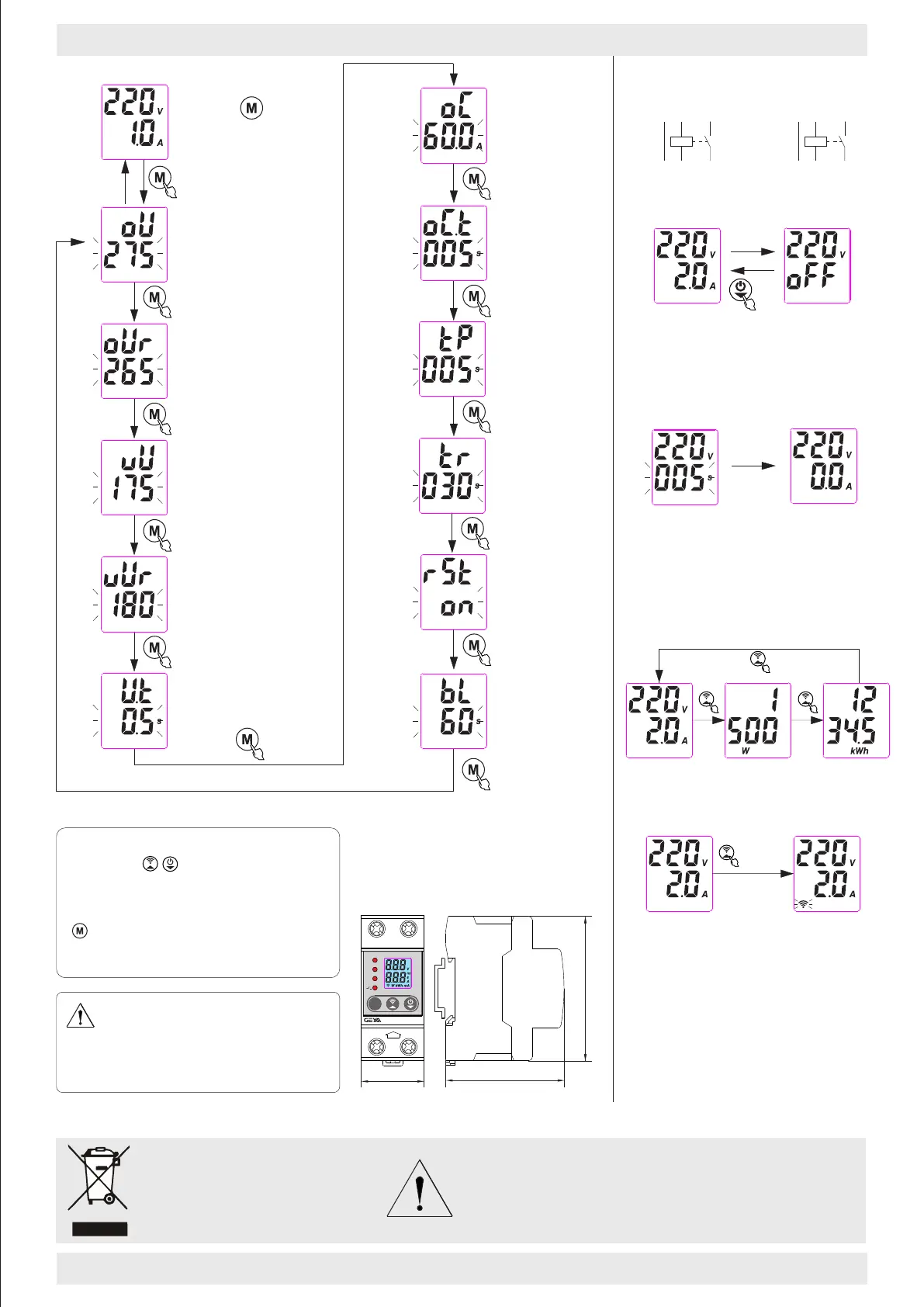
Parameter setting
NOTE:
Short press to increase or decrease
the value, long press can be quickly set.
If 60 seconds does not operate the key,
it will exit automatically.You can press the
for 3 seconds at any time to exit the and
save the setting.
AC220V
C16
230 V~
300 0
IEC 60 898-1
1
2
ON
OFF
C63
400 V
~
300 0
IEC 60 898-1
ON
OFF
3
4
1
2
C25
400 V~
300 0
IEC 60 898-1
ON
OFF
3
4
1
2
L
N
LOAD
LOAD
140V~210V,OFF
Undervoltage value
OFF,1A~32A/40A/50A/63A
Overcurrent setting
Long press 3 second to
enter the parameter setting.
OFF,230V~300V
Overvoltage value
2s~900s
Reset time setting
2s~600s
Overcurrent action time
ON-OFF
Fault reset
3s
2s~600s
Power on delay setting
225V~295V
Overvoltage recovery value
145V~215V
Undervoltage recovery value
0.1s~10s
Over/under voltage fault action time
>I
A
<U
>U
V
GPS8-02 63A
N
N
IN
M
Open and close manually
0.5s
Under normal operation, the load can
be switched on or off manually by
pressing the power keyfor 0.5 seconds.
N
N
2
1
GPS8-06U
N
N
1
2
GPS8-06D
Wiring Diagram
Power-on and reset delay
During the power-on and fault reset of
the product, the product will count down
and display according to the set delay
time, and will enter the running state
when the countdown ends.
This product does not have isolation function.
Please disconnect the superior MCB during
maintenance!!!
GPS8-06 63A
N
N
IN
>I
<U
>U
Query electricity and power
LCD backlight time
10s~900s,ON
M
Power: 1500W
Quantity of
electricity :
1234.5kWh
Power: 1500W
Quantity of
electricity :
1234.5kWh
WIFI configuration
There is a QR code on the side of the product.
Please scan, download, and install it.Press
and hold for 5 seconds before entering the
WIFI configuration state. At this time, the WIFI
indicator flashes. Please open the app and press
the prompt to configure. When the WIFI indicator
is always on, it indicates that the WIFI signal is
good. When the WIFI indicator flashes, it indicates
waiting for WIFI configuration.When the WIFI
indicator is always off, it indicates that the WIFI
cannot be connected.
5 second



 To Previous Page
 Loading...