Chapter 6 Fault Code Information
VFD-E Series
6-4 Revision August 2006, 01EE, SW--PW V1.03/CTL V2.03
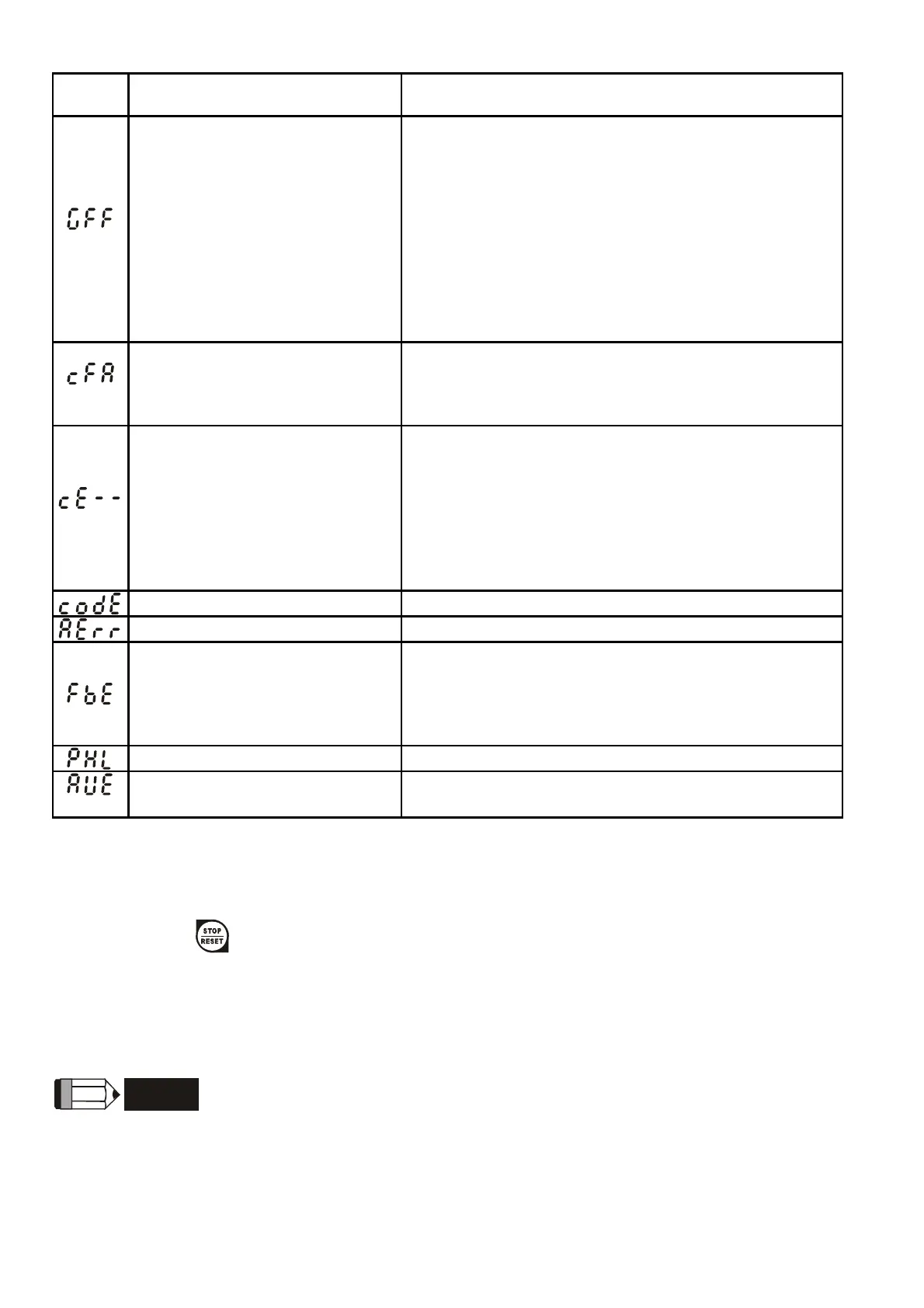
Fault
Name
Fault Descriptions Corrective Actions
Ground fault
When (one of) the output terminal(s) is grounded,
short circuit current is more than 50% of AC motor
drive rated current, the AC motor drive power
module may be damaged.
NOTE: The short circuit protection is provided
for AC motor drive protection, not for
protection of the user.
1. Check whether the IGBT power module is
damaged.
2. Check for possible poor insulation at the
output line.
Auto accel/decel failure
1. Check if the motor is suitable for operation by
AC motor drive.
2. Check if the regenerative energy is too large.
3. Load may have changed suddenly.
Communication Error
1. Check the RS485 connection between the AC
motor drive and RS485 master for loose wires
and wiring to correct pins.
2. Check if the communication protocol, address,
transmission speed, etc. are properly set.
3. Use the correct checksum calculation.
4. Please refer to group 9 in the chapter 5 for
detail information.
Software protection failure Return to the factory.
Analog signal error Check the wiring of ACI
PID feedback signal error
1. Check parameter settings (Pr.10.01) and
AVI/ACI wiring.
2. Check for possible fault between system
response time and the PID feedback signal
detection time (Pr.10.08)
Phase Loss Check input phase wiring for loose contacts.
Auto Tuning Error
1. Check cabling between drive and motor
2. Retry again
6.2 Reset
There are three methods to reset the AC motor drive after solving the fault:
1. Press
key on keypad.
2. Set external terminal to “RESET” (set one of Pr.04.05~Pr.04.08 to 05) and then set to be
ON.
3. Send “RESET” command by communication.
NOTE
Make sure that RUN command or signal is OFF before executing RESET to prevent damage or
personal injury due to immediate operation.


 To Next Page
 Loading...