Appendix D How to Use PLC Function
VFD-E Series
D-10 Revision August 2006, 01EE, SW--PW V1.03/CTL V2.03
You can recognize this command by the symbol “
Ѭ”. Basically, that is all right to use the above
method to analyze but sometimes compiler will
omit the same outputs as shown at the right.
MPS
MRD
MPP
MPP
MPS
D.5 The Example for Designing Basic Program
Start, Stop and Latching
In the same occasions, it needs transient close button and transient open button to be
start and stop switch. Therefore, if you want to keep the action, you should design
latching circuit. There are several latching circuits in the following:
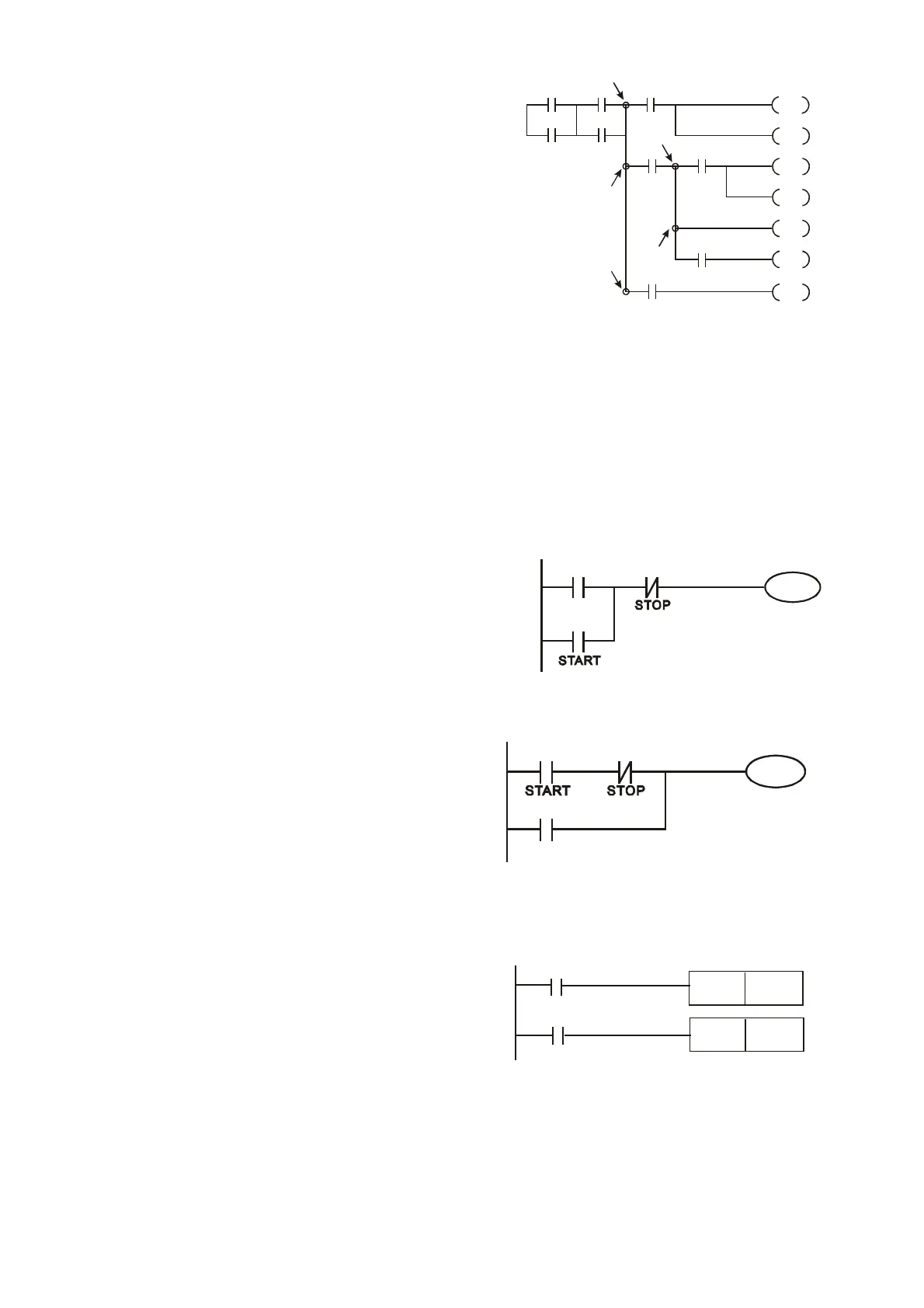
Example 1: the latching circuit for priority of stop
When start normally open contact X1=On, stop
normally contact X2ЈOff, and Y1=On are set at
the same time, if X2=On, the coil Y1 will stop
acting. Therefore, it calls priority of stop.
X2
Y1
X1
Y1
Example 2: the latching circuit for priority of start
When start normally open contact X1=On, stop
normally contact X2ЈOff and Y1=On (coil Y1 will be
active and latching) are valid at the same time, if
X2=On, coil Y1 will be active due to latched contact.
Therefore, it calls priority of start.
X2
Y1
X1
Y1
Example 3: the latching circuit of SET and RST commands
The figure at the right side is latching circuit that made
up of RST and SET command.
It is top priority of stop when RST command is set
behind SET command. When executing PLC from up to
down, The coil Y1 is ON and coil Y1 will be OFF when
X1 d X2 t t th ti th f it ll
SET
Y1
RST
Y1
X1
X2
Top priority of stop


 To Next Page
 Loading...