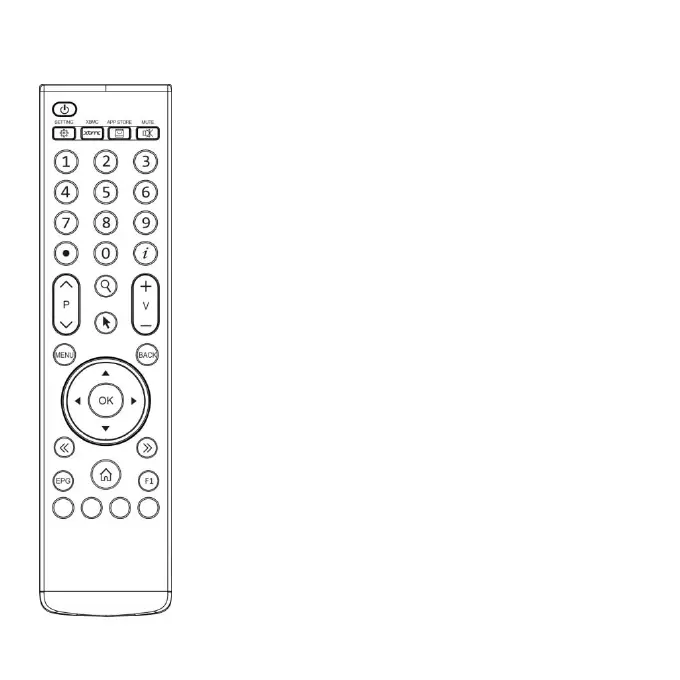
Remote Control Unit
1. Power - Switch on or switch off receiver
2. MUTE - Switch on or switch off receiver's sound.
3. SETTING - A shortcut to run System Setting.
4. XBMC - A shortcut to run XBMC.
5. APP STORE - A shortcut to run APP STORE.
6. BACK - Back to the previous menu.
7. Menu - The entry of application's functions.
8. OK - Confirm the selection.
10. <</>> - Move to the left screen or right screen.
11. Home - Back to the portal of receiver.
12. Color Keys - Entries of application’s key functions.
13. V+/V- - Adjust receiver's volume.
14. Cursor - Enable or disable mouse function.
15. EPG - Display Electronic program Guide information.
16. INFO - Display detailed information of channel, program or application.
17. FIND - Search channel, program or application.
18. Num. keys - Enters specific channel number or values when needed.
19. Record - Record program to local storage such as USB st ick.
20. F1 - Entries of application’s complement functions.
21. P+/P- - Page up/down.
22. Left/Right - Moving the highlight to left/right.
23. Up/Down - Moving the highlight to up/down.
How to activate mouse?
Press cursor key to activate mouse .The OK key has the same function as the left
button of the standard mouse.
Please notice that: mouse function is unavailable in TV screen.



 To Next Page