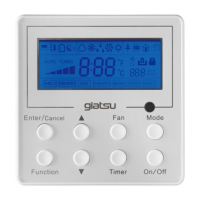
This document serves as the Owner's Manual for the Giatsu RA1A-WIFI remote control, designed for use with Giatsu air conditioning units. It provides comprehensive instructions for installation, operation, and maintenance, along with details on its Smart APP integration.
Function Description:
The Giatsu RA1A-WIFI remote control is a device used to operate Giatsu air conditioners. It allows users to control various functions of the air conditioner, including power on/off, mode selection (Auto, Cool, Dry, Fan, Heat), temperature adjustment, fan speed settings, and fan blowing angle. The remote also features specialized functions such as Turbo, Health, Sleep, I FEEL, Clean, Clock, Timer On/Off, Quiet, ECO, and Light. A key feature is its Wi-Fi connectivity, enabling control via a Smart APP from mobile devices.
Important Technical Specifications:
- Batteries: Requires two AAA 1.5V dry batteries.
- Signal Range: The distance between the remote control signal sender and the indoor unit's receiving window should be no more than 8m, without obstacles.
- Smart Module (SWM100):
- Transmitting Frequency: 2.4G
- Transmitting Power: ≤18dBm
- Power Supply: 12V DC / 0.5A
- Operating Temperature: -10℃ ~ 70℃
- Operating Humidity: 10%-90%RH
- Temperature Range: Set temperature range from remote controller: 16~31°C.
- Fan Speed: Auto, fan1, fan2, fan3, fan4, fan5, stepless speed.
- Smart APP Compatibility:
- Android: Requires Android 4.4 or later version.
- iOS: Requires iOS 7.0 or later version.
- Wireless Router: Supports WPA/WPA2 connected encryption or no password. 5G wireless routers are not supported.
- Password Limit: Wi-Fi password should be 8-32 characters long or without a password.
Usage Features:
Basic Operation:
- Power On/Off: Press the ON/OFF button to turn the air conditioner on or off.
- Mode Selection: Use the MODE button to cycle through Auto, Cool, Dry, Fan, and Heat modes.
- Temperature Adjustment: Use the "+" or "-" buttons to increase or decrease the set temperature (not adjustable in Auto mode).
- Fan Speed: The FAN button cycles through auto, fan1, fan2, fan3, fan4, fan5, and stepless speed. In Auto speed, the unit automatically selects the appropriate fan speed. In Dry mode, fan speed is fixed at fan1.
- Fan Blowing Angle: The "swing" buttons control the up&down and left&right swing functions. Pressing the up&down swing button starts or cancels the function, with options for auto swing or fixed positions. Similarly, the left&right swing button controls the horizontal airflow.
Special Functions:
- TURBO: Activates rapid cooling or heating (not available in Auto or Dry modes).
- HEALTH: Turns on/off the health function (may not be available on all models).
- SLEEP: Activates sleep mode, which adjusts settings for comfortable sleep (not available in Fan or Auto modes, and resets if mode is changed).
- I FEEL: When activated, the remote control senses the ambient temperature and sends it to the indoor unit, which then adjusts the indoor temperature accordingly. The remote should be placed near the user for accurate readings.
- CLEAN: Initiates or cancels the clean function. This function is typically available after the unit has run in Cool or Dry mode before turning off.
- CLOCK: Sets the current time in 24-hour mode.
- TIMER ON/OFF: Allows scheduling the air conditioner to turn on or off at a specific time.
- QUIET: Reduces noise levels (not available in Fan or Dry modes, and cancels Turbo function if active).
- ECO: Operates the unit in energy-saving mode (only in Cool mode, fan speed is auto, temperature not adjustable, and Sleep function cannot work simultaneously).
- LIGHT: Turns the indoor unit's display light on or off.
- Child Lock: Press "+" and "-" simultaneously to activate/deactivate. When active, the remote's icons blink three times without sending a signal if buttons are pressed.
- Temperature Display Switchover: In OFF mode, press "-" and "MODE" simultaneously to switch between °C and °F.
- Timing Defrost: In Heating mode, press "SLEEP" and "TURBO" together for 3s to start or cancel.
- Low Temperature Heating: In Heating mode, press "Mode" and "+" simultaneously to enter/exit. Fan speed defaults to Auto and is not adjustable. Turbo and Quiet functions cannot be set.
Smart APP User Guide:
- Download: Search "Easy Home AMS" on Google Play (Android) or App Store (iOS).
- Configuration: Connect the mobile phone to the wireless router. Press the Wi-Fi button on the remote control for 2 seconds to put the air conditioner into configuration mode (indicated by a long beep, then a short beep, "A2" display on the unit, and blinking Wi-Fi light).
- Adding AC: In the APP, select "add Air Conditioner" and follow the on-screen instructions. Choose the Wi-Fi network and enter the password.
- Control Interface: The APP provides a main control interface with buttons for power, temperature adjustment, mode, swing, fan speed, sleep, light, and a menu for managing multiple AC units.
- Troubleshooting: The manual includes solutions for common issues like connection failures, offline units, APP crashes, and Wi-Fi indication light meanings.
Maintenance Features:
- Battery Replacement: Replace batteries when the display on the remote controller is fuzzy or there's no display. Use new batteries of the same model (AAA 1.5V).
- Battery Storage: If the remote controller is not used for a long time, remove the batteries to prevent leakage.
- Environmental Responsibility: The product is marked with a crossed-out wheeled dustbin, indicating that it should not be disposed of with household waste. It should be recycled responsibly through designated collection centers or retailers to promote sustainable reuse of materials.

 Need help?
 General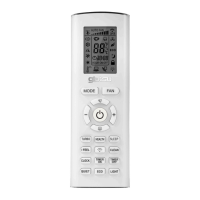

 To Next Page