EasyManua.ls Logo

Giant Axact 9/11 - User Manual

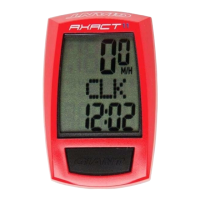
Giant Axact 9/11
2 pages
Print Icon
To Next Page IconTo Next Page
Loading...
B.
C.
3
4
S
7
8
6
2
1
(S)
(M)
9
(L)
5
Wired
A.
A.
B
Brake cable
Sensor
cable
A
8
Sensor
cable
8
8
B-2
B-1
1.
2.
A-2
2.
A-1
1.
2
1
8
3
2
1
9
3
2
1
2
1
9
8
3
3
B.
PULL
CLICK
Question and Answer IconNeed help?

Do you have a question about the Giant Axact 9/11 and is the answer not in the manual?

Summary

A. Sensor Installation

A-1. Front Wheel Sensor Attachment

Steps for attaching the sensor unit to the front wheel.

A-2. Rear Wheel Sensor Attachment

Steps for attaching the sensor unit to the rear wheel.

B. Display Unit Installation

B-1. Handlebar Mount Attachment

Procedure for securing the display unit's mounting bracket to the handlebars.

B-2. Display Unit Mounting

Steps for attaching the main display unit to its mount.

C. Magnet Mounting

C.1. Aligning Magnet to Sensor

Correctly positioning the magnet center relative to the sensor point.

C.2. Spoke Type Considerations

Instructions for mounting magnets on flat or round spokes.

Summary

A. Sensor Installation

A-1. Front Wheel Sensor Attachment

Steps for attaching the sensor unit to the front wheel.

A-2. Rear Wheel Sensor Attachment

Steps for attaching the sensor unit to the rear wheel.

B. Display Unit Installation

B-1. Handlebar Mount Attachment

Procedure for securing the display unit's mounting bracket to the handlebars.

B-2. Display Unit Mounting

Steps for attaching the main display unit to its mount.

C. Magnet Mounting

C.1. Aligning Magnet to Sensor

Correctly positioning the magnet center relative to the sensor point.

C.2. Spoke Type Considerations

Instructions for mounting magnets on flat or round spokes.

Giant Axact 9/11 Specifications

General IconGeneral
ModelAxact 9/11
CategoryBicycle Accessories
DisplayLCD
WaterproofYes
Mounting TypeHandlebar Mount
TypeCycling Computer
FunctionsSpeedometer, Odometer, Clock, Trip Distance, Average Speed, Maximum Speed

Related product manuals