
 Need help?
Do you have a question about the Giesecke & Devrient ProNote 130 and is the answer not in the manual?
Details different manuals part of the system instructions.
Outlines chapters, structure, and formatting conventions used in the manual.
Explains hazard symbols (DANGER, WARNING, CAUTION) and specific risk symbols.
Details proper use, prohibitions, personnel safety, and special dangers.
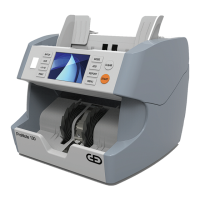
Provides a general description of the ProNote 130's capabilities and special features.
Details front/rear views, control panel, touchscreen, and keys.
Explains counting modes (VALUE BALANCING, SINGLE, COUNT) and banknote preparation.
Lists moisture content, capacity, dimensions, operating conditions, and electrical specs.
Details minimum installation area, external interfaces, and magnetic field considerations.
Provides safety warnings for transport and instructions for unpacking the machine.
Guides on connecting the machine and proper disposal of packaging and product.
Describes the procedure to power the machine on and off correctly.
Covers core functions like feeding, value balancing, single count, and piece count.
Guides on selecting currency and operating modes like ADD, BATCH, SPEED.
Covers how to initiate counting, view details, and clear previous results.
Explains accessing the menu, setting keys, saving user settings, and checking version.
Covers alarm beep, mode configuration, language, auto count, button delay, ADD function.
Describes restoring user parameters to defaults and calibrating the touchscreen.
Details opening/closing the transport section and cleaning procedures.
Explains how to adjust the feed gap and change the fuse for maintenance.
Describes the step-by-step process to remove a jam from the transport section.
Lists and explains common errors like Stacker Full, Counterfeit, Slant Notes, and Double Notes.
Lists errors detected during self-test, covering sensors and abnormal conditions.
Details resolutions for errors like Width/Length, Cannot Judge Denomination, Denomination Different.
 General
| Hopper Capacity | 500 notes |
|---|---|
| Display | LCD |
| Power Supply | 100-240 V AC, 50/60 Hz |
| Speed | 1, 300 notes/min |
| Stacker Capacity | 200 notes |
| Counterfeit Detection | UV, MG, IR |
| Connectivity | USB |
| Reject Pocket Capacity | 100 banknotes |

 To Next Page