2
3
5
4
6
13
10
1
12
9
11
8
7
i Ã
V
07:15
INT 1 14 Oct
Calls Calendar
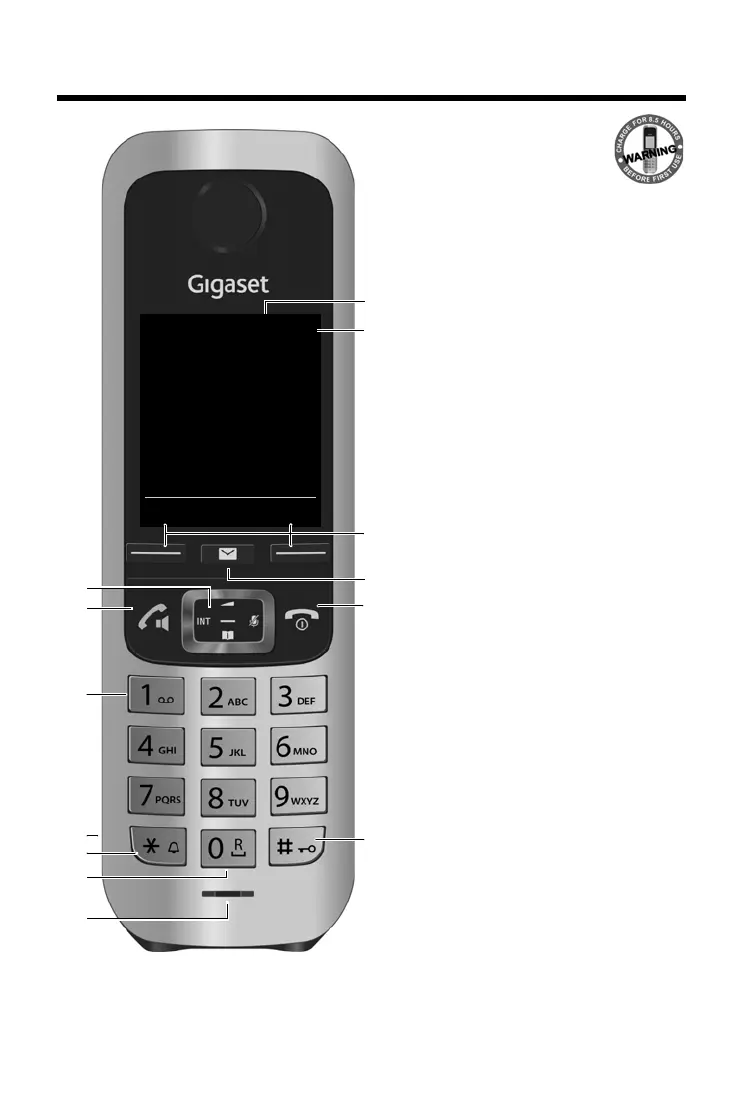
1 Display in idle status
2 Status bar (
¢ page 53)
Icons display current settings and
operating status of the phone
3 Display keys (
¢ page 16, ¢ page 31)
4 Message key (
¢ page 17)
Access to the calls and message lists;
Flashing: new message or new call
5 End call key, On/off key
End call, cancel function, go back one menu
level (press briefly), back to idle status
(press and hold), switch handset on/off
(press and hold in idle status)
6 Hash key
Keypad lock on/off (press and hold in idle
status);
Toggles between upper/lower case and
digits;
Insert a dialling pause (press and hold)
7 Microphone
8 Recall key
Consultation call (flash) (press and hold)
9 Star key
In idle status: Ringtone on/off (press and
hold);
With an open connection: switch from
pulse dialling to tone dialling (press
briefly);
When inputting text: Open special
characters table
10 Connection socket for headset
(
¢ page 12)
11 Key 1
Select answer machine (C430A-C530A-
C190A-C630A only)/network mailbox
(press and hold)
12 Answer call key / Handsfree key
Dial number displayed;
Accept call; switch from earpiece to
handsfree mode;
Open the redial list (press briefly);
start dialling (press and hold);
13 Control key / Menu key (
¢ page 15)



 To Next Page