elements cameran rekisteröinti
Registration of elements camera
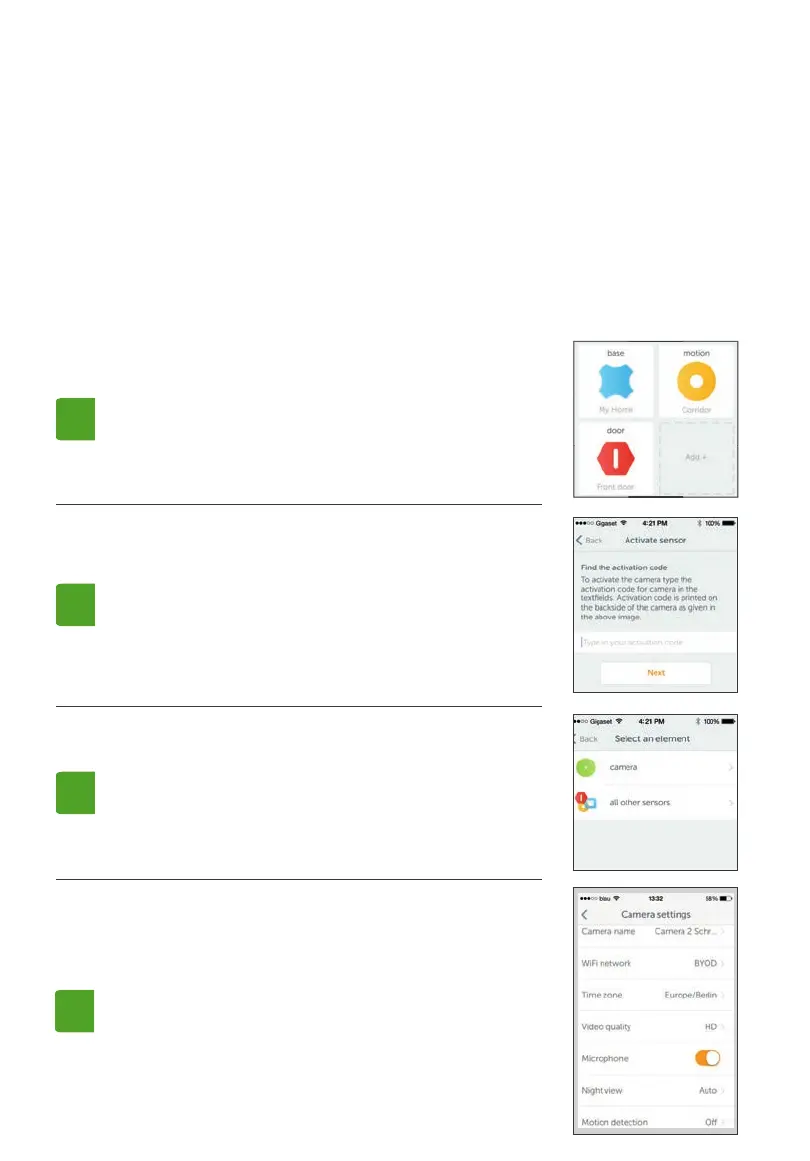
Siirry järjestelmän yleiskatsaukseen ja napsauta
Add + (Lisää).
Valitse luettelosta camera.
Go to the system overview and click “Add +“.
Select camera from the list.
Avaa Gigaset elements -ohjelma tai kirjaudu sisään
Gigaset elements -tilillesi verkko-ohjelman kautta.
Open the Gigaset elements app or log into your Gigaset elements
account on the Web application.
Seuraa asennusapurin vaiheita.
Please follow the steps of the installation wizard.
1.
3.
Jos haluat kon guroida camera, avaa järjestelmän
yleiskatsaus ja napsauta camera-kuvaketta. Siirry
muokkaustilaan ja tee haluamasi asetukset.
To con gure camera, go to the system overview and
click the camera symbol.
Then go to “Edit“ and make your desired personal
settings.
4.
Näppäile nyt aktivointikoodi. Koodi löytyy Cameran
kääntöpuolelta.
Camera lisätään järjestelmään.
Now enter the activation code. You will nd the code
on the back of camera.
camera is now added to your system.
2.



 To Next Page