The GigRig Ltd
Unit 15 Whitehill Industrial Pk, Whitehill Lane
Royal Wootton Bassett, Wiltshire. UK
SN4 7DB
THEGIGRIG REMOTEST LOOPY2 MANUAL
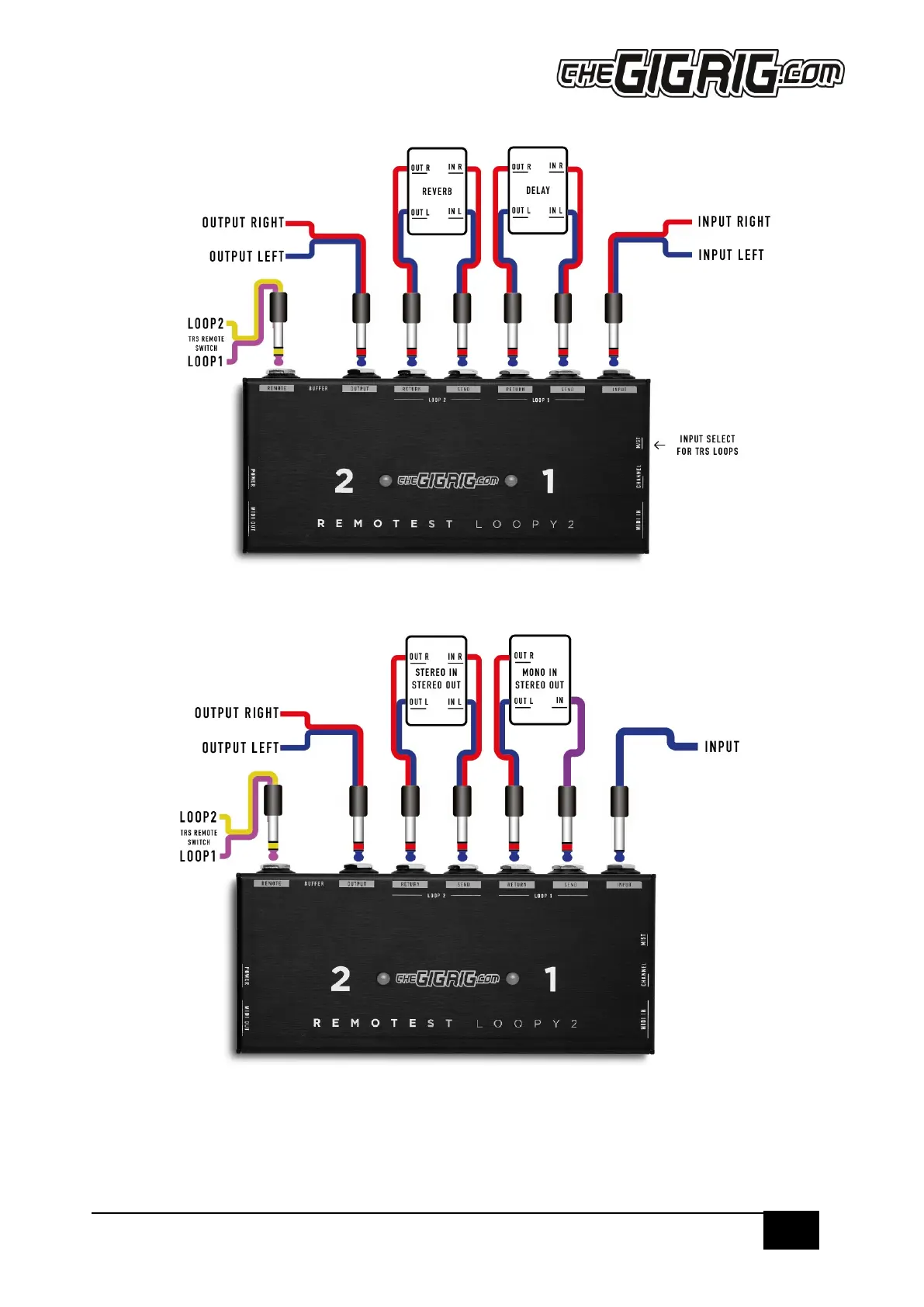
Set Up Example 2 – STEREO Connections
ST/M Switch setting for a standard STEREO set-up is ST.
Set Up Example 3 – MONO IN/STEREO OUT Connections
For a pedal that has a MONO input and a STEREO output, select M on the M/ST switch. In this setting the TIP is sent to
both the TIP and RING on the loop sends.
As soon as you have a TRS cable in a loop send or return, it is important that all send and return connections are TRS. If
not, you will find that the shield/ground of the mono cable will short the stereo side to ground giving you only a mono
connection. The M/ST switch means you can choose if the MONO input goes to both TIP and RING, but it will need a
connection that includes both TIP and RING to do this.


 To Next Page