Need help?
Do you have a question about the Gilman Creek 1656670 and is the answer not in the manual?
Recommends two people for safe handling and assembly of the unit.
Advise against dragging the unit when moving to prevent damage.
Advises against sitting on arm rests or back rests to prevent damage.
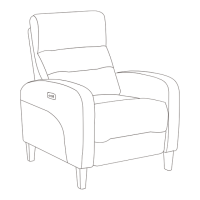
Tip the recliner back and remove the hardware pack to begin assembly.
Instructions for installing the legs onto the furniture unit.
Align and secure the seat back onto the metal arms.
Instructions to reduce the risk of electric shock during use and servicing.
Precautions to prevent burns, fire, electric shock, or injury from electrical components.
Connect the power cord to the unit's transformer.
Plug the transformer into a wall electrical outlet for power.
Confirm all connections are made and the green LED indicates power.
Connect the power supply from the backrest to the seat cushion.
Plug the unit into a wall outlet or surge protector.
Regular vacuuming and general cleaning with a damp cloth for fabric care.
Avoid direct sunlight to minimize fading and do not dry clean cushion casings.
Details of the 1-year warranty for cover, frame, and cushioning material.
Instructions for filing a warranty claim, including required photos and tags.
Check and remove any plastic straps restraining the reclining mechanism before use.
Keep children away from the reclining mechanism to prevent injury.
Engage the reclining mechanism only when the user is seated properly.
Apply lubricant to hinges and joints if squeaks occur during reclining.
Do not use the furniture in environments with flammable or explosive gases.
Avoid using the furniture in excessively humid conditions.
Ensure power supply is disconnected during installation and connected only after completion.
Insert digital device into the USB charger on the arm to begin charging.
Read security instructions carefully before using the USB charger.
Information on USB charger compatibility and output limits (5V, 2A).
Statement that the device complies with FCC Part 15 rules and conditions.
Details FCC testing for Class B digital devices and protection against interference.
Provides measures to correct harmful interference to radio or TV reception.
Outlines consumer rights for replacement, refund, or repair under Australian law.
 General
| Brand | Gilman Creek |
|---|---|
| Model | 1656670 |
| Category | Indoor Furnishing |
| Language | English |

 To Next Page