
 Need help?
Do you have a question about the GIMBAL REMOVU K1 and is the answer not in the manual?
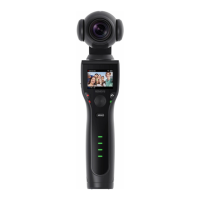
Overview of REMOVU K1 as a 4K camera with a 3-axis gimbal, highlighting its features and capabilities.
Details the technical specifications of the REMOVU K1 camera and its smart battery.
Crucial information regarding handling, gimbal unlocking, and water resistance of the REMOVU K1.
Lists compatible SD card brands, specs, and capacities required for the REMOVU K1.
Explains why the camera tilts when the power is off due to component weight.
Clarifies that the REMOVU K1 is not waterproof and advises against water exposure.
States that a smartphone cannot be mounted on the K1, but an LCD provides viewing.
Confirms the K1 has a 1/4-inch connection for tripod mounting.
Explains the K1 battery charges via micro USB cable without a cradle.
Informs about the availability of the K1 Accessory Kit and its MSRP.
Recommends operating temperatures for the K1 and advises on calibration in different environments.
States the K1 camera cannot be detached from its integrated gimbal.
Informs that Lock mode is not currently supported but planned for future updates.
Suggests disabling mobile data to resolve K1 app preview or connection problems.
Explains the LCD screen displays subjects without inversion in Selfie Mode due to a single lens.
Addresses slow saving or freezing issues, recommending compatible SD cards.
Suggests unsupported SD cards or slow write speeds may cause automatic stopping or freezing.
Explains videos are divided into files due to a 4GB maximum file size limit.
Details how file names initialize and reset after SD card formatting.
Mentions no settings for internal mic but options for external mic volume.
Guides on how to use the self-timer feature with 3, 5, or 10-second options.
Explains how to adjust gimbal speed settings to Fast, Normal, or Slow.
Details how to adjust ISO/EV settings within the Pro Settings menu.
Explains K1 cannot connect directly to TV via HDMI, suggests SD card reader method.
Demonstrates and explains barrel distortion in wide-angle lenses, noting K1's design.
Advises on occasional gimbal calibration if the horizontal axis seems off.
Provides step-by-step instructions for performing an Auto Calibration on the K1.
Explains how to zoom in/out using the joystick while holding the trigger.
States the K1 records 60 bits per second for 4K video.
Confirms that the K1 only supports the MP4 file format.
Defines THM files as low-resolution thumbnails for previewing high-res files.
Guides on how to check, reset Wi-Fi ID and Password in camera settings.
Instructions for transferring photos/videos from K1 to a computer via SD card.
Outlines three methods for transferring files to a smartphone.
Step-by-step guide for updating K1 firmware via SD card or the K1 app.
Addresses a bug causing trembling at a 45° angle, noting a future firmware fix.
Explains a software bug affecting external microphone volume levels.
Provides troubleshooting steps for Android and iOS when files are not found on SD card.
Instructions on how to clean the internal lens of the K1 by unscrewing the front lens.
Explains the feature to toggle camera orientation using the joystick and trigger.
Advises updating firmware and adjusting EV/ISO for better low-light performance.
Addresses freezing/stopping issues, recommending SD card speed and firmware updates.
Explains cellular data interference with K1 Wi-Fi connection and suggests disabling it.
Emphasizes the importance of reading the manual for product understanding.
Outlines how formal notices are sent to distributors and minor issues are handled.
Provides email addresses for inquiries and additional training information.
 General
| Battery Life | 4 hours |
|---|---|
| Aperture | f/2.8 |
| ISO Range | 100-3200 |
| Payload Capacity | Not Applicable |
| Camera Type | Gimbal Camera |
| Weight | 340 g |
| Connectivity | Bluetooth, Wi-Fi |
| Control | Joystick |
| Sensor Size | 1/2.3 inch |
| Video Resolution | 4K at 30fps, 1080p at 60fps |
| Frame Rate | 30 fps (4K) |
| Display Size | 2 inch |
| Material | Plastic |

 To Next Page