SCOOTER OPERATION continued…
Charging the Scooter
This scooter requires a full charge before its first use. To maintain the
batteries, charge the scooter after each use and do not allow the battery to
fully empty. Locate the charging port behind the plastic flap on the outside
rear body below the window. Insert the charger into the port and then into a
wall socket. The charger will illuminate green to indicate it is powered, and
then switch to red to indicate it is actively charging. When charging is
complete the charger will switch back to green standby mode to indicate it is
no longer charging. The charger can then be disconnected.
Charger Indicator Lights:
Red: ☼ Actively Charging
Green: ☼ Charging Complete (Standby Mode)
Please note that the charger may become warm or emit sound during
charging, this is normal. Oppositely if it doesn’t, this does not indicate a
problem with the charger.
⚠ AVOID DROPPING THE CHARGER AND KEEP AWAY FROM
MOISTURE AND COLD TEMPERATURES. THE SCOOTER WILL ONLY
CHARGE/OPERATE WITH THE BREAKER IN THE ON POSITION! ⚠
Adjusting the seat
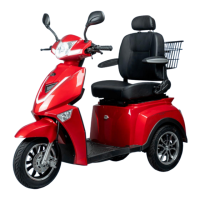
There are 3 points of adjustment on the driver’s seat of the Golf. Similar to
most cars the head adjusts up and down by squeezing the catch where the
prong of the headrest inserts into the backrest. The handle on the left side
of the seat adjusts the angle of the seat back. The handle on the right
adjusts the seat forwards and backward.
15



 To Next Page