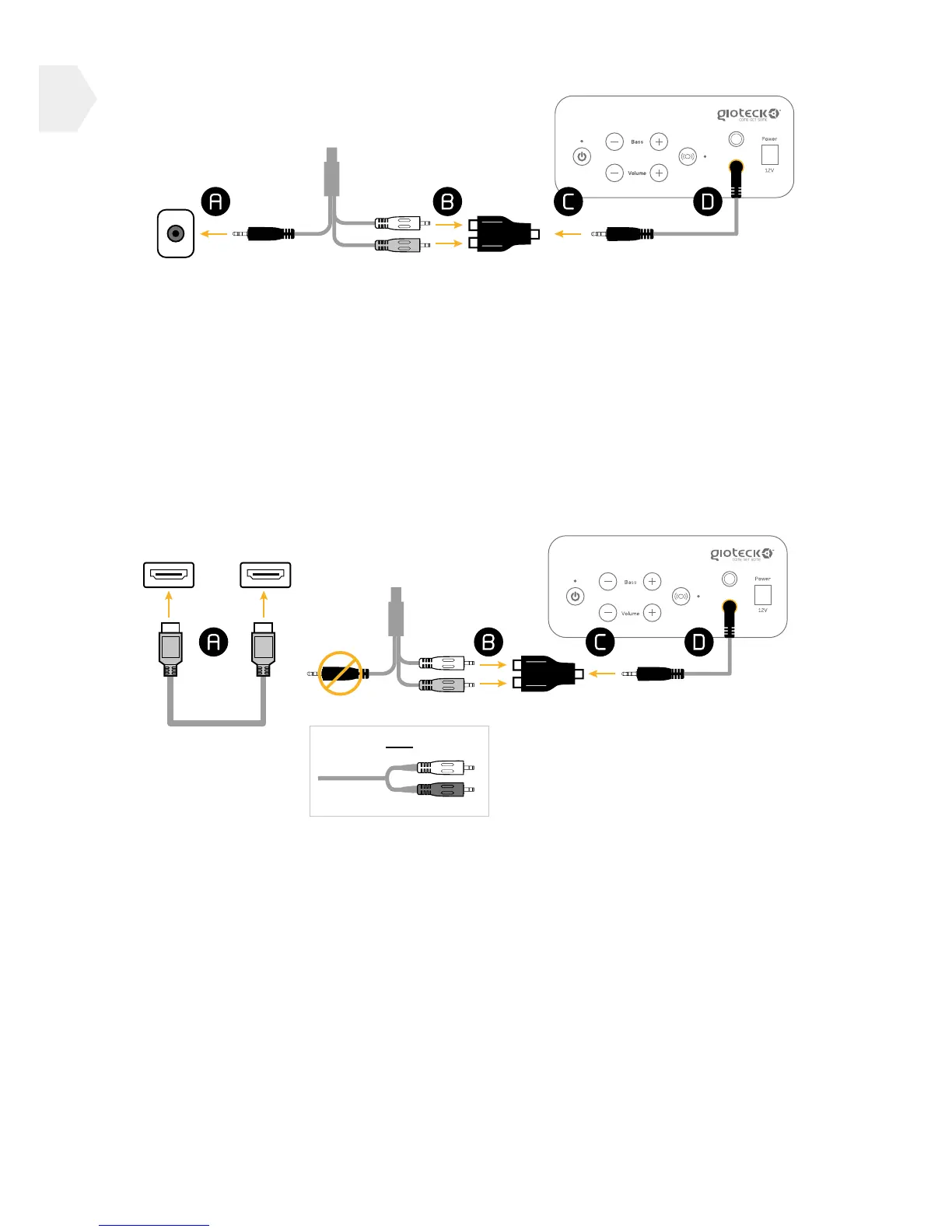
CONNECTION TO PS3/XBOX 360
1] Connect the RCA cable to your chosen VIDEO INPUT source (A).
2] Connect the red and white ends of the RCA cable (not included,
but usually provided with your game console) into the corresponding
ports of the RCA adapter (B).
3] Connect one end of the mini audio cable into the RCA adapter (C) and
the other end into the OUTPUT socket on the control panel (D).
CONNECTION VIA HDMI
1] Connect the HDMI cable between the TV and your game console (A).
2] Connect the red and white ends of the RCA cable (not included,
but usually provided with your game console) into the corresponding
ports of the RCA adapter (B).
3] Connect one end of the mini audio cable into the RCA adapter (C) and
the other end into the OUTPUT socket on the control panel (D).
If you have a HDMI Cable connected:
PS3 : The PS3 settings need to be changed as follows : Settings > Sound
Settings > Audio Output Settings then choose Audio Input Connector/
Scart / AV Multi.
Xbox 360 : An AV RCA adaptor is required (to enable simultaneous use of
both the HDMI and AV RCA ports).
5


 To Next Page