EasyManua.ls Logo

Gioteck RC5 - Page 7

Gioteck RC5
68 pages
Print Icon
To Next Page IconTo Next Page
To Previous Page IconTo Previous Page
Loading...
EN
Video
Input
Audio
Out
Headphone
Input
CHAIR 1 CHAIR 2
HDMI Input on
game console
HDMI Input
on TV
(NOT INCLUDED)
(NOT INCLUDED)
Connection
to console
Connection
to console
Connection
to console
(NOT INCLUDED)
(NOT INCLUDED)
Output
Output
Input
Output
OR
Output
Input
Vibration
Vibration
Vibration
Vibration
Vibration
D E
Video
Input
Audio
Out
Headphone
Input
CHAIR 1 CHAIR 2
HDMI Input on
game console
HDMI Input
on TV
(NOT INCLUDED)
(NOT INCLUDED)
Connection
to console
Connection
to console
Connection
to console
(NOT INCLUDED)
(NOT INCLUDED)
Output
Output
Input
Output
OR
Output
Input
Vibration
Vibration
Vibration
Vibration
Vibration
Video
Input
Audio
Out
Headphone
Input
CHAIR 1 CHAIR 2
HDMI Input on
game console
HDMI Input
on TV
(NOT INCLUDED)
(NOT INCLUDED)
Connection
to console
Connection
to console
Connection
to console
(NOT INCLUDED)
(NOT INCLUDED)
Output
Output
Input
Output
OR
Output
Input
Vibration
Vibration
Vibration
Vibration
Vibration
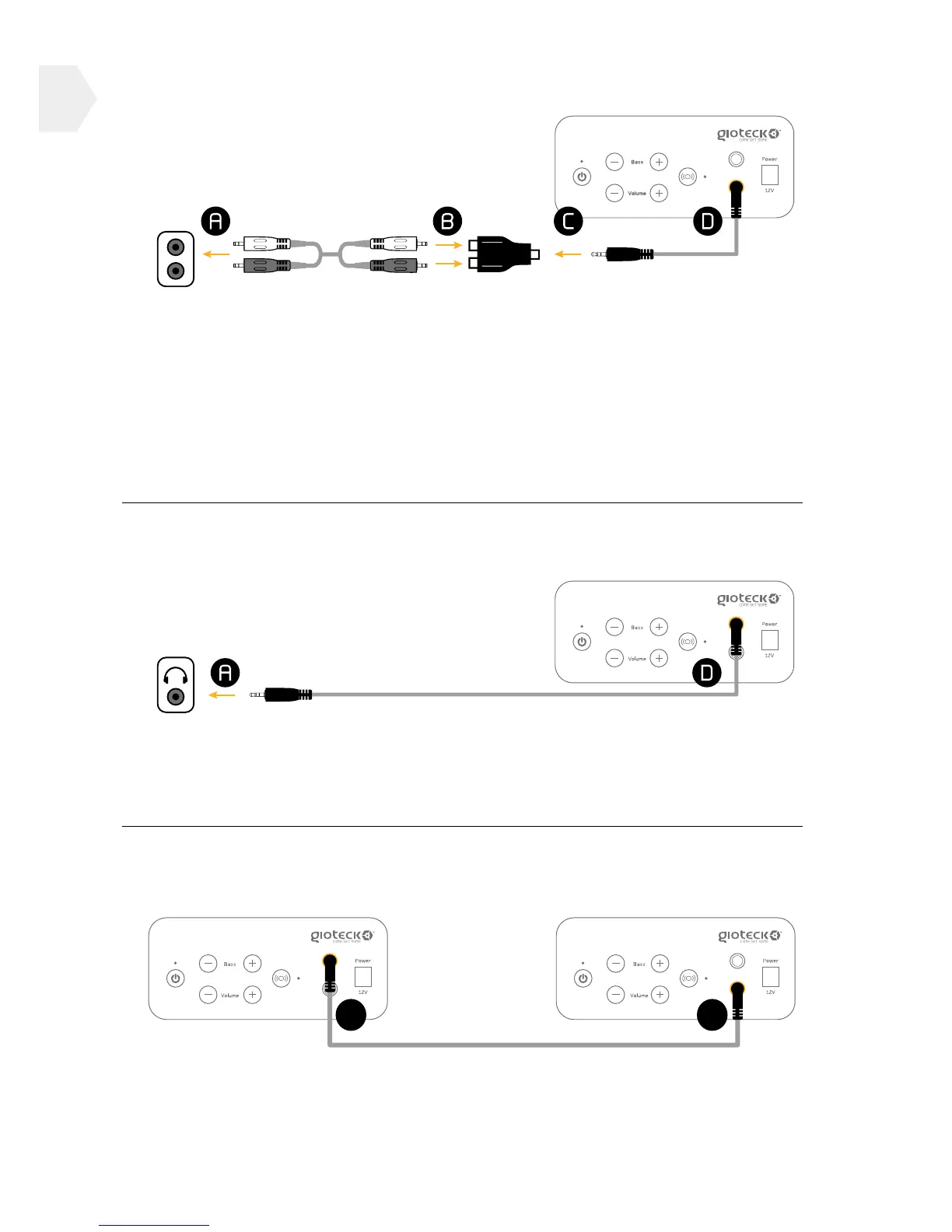
CONNECTION TO TV, DVD, RECEIVER
1] Connect the female to female RCA cable (not included) to your chosen
AUDIO OUT source (A).
2] Connect the other ends of the RCA cable into the corresponding ports
of the RCA adapter (B).
3] Connect one end of the mini audio cable into the RCA adapter (C) and
the other end into the OUTPUT socket on the control panel (D).
CONNECTION TO HANDHELD DEVICE /IPOD / MP3
Connect one end of the mini audio cable into the HEADPHONE INPUT
socket (A) of your handheld device/ipod/Mp3 player and the other end
into the INPUT socket on the control panel (D).
CONNECTION TO MULTIPLE CHAIRS
Connect one end of the mini audio cable into the INPUT Socket of
Chair 1 (D) and the other end into the OUTPUT socket of Chair 2 (E).
7