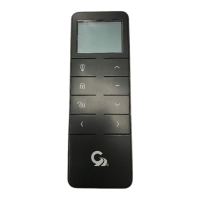
The Girard Systems GC104 is a single-channel RF transmitter, designed for controlling Girard Systems awnings. This remote handset operates on a 3V Lithium battery (CR2430) and provides a multi-functional circular control pad for extending, retracting, and stopping the awning. It is compatible with various Girard Systems motor controllers, including GC136 AC, GC274A/GC274B AC, 98GC74 AC, GC732G DC, and GC1146C DC motor controllers.
Function Description:
The primary function of the GC104 remote handset is to wirelessly control the operation of Girard Systems awnings. It allows users to:
- Extend the awning: Pressing the "IN" button (indicated by an upward arrow) extends the awning.
- Retract the awning: Pressing the "OUT" button (indicated by a downward arrow) retracts the awning.
- Stop the awning: Pressing the central button on the control pad stops the awning's movement at any desired position.
The remote handset communicates with the motor controller via RF signals on a frequency of 433.92 MHz. This wireless communication eliminates the need for wiring and drilling of holes in the vehicle, simplifying installation and operation.
Important Technical Specifications:
- Device Type: Single channel RF transmitter (remote handset)
- Model: GC104
- Power Source: Single 3V Lithium battery (CR2430)
- RF Frequency: 433.92 MHz
- Compatibility:
- GC136 AC Motor Controller
- GC274A / GC274B AC Motor Controllers
- 98GC74 AC Motor Controller
- GC732G DC Motor Controller
- GC1146C DC Motor Controller
- Control Interface: Multi-functional circular control pad with "IN" (extend), "OUT" (retract), and central "STOP" buttons.
- Programming Button: A small P2 button located on the back of the handset for pairing with motor controllers.
Usage Features:
The GC104 remote handset is designed for ease of use and convenience in controlling RV awnings.
- Simple Operation: The intuitive control pad allows for straightforward extension, retraction, and stopping of the awning.
- Wireless Control: Eliminates the need for physical wiring, offering flexibility in where the awning is controlled from within the vehicle.
- Pairing Process: The handset must be paired with the specific motor controller installed in the RV. The pairing procedure generally involves:
- Ensuring power is supplied to the motor controller.
- Pressing a "Program Button" on the motor controller (or P2 button on the handset for certain DC controllers).
- Pressing the STOP button on the motor controller.
- Pressing the IN button on the remote handset.
- Pressing the OUT, STOP, and IN buttons alternately on the handset to ensure successful pairing.
- For GC136 AC Motor Controller: The program button is located on the controller. The Green LED will blink during programming.
- For GC274A / GC274B AC Motor Controllers: Remove the lid of the motor control module to access the program button. The Green LED will blink during programming.
- For 98GC74 AC Motor Controller: The awning needs to be manually extended a couple of feet before programming. The P2 button on the remote handset is pressed TWICE, and the motor controller will beep with each press. Then press the IN button on the remote handset.
- For GC732G DC Motor Controller: The program button is on the controller. The Red LED will start blinking.
- For GC1146C DC Motor Controller: An appropriate tool is used to press the P2 button on the back of the handset TWICE. The GC1146C will beep with each press. Then press the IN button on the wall switch and verify awning movement in the desired direction.
- Safety Precautions:
- Always ensure the awning is closed or retracted prior to moving the vehicle for any reason.
- As an extra safety precaution, a visual check that every awning is fully closed is required.
- Damage caused by wind and rain is not covered by warranty.
- Damage caused by failure to comply with these instructions is not covered by warranty.
- Before deploying your awning, ensure the area into which the awning will be deployed is free of obstructions (Trees, walls, pillars, posts, other vehicles, etc.).
- Damage caused by collisions with any of the above or similar is not covered by warranty.
- Before using your awning, make sure that all of your electrical circuits are operating correctly. Recreational Vehicles can generate AC power from three separate sources: The electrical system transfer switch in your vehicle will select power for the awning as follows: Shore Power (if connected), Generator Power (if the generator is running), Inverter Power (batteries must be charged for inverter operation).
- Girard Systems awnings are supplied with an electric motor appropriate to the product.
Maintenance Features:
- Battery Replacement: The remote handset is powered by a single CR2430 3V Lithium battery. The battery compartment is located on the back of the handset. To replace the battery, the P2 button (used when pairing the device to some other G-Link Modules) is also accessible.
- Troubleshooting: For queries or assistance with programming the GC104 remote handset to any of your G-Link devices, Girard Systems provides customer support.
Important Notes on Programming:
- When carrying out the programming procedure, each step must be executed within 10 seconds of the previous one, or the module will revert to factory settings. It is highly recommended that you read and understand the following sequence before attempting to execute it.
- If the awning extends at this point instead of retracting, press the STOP button immediately, then remove the power supply to the motor controller for at least 10 seconds.
- Next, repeat steps 1 to 3 above, then press the OUT button on the wall switch to complete the programming procedure.
- Ensure that the awning responds correctly to the wall switch by pressing the OUT, STOP, and IN buttons alternately.

 Need help?
 General

 To Next Page