2.4. Starting a program
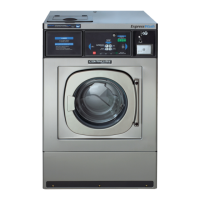
• Close the washer door. The door report on display changes to SEL. (if SEL does not appear on the
display, repeat the door closing operation).
• Select the desired program with the program selection keys. (For information on the characteristics of
each program, refer to section 2.6. Wash Programs). The selected program number will be shown on the
display.
• Place the washing products in the dispenser and close it.
• After pressing the
P
key again to confirm the temperature selected and start the washing program.
Once the program has finished, the temperature is reset back to its programmed value.
• Throughout the program’s duration, the display will show the various operations run by the washer (refer
to section 1.1) and door remains locked until the LED indicating the end of the program comes on.
Door lock. After giving the start order, a 30-second security time is started during which the drum rotation
and the water inlet operate at short impulses and door remains released. At the end of this time, the locking
mechanism closes and the wash cycle begins.
VERY IMPORTANT
PROGRAMS FOR THE WASHING OF CLOTHES REQUIRING DISINFECTION
To reduce biologic risks, clothes disinfection programs must be carried out in whole.
The programs content must agree to the standards applicable to each case.
Never modify its content, especially the following functions:
• products dosing
• Bath temperature
• processes length
2.5. Modifying a program in progress
Program acceleration
You can modify the duration of a program whilst it is in progress.
• Press the key to activate the option. The display will flash.
• By pressing the σ key repeatedly it is possible to increase the rotation time minute by minute. The
duration of the spin cycle cannot be increased.
• By pressing the τ key repeatedly it is possible to decrease the rotation or spin times.
•
Passing to the subsequent phase. The passing from one phase to the next is delayed. Press
the τ key until the end of the phase and wait a few moments until the first operation of the next
phase appears. Continue pressing the τ key.
• After a few seconds without pressing any key, the display will remain fixed and the modification option is
deactivated.
Crease-guard stop
Once the washing program has started, you can program to stop the drum rotation before the final extract,
with the objective of avoiding creases.
For activating this function once the washing cycle has started, press the key for some seconds. On the display
the rh-0 message will appear. Press the σ key. The display message will change to rh-I. The crease-guard
Stop function has been activated.
Before the last extract, the drum rotation will be interrupted and the PUSH STAR message will appear on the
display.
For resuming the program, press the



 To Next Page