This document describes the DSP series amplifier, a high-performance audio device designed for professional use.
Function Description
The DSP series amplifier utilizes a high-performance 32-bit floating-point DSP chip from TI, operating at a dominant frequency of 200MHz with a sampling frequency of 96KHz and 24-bit A/D and D/A converters. It features a 4-inch touch screen for easy operation and can be connected to a computer via USB or RS485 connectors. The RS485 connection allows for operation over distances up to 1500 meters and supports multiple amplifiers simultaneously. Each output channel is equipped with an 8-band EQ, X-over, delay, limiter, gain, and polarity adjustments, enabling precise control over the output signal. The amplifier employs high-efficiency, high-power, and high-density Class D amplification, complemented by comprehensive protection features against over current, overheat, and high-frequency issues to ensure safe operation.
Important Technical Specifications
Output Power (FTC: 20Hz-20KHz@0.03% THD):
- DSP2.6 / DSP4.6:
- 8Ω per channel: 600W
- 4Ω per channel: 1200W
- DSP2.9 / DSP4.9:
- 8Ω per channel: 900W
- 4Ω per channel: 1800W
- DSP2.12 / DSP4.12:
- 8Ω per channel: 1250W
- 4Ω per channel: 2500W
- DSP2.15 / DSP4.15:
- 8Ω per channel: 1500W
- 4Ω per channel: 3000W
- DSP2.18 / DSP4.18:
- 8Ω per channel: 1800W
- 4Ω per channel: 3600W
- DSP2.21 / DSP4.21:
- 8Ω per channel: 2100W
- 4Ω per channel: 4200W
THD: <0.03%
Frequency Response: 20 Hz - 20 kHz, ±0.15 dB (-3 dB points: 5 Hz and 50 kHz)
Damping Factor: > 400 @ 8Ω
Hum & Noise: 102dB
Input Sensitivity: 0.775V, 1V, 1.4V
Input Impedance: 10 kΩ unbalanced, 20 kΩ balanced
Connectors:
- Input: 2 channels of XLR F & XLR M (for 2-channel models); 4 channels of XLR F (for 4-channel models)
- Output: Speakon
Cooling: Front-to-rear airflow, temperature-controlled fans
Protections: Short circuit, open circuit, overheat, radio-frequency, ultrahigh or ultralow frequency protection
Power Requirement: AC 220 V (±10%) 50-60 Hz
Dimensions (mm): 88x483x425
Net Weight:
- 2CH: 11±0.2KG
- 4CH: 12±0.2KG
Gross Weight:
- 2CH: 15±0.5KG
- 4CH: 16.5±0.5KG
Usage Features
Front Panel Controls:
- Screen: Displays operational information.
- Signal/Limiter Indicators: Green for signal, red for limiter.
- MUTE/PROTECT Light: Indicates mute or protection status.
- Power Light: Indicates power status.
- USB Connector: For PC connection.
- Control Knob: For navigation and adjustments.
- Power Switch: To turn the unit on/off.
Rear Panel Connectors:
- AC Power Cord: For power input.
- Speakon Output Connectors: For speaker connections.
- XLR Input Connectors: For audio input.
- RS485 Internet Connector: For multi-amp networking.
- XLR Linear Output Connector: For line-level audio output.
Touch-Screen Operation:
- Main Page: Provides an overview of channel status (A, B, C, D) with quick access to X-over, Gain&Del, and Limit settings.
- Save/Load Settings: Allows users to save up to 20 user-defined settings and load them as needed.
- Settings Menu:
- Language: Choose between English and Chinese.
- Panel Lock: Offers "First Lock" (limits control to "Normal" page) and "Second Lock" (disables all controls) with password protection. A password reset requires factory service.
- Work Mode:
- Stereo Mode: Each channel uses its own input signal.
- Parallel Mode: All channels use channel A input signal.
- Customize Mode: Allows each channel's output to use any channel's input signal.
- Screen Timeout: Configurable options for screen inactivity.
- RS485 Address: Set unique addresses for multiple amplifiers in a network (0-250).
- Data Recover: Restore factory settings.
- Channel Link: Copy settings from a source channel to other channels.
- EQ Operation: Adjust 8-band EQ parameters (Freq, Q, Gain, Type) for each channel.
- Gain, Delay Operation: Adjust gain and delay for each channel.
- Limiter Operation: Set threshold, attack, and release parameters for the limiter. The threshold values correspond to different power outputs (refer to the provided table).
- Normal Menu: Adjust gain, mute, level, and temperature for each channel.
PC Software Operation:
- System Requirement: Compatible with 32-bit or 64-bit Windows systems.
- Connection: Connect via USB or RS485. The software supports up to 9 COM ports.
- USB Connection:
- Open the software and click the USB connection icon.
- Select the COM port.
- The software will display "PC Connecting..." upon successful connection.
- RS485 Connection:
- Use a USB-RS485 converter to connect the PC to the RS485 network.
- Connect multiple amplifiers in series using network cables (A to 4, B to 5).
- Set a unique RS485 address for each amplifier via the touch screen.
- In the PC software, click the RS485 connection icon, choose the amplifier ID, and select the COM port.
- Software Features:
- Export/Import Settings: Save current settings to a file and load previously saved settings.
- Save Settings: Save configurations to the amplifier's memory (up to 20 user settings).
- Load Settings: Load saved configurations from the amplifier's memory.
- Language Setting: Change software language (separate from panel language).
- Channel Copy: Copy settings from a source channel to a target channel.
- Channel Link: Link channels for synchronized control.
- Channel Sensitivity: Adjust input sensitivity (0.775V, 1.000V, 1.400V).
- Work Mode: Configure stereo, parallel, or customized input routing.
- Panel Lock: Control panel lock settings (Unlock, First Lock, Second Lock).
Maintenance Features
Safety Precautions:
- Lightning Flash Symbol: Indicates dangerous voltage; avoid contact with uninsulated parts.
- Exclamation Point Symbol: Refers to important operating and maintenance instructions in the manual.
- Output Terminal Warning: Do not touch output terminals when the amplifier is powered on. Make all connections with the amplifier turned off.
- Cover Removal: Do not remove the cover; no user-serviceable parts inside. Refer servicing to qualified personnel.
- Moisture Warning: Do not expose the equipment to rain or moisture. Avoid placing water containers on the amplifier.
- Hot-Plugging: Do not hot-plug input signals; only plug in or out when the power is off.
- Load Impedance: Do not use the DSP amplifier under 3 ohms load.
LED Indicators:
- POWER (green): On during normal operation, with a 7-9 second delay after power-on.
- MUTE (red): On during mute or protection. Flashes faster during high temperature, fans run faster.
- SIG (green): Indicates signal presence.
- VPL (green/red): Flashes when the amplifier is at its highest output, indicating VPL is active to prevent overload. On during overheat protection.
Overheat Protection:
- 25-50°C: Fans run at low speed.
- 50-60°C: Fans increase speed from low to high.
- 75°C: Protection LEDs start to flash.
- 85°C: Protection splash quickly, CLIP LED illuminates, output controlled at 15 dB.
- 90°C: Overheat protection, protection LEDs flash at high speed, CLIP LED is fully bright, indicating extreme low load, no ventilation, or fan malfunction.
Password Management:
- Be careful with panel lock passwords. If forgotten, the amplifier must be sent back to the factory for data flashing.
Serial Number:
- Record the serial number, date of purchase, and purchased-from information from the rear panel for records and warranty purposes.

 Need help?
 General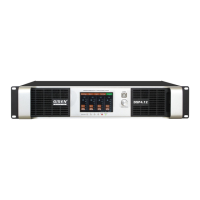

 To Next Page
