This GIT-EZDS Aftermarket Distributorship Manual contains important information on the sensitive business practice and confident
ial business facts and figures that must be kept confidential and protected from the third party’s unauthorized approach. Du
plication, photo copy,
reproduction or translation to the other language is strictly prohibited without GIT and EZDS’ prior written consent, and any
violation of such prohibition will entitle GIT or EZDS to terminate the distributorship contract.
TROUBLE SHOOTING GUIDE
GIT-EZDS
AFTERMARKET DISTRIBUTORSHIP MANUAL
GIT-EZDS AFTERMARKET DISTRIBUTORSHIP MANUAL
Feb 19
th
, 2019
FIRST EDITION
30
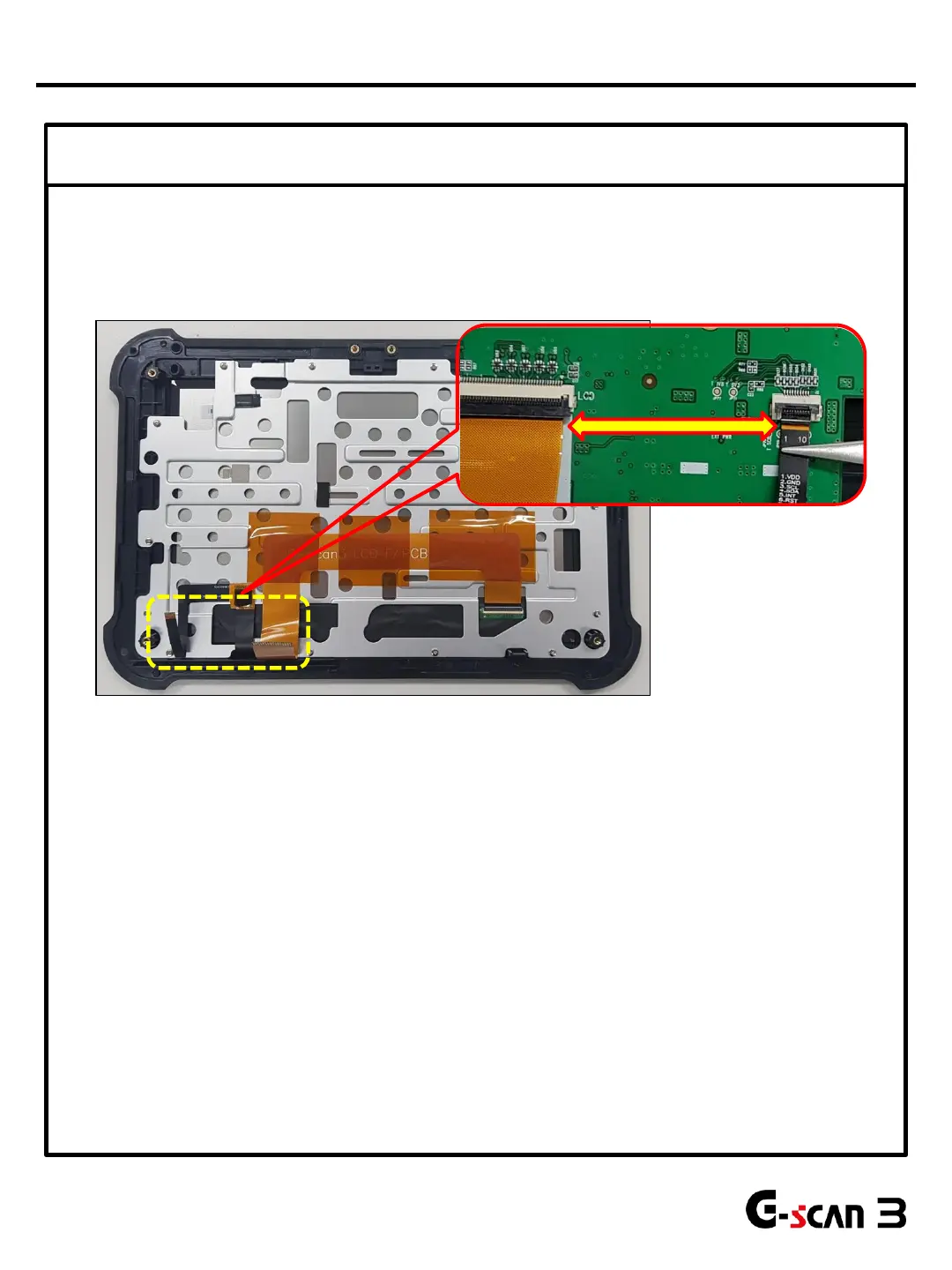
③ Check Connection of LCD module harnesses
Black line
Yellow line
1. Remove Front case referring to Part Replacement Manual
2. Make sure that lines on LCD F-PCB cable and Touch F-PCB cable is aligned as shown above.
3. Remove and clean F-PCB contact area.
4. Try to turn the power ON and check the LCD operation before assembling the unit.
* Replace F-PCB and if the problem persists, replace the LCD module.
LCD Problems


 To Next Page