Need help?
Do you have a question about the GiveBest MH-04 and is the answer not in the manual?
Explains how to turn the heater on, put it in standby mode, and reactivate it.
Details how to set the desired temperature using the +/- buttons and view it on the LED display.
Describes how to set the auto shut-off timer from 1 to 12 hours for automatic shutdown.
Explains how to set the auto power-on timer for automatic startup after a set delay.
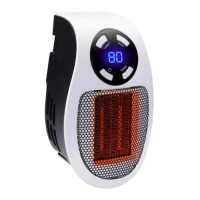
The GiveBest Mini Plug-In Ceramic Heater, model MH-04, is a compact and portable heating device designed for personal use in various indoor settings. Its primary function is to provide supplemental heat through a ceramic heating element, making it suitable for warming small areas. The heater is designed to plug directly into a wall outlet, eliminating the need for cords and offering a clean, space-saving solution.
The MH-04 operates as a ceramic heater, utilizing a ceramic heating element to generate warmth. The heat is emitted from the front of the unit, and a fan helps to distribute the warm air. The device is controlled via a user-friendly interface located on the front panel, which includes buttons for temperature adjustment, timer settings, and power control. An LED display provides visual feedback on the current temperature and timer settings.
The heater is designed for straightforward operation. To begin, the user must find an open wall plug free from obstructions like curtains or hanging wall panels and plug the heater directly into it. It is crucial that the heater is plugged in upright and not lying down, and it should not be connected to a surge protector. Once plugged in, the heater is turned on by flipping the power switch located on the side of the unit.
The control panel on the front offers several features for customized heating:
The heating process stops when the heater is turned off, but the fan will continue to run for 1 minute to cool down the internal ceramic heating element before the unit fully shuts down automatically. This cool-down period helps to ensure the longevity and safety of the device.
Proper maintenance is essential for the heater's performance and safety. The cleaning process is simple and requires the unit to be turned off and unplugged, allowing it to cool completely before handling.
The MH-04 is equipped with an internal overheat safety feature. If the internal components reach a temperature that could lead to overheating or fire, the heater will automatically shut off.
Users are advised that it is normal for the rear of the heater to feel warm. However, a loose fit between the outlet and the plug can cause the plug to overheat. If this occurs, the user should try a different outlet and contact a qualified electrician to inspect the original outlet for potential damage.
When not in use, the heater should be stored in a cool, dry location. To prevent dust and dirt accumulation, it is recommended to repack the unit in its original packaging.
Basic troubleshooting steps are provided if the heater fails to operate:
The device is designed for household use only, and any use not recommended by the manufacturer may lead to hazards. It is not intended for use in bathrooms, laundry areas, or similar indoor locations where it could fall into water. The unit contains no user-serviceable parts, and any repairs or adjustments should only be performed by qualified personnel to avoid voiding the warranty.
 General
| Heating Element | Ceramic |
|---|---|
| Safety Features | Overheat protection, tip-over switch |
| Dimensions | 6.2 x 4.7 x 9.1 inches |
| Heating Method | Convection |
| Power Source | AC |
| Power | 1500W |
| Heating Modes | High, Low |

 To Next Page