Need help?
Do you have a question about the GL-INET GL-B2200 and is the answer not in the manual?
Download the glinet app to set up your Wi-Fi and additional wireless nodes.
How to reset the router to factory settings or repair your network using the reset button.
Access detailed instructions, get help via email, Facebook, or the official forum.
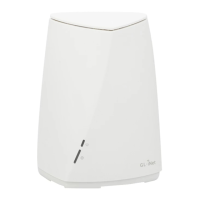
This document serves as a comprehensive guide for the GL-B2200/Velica Tri-Band Wireless Gigabit Router, outlining its setup, support, and warranty information. It is designed to assist users in quickly getting their new Wi-Fi network operational and to provide resources for troubleshooting and maintenance.
The primary function of the GL-B2200/Velica is to establish a new Wi-Fi network and extend its coverage through additional wireless nodes. This is facilitated by a user-friendly setup process primarily managed through a dedicated mobile application. The router is a Tri-Band device, indicating its capability to operate on multiple frequency bands simultaneously, which typically results in improved performance and reduced network congestion, especially in environments with many connected devices. As a Gigabit Router, it supports high-speed wired and wireless connections, making it suitable for demanding applications like streaming high-definition content, online gaming, and large file transfers.
Key usage features revolve around its ease of setup and connectivity. Users are guided to download the GL.iNet app from either the Apple App Store or Google Play. This application is central to the initial configuration, allowing users to set up their Wi-Fi network and integrate any additional wireless nodes seamlessly. The physical device itself features several ports and buttons for direct interaction. These include LED Lights, which likely indicate the device's operational status and connectivity. A Power Port (Type-C) ensures modern and convenient power input. It also includes a LAN Port for connecting wired devices to the local network and a WAN Port for connecting to the internet service provider's modem. A WPS Button is present, enabling quick and secure connections to Wi-Fi devices without needing to manually enter passwords.
Maintenance features are primarily focused on network repair and resetting the device to factory defaults. Should users encounter issues accessing the web-based setup page or connecting to the router, a Reset Button is provided. This button offers two distinct functions based on the duration it is pressed:
Beyond these physical controls, extensive technical support resources are made available. For detailed and updated instructions, users are directed to the GL.iNet website, specifically the documentation section. This online resource likely contains comprehensive guides, FAQs, and advanced configuration options. For further assistance, multiple channels are provided:
The warranty information provided outlines the terms of service and support. A one-year limited warranty is offered for the routers, with a three-month limited warranty for accessories. It is noted that extra warranty may apply based on local laws. Users are strongly advised to use the included 5V/3A power adapter to ensure proper operation. The warranty is voided if damage is caused by not following instructions, modifying the PCBA, components, or case, or using third-party firmware that is not officially supported. Damage resulting from inappropriate use, such as incorrect voltage input, high temperatures, or physical impact (dropping in water or on the ground), also voids the warranty. The document also clarifies that pictures in the instructions are for reference, and GL.iNet reserves the right to modify materials without prior notice.
Regulatory compliance information is also included, detailing adherence to FCC rules and European directives (RED, RoHS). This ensures the device meets safety and environmental standards. Restrictions on indoor use in certain European countries for specific frequency bands are also mentioned to prevent interference. Contact information for both Hong Kong and Shenzhen offices is provided for corporate inquiries.
 General
| Model | GL-B2200 |
|---|---|
| Wi-Fi Standards | IEEE 802.11a/b/g/n/ac |
| USB Ports | 1 x USB 3.0 |
| Operating System | OpenWrt |
| RAM | 256 MB |
| Flash Memory | 16 MB |
| Wi-Fi Speed | 300Mbps (2.4GHz) + 867Mbps (5GHz) |
| Wireless Standard | 802.11a/b/g/n/ac |
| Frequency Bands | 2.4GHz, 5GHz |
| VPN Support | OpenVPN, WireGuard |
| Ethernet Ports | 3 x Gigabit LAN ports, 1 x Gigabit WAN port |
| Antennas | 4 x external omnidirectional antennas |


 To Next Page