EasyManua.ls Logo

Global Industrial 761218 - User Manual

Global Industrial 761218
12 pages
Print Icon
To Next Page IconTo Next Page
Loading...
1
Wall Mounted Water Bottle Refilling Station
052120
globalindustrial.ca
User's manual Manual del usuario Manuel de l'utilisateur
Customer Service
US: 1-800-645-2986
Servicio de atención al Cliente
US: 1-800-645-2986
Service à la clientèle
Canada: 888-645-2986
WARNING
Keep compressor in upright position for 24 hours
before water connections and initial power-on. Failure
to do so will void warranty.
• For indoor commercial use only.
All installation work must be performed by authorized
service personnel.
Two or more people are recommended to lift and install
the unit.
To avoid the risk of property damage and/or personal
injury, mount the unit to a flat finished wall surface with
adequate support.
Check local codes for plumbing requirements prior
to installation.
Prior to initial installation, install a shut-off valve (not
included) from the water supply.
Thoroughly flush all water lines and fittings of all foreign
matter before connecting to the cooler. Failure to do so
will void warranty.
Check for any leaks before initial operation.
DO NOT attempt to repair or replace any part of your
appliance unless it is specifically recommended in
this manual. All other services should be referred to a
qualified technician.
• For use with clean, clear potable drinking water only.
Shut-off water supply during installation to reduce risk
of water damage.
Ensure proper ventilation by allowing appropriate
clearance of housing louvers to the wall on each side
of the cooler, as specified in rough-in guide.
NEVER wire the compressor directly to an electrical supply.
• DO NOT allow children to play with the appliance.
Interior of unit may contain sharp edges. Wear gloves
when handling or servicing unit.
Failure to follow installation instructions will void warranty.
Note: These fixtures are intended for indoor commercial
use only. Do not expose to freezing temperatures.
The grounding of electrical equipment to water lines is
a common procedure. This grounding may be in the
building or occur away from the building. This grounding
can cause electric feedback into the water cooler
creating an electrolysis which creates a metallic taste or
causes the water metal content to increase. Connect to
water supply using non-conductive materials.
Model 761218
Read this manual thoroughly prior to
installation, operation or maintenance.
Keep these instructions in a safe location
for future reference. For questions, visit
globalindustrial.com or contact Customer
Service at 1-800-645-2982.

Questions and Answers

Summary

Users Manual Overview

Customer Service Contact

Provides customer service phone numbers for US and Canada.

General Warnings and Notes

Key warnings and operational notes for initial setup and use.

Electrical Safety and Specifications

Risk of Electrical Shock

Details electrical hazards and necessary precautions.

Unit Specifications

Technical specifications including voltage, capacity, and dimensions.

Required Tools

Lists tools necessary for installation and maintenance.

Installation Guidance

Plumbing Code Compliance

Reminder to check local codes for plumbing requirements before installation.

Assembly Instructions: Preparation

Package Contents

Lists all components included in the product package.

Initial Disassembly Steps

Instructions for removing the lower cover and mounting bracket.

Assembly Instructions: Component Handling

Component Removal

Steps for removing the top mounting bracket and back plate.

Component Attachment

Instructions for attaching the gasket and bottle filler assembly.

Assembly Instructions: Connections

Water Line and Wire Connections

Procedure for connecting water lines and wires to the unit.

Stainless Steel Pan Attachment

Instructions for attaching the stainless steel pan.

Assembly Instructions: Mounting

Back Plate and Wall Bracket Installation

Steps for attaching the back plate and wall mounting brackets.

Hanging the Assembled Unit

Procedure for safely hanging the assembled unit onto wall brackets.

Assembly Instructions: Final Steps

Valve Control and Water Supply

Connecting water supply and controlling valves.

Water Filter Installation

Steps for installing the water filter.

Powering On and Leak Check

Turning on water supply, checking for leaks, and plugging in the unit.

Assembly and Safety Finalization

Maintenance and Electrical Safety Warnings

Critical warnings for maintenance and electrical safety.

Reattaching Lower Cover and Cable Connection

Instructions for reattaching the lower cover and connecting the reset cable.

Operation and Settings Adjustment

Unit Operation Modes

How to operate the bottle filler and drinking fountain.

Adjusting Water Flow and Temperature

Instructions for adjusting water flow pressure and temperature.

Installing and Replacing Water Filter

Procedure for removing and installing the water filter.

Programming and Filter Monitoring

Accessing Programming Buttons

How to access the programming buttons via the filter access door.

Resetting Filter Status

Procedure to reset the filter status indicator.

Selecting Filter Size

How to select the correct filter size for the unit.

Resetting Bottle Counter

Procedure to reset the disposable bottles saved counter.

Status Lights and Troubleshooting

Filter Status Indicator Lights

Explanation of the filter status indicator lights.

Maintenance Recommendations

Guidelines for cleaning and inspecting the unit.

Troubleshooting Common Issues

Lists common problems and their suggested solutions.

Overview

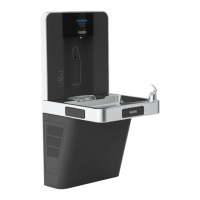
This document describes the Wall Mounted Water Bottle Refilling Station, a device designed for indoor commercial use, providing cooled and filtered potable drinking water. The unit combines a water bottle refilling station with a traditional drinking fountain, offering a versatile solution for hydration needs.

Function Description

The Wall Mounted Water Bottle Refilling Station serves two primary functions: refilling water bottles and dispensing water as a drinking fountain. For bottle refilling, users place a bottle in front of a sensor area, which triggers the automatic dispensing of water. The unit features an LCD display that shows the number of disposable bottles saved, promoting environmental awareness. As a drinking fountain, it dispenses cooled, filtered water through a bubbler when front or side activation buttons on the stainless steel pan are pressed. The device includes a water filter to ensure the dispensed water is clean and clear. A cooling system maintains the water at a preset temperature, typically around 45°F, which can be adjusted if desired. The unit is designed for wall mounting, requiring adequate support and proper ventilation.

Usage Features

The refilling station is designed for user convenience and safety. It operates with a quick-fill rate, providing laminar water flow to minimize splashing during bottle refilling. The sensor-activated bottle filler ensures touchless operation, enhancing hygiene. For the drinking fountain, physical activation buttons are provided. The unit incorporates a filter monitor system, displayed on the LCD, which tracks filter status with LED bars and indicates when a filter change is needed. This system also allows users to reset the bottle counter and select the appropriate filter size (1500, 3000, or 3600 gallons) or bypass the filter size setting if no filter is used. Initial water flow may sputter due to air in the lines, but this will clear once air is purged. The water flow pressure can be adjusted using a water control valve, allowing users to customize the flow to their preference. The water temperature can also be adjusted by accessing the thermostat located behind the lower cover. The unit is ADA compliant, ensuring accessibility for all users.

Maintenance Features

Regular maintenance is crucial for the optimal performance and longevity of the Wall Mounted Water Bottle Refilling Station. Before any servicing, it is imperative to disconnect power and shut off the main water supply to prevent electrical shock and water damage. The cooling system should be inspected every six months for leakage, proper operation, and performance. When cleaning the unit, it is important to avoid harsh chemicals, abrasive, or petroleum-based cleaners, as these can void the warranty. Exterior parts can be cleaned with a soft cloth, mild detergents, or soapy water, followed by rinsing and towel drying. Special care should be taken when cleaning mirror-finished stainless steel panels to avoid scratching. Periodically, the cabinet ventilation louvers and condenser fins should be cleaned with a vacuum cleaner or air hose to prevent dirt buildup. The lower cover of the cooling system should be removed periodically to clean out the water drain.

Filter replacement is a key maintenance task. To replace the filter, the filter access door on the lower cover is removed using a provided key. The old filter is then grasped and turned counterclockwise to remove it from the filter head. After installing a new filter by turning it clockwise until locked, the filter monitor needs to be reset. This involves pressing and holding the ENTER button for 5 seconds until "Reset Ft" is displayed, then tapping SET to select and holding SET again for 5 seconds to reset the filter status. The bottle counter can also be reset to zero using a similar process. The manual provides troubleshooting guidance for common issues such as water temperature not being cool, restricted water flow, noisy operation, and water not dispensing properly, offering suggested actions for each problem. It emphasizes that all installation and service work should be performed by authorized personnel and that any repairs or replacements not specifically recommended in the manual should be referred to a qualified technician. The unit requires two people for lifting and installation due to its weight and size.

Global Industrial 761218 Specifications

General IconGeneral
Product TypeWater Dispenser
Model Number761218
BrandGlobal Industrial
ColorWhite
MaterialPlastic
CertificationUL
Width12.5 inches

Related product manuals