
 Need help?
Do you have a question about the Global Sources BC86 and is the answer not in the manual?
Adjust the FM transmission frequency using CH- and CH+ buttons.
Adjust the audio volume by rotating the VOL button clockwise or counterclockwise.
Control music playback including pause, play, next song, and previous song.
Modify the sound effect by adjusting bass and treble using dedicated buttons.
Instructions for answering, rejecting, and ending calls using the device.
Activate SIRI or voice assistant by long-pressing the multi-function button.
Switch between Bluetooth, U-Disk, and TF card audio sources.
Connect and use the device via AUX input for audio playback.
Solutions for problems like device not responding or no sound.
Tips for achieving better sound quality, including FM channel selection.
Explanation of the automatic low-power mode to protect the car battery.
The BC86 Bluetooth Car Charger is a versatile in-car device designed to enhance your driving experience with audio transmission, charging, and hands-free communication capabilities.
The primary function of the BC86 is to transmit audio via Bluetooth and FM. It supports a wide range of charging protocols, including QC 3.0, QC2.0, PD, Huawei FCP, Samsung AFC, BC1.2, and Apple 2.4A, ensuring fast and efficient charging for various devices. The charger also supports multiple music formats such as WMA, MP3, WAV, APE, and FLAC, allowing you to play your favorite tunes from a U-Disk or TF card.
For communication, the BC86 offers Bluetooth hands-free calling, voice broadcast, and navigation assistance. It features output over-voltage, short-circuit, over-current, and over-temperature protection, safeguarding your devices. A low voltage flashing alarm provides an early warning when the car battery voltage is low. The device automatically connects to previously paired devices and allows for adjustment of BASS and TREBLE sound effects. A dazzling music spectrum display adds a visual element to your audio experience.
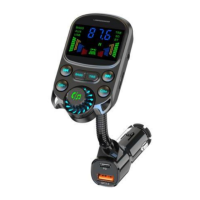
The device features a display window, a U disk port/1A, a TF card slot, a PD fast charge port, a QC fast charge port, and an AUX input/output. Control buttons include those for last song, next song, BASS, Treble, FM frequency adjustment, and a multi-function button.
Operation Instructions:
FM Frequency Adjustment: Click or long press the "CH-" or "CH+" buttons to adjust the FM frequency.
Volume Adjustment: Rotate the multi-function button clockwise to increase volume (+) or counterclockwise to decrease volume (-).
Music Control:
BASS/TREBLE Sound Effect Adjustment: Click the "BASS" button to turn bass on/off. Click the "TRE" button to turn treble on/off. The device has power-off memory for the current sound effect.
Dial/Answer Call:
Play Source Switch: The device prioritizes U-Disk/TF Card/AUX IN playback. When connected to Bluetooth/U disk/TF card/AUX IN, double-click the multi-function button to switch between these modes.
AUX Mode: Plug in an audio cable to enter AUX mode. In audio output mode, music plays directly after connecting a device (buttons are not controlled). If you switch to TF card/U disk/Bluetooth play at the same time, sound mixing will occur. In audio input mode, click the multi-function button to switch between TF card/U disk/Bluetooth play.
Voice Assistant Wake-up: After Bluetooth connection, long press the multi-function button for 2 seconds to activate SIRI/voice assistant. Short press to exit voice assistant.
Low Power Mode: When the battery voltage is less than 11V, the display flashes and alarms. If it continues to flash for 10 minutes without operation, Bluetooth will enter low-power mode automatically. This function protects the car battery. Note that some cars may not power the cigarette lighter after being turned off and locked.
Troubleshooting:
Warm Tips:
Packaging Accessories:
 General
| Brand | Global Sources |
|---|---|
| Model | BC86 |
| Category | Automobile Accessories |
| Language | English |

 To Next Page