globalindustrial.com 3 globalindustrial.com 6
V. ALARM INDICATION/ERROR MESSAGE
1. If the weight is over 100% FS+9d, display shows “OF” with a continuous
alarm. If the ADC overflows, the display shows “ADC” with a continuous
alarm.
• Weight must be taken off the platform.
2. If the internal battery is low, display shows “Lo” while the weight is zero.
• Battery must be recharged; use AC adapter.
3. If the zero weight is higher or lower than the permitted range, “HHHH” or
“LLLL” will show on display.
4. If “UNSTA” shows on display when turning on scale, the scale and/or
platform is not stable.
• Strengthen or level platform for stability.
5. If “Set” shows up on display, then the alarm setting is incorrect.
• Reset the alarm value.
6. “SYS” shows on display when the scale is switched on
• Scale needs to be re-calibrated or sent in for repair.
VI. RS232 TRANSMISSION (Optional)
1. RS232 Setting:
• Press [Mode] and [Tare] keys when self-testing until alarm sounds.
• Enter RS232 transmission setting.
• Set transmission method: Press [Set], then choose output setting by using
[▲] and [Enter].
• Output settings include; “STB” = output when stable, “ETB” = output
once when [Enter] key is pressed, “SER” = continuous output, or
“CLOSE” = output disabled.
2. Baud Rate Setting:
• Press [▲] to select desired baud rate setting, then [Enter] to confirm and
exit setting.
Read this manual carefully before operation
I. SPECIFICATIONS
1. Model: Internal rechargeable battery. Allows
scale operation during recharging
2. Power supply: Input 100-240V. 50-60HZ. 0.2A
OUTPUT D C 5.0V. 550mA
FOR INDOOR USE ONLY
3. Operating temperature range: 32°F – 104°F
4. Relative humidity:
<
85% RH
II. KEYBOARD FUNCTIONS
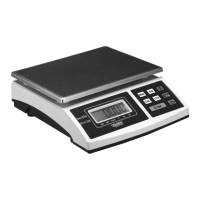
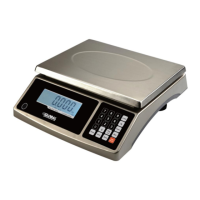
1. [Cali.] Calibrates scale
2. [Mode] Choose between different functions; Weigh, Count and Percent
3. [Unit] Switches between kg. and Lb. readouts
4. [Set] Choose high and low limit ranges in weighing mode;
Samples weight in counting and percentage mode
5. [Zero] Resets scale to zero.
Press [Zero] for 2-4 seconds to switch backlight on and off
6. [Tare] Deletes weight on scale to determine Net Weight readings
7. [▲] Cycles through information
8. [Enter] Inputs information


 To Previous Page
 Loading...