4
5
BEFORE STARTING YOUR SPOT COOLER
ALLOW COOLER TO STAND IN AN UPRIGHT
POSITION FOR AT LEAST 24 HOURS.
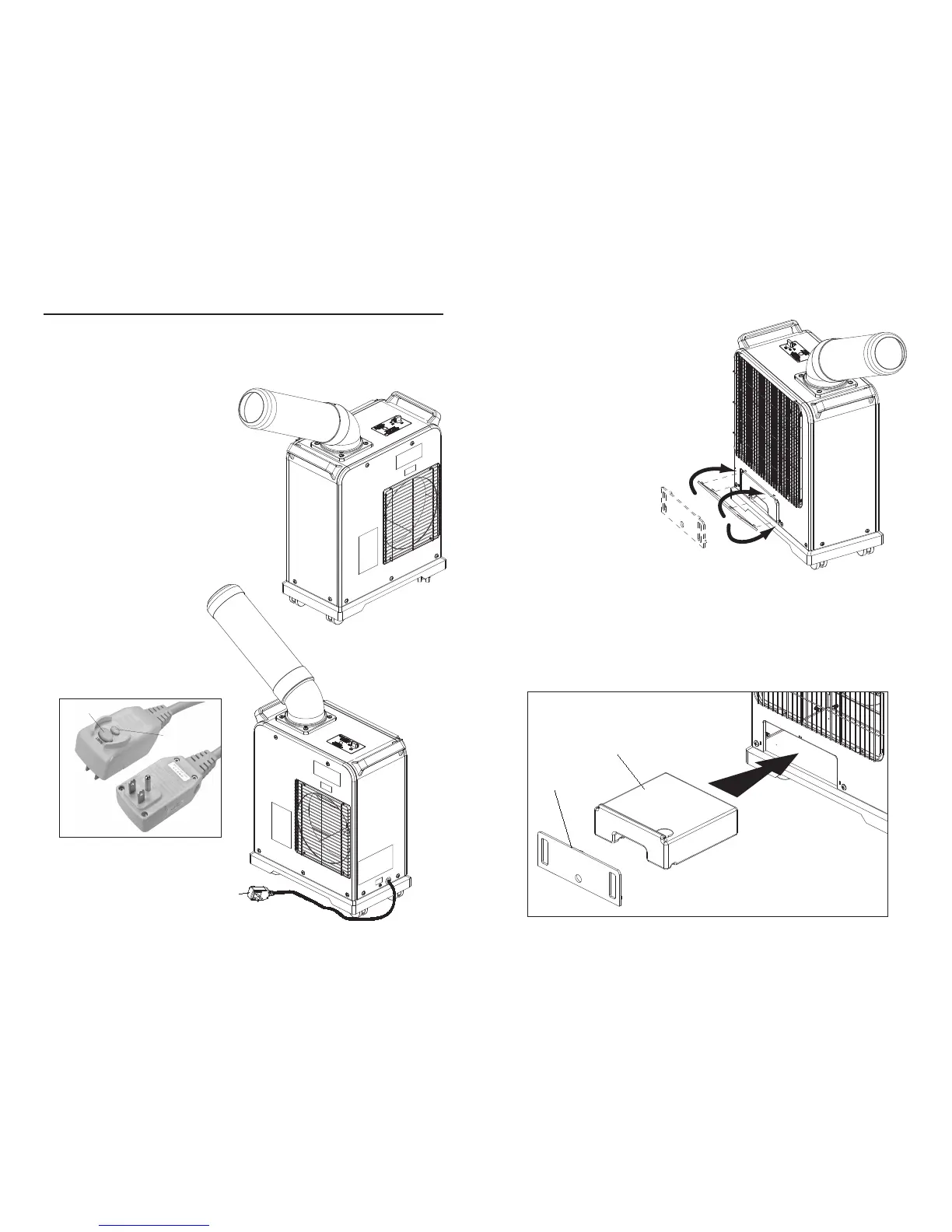
1. Place the cooler at least 3 feet from wall or obstruction.
2. Only place on level surface
3. Plug into a 115V outlet. Do not
use an extension cord.
4. Test the GFIC plug by
depressing the lower button on
the plug.
5. Reset GFIC plug by depressing
the RESET button.
6. Rotate power switch to LOW
position fan will start.
7. To increase air output turn
switch to HIGH position.
Reset
Button
Test
Button
WATER TANK
The condensation tank is
located behind a small
plastic cover. To remove
tank place your finger
into the plastic cover and
pull to remove the cover.
The tank is equipped
with an automatic shut
off valve that will turn the
cooler off once the tank
is 3/4 full and indicator
light will illuminate.
Remove the cover
exposing the tank. Slide
the tank out of the
pocket. Empty the tank.
Slide the tank back into
the pocket and replace the cover by placing the tabs on the cover onto the
slots on the face of the case and press the cover into place.
Before moving cooler at any time the condensation tank should be emptied,
to prevent water from spilling into cooler. Unplug cooler from power supply
before performing any maintenance or moving the cooler.



 To Previous Page