The MAXI S 4500 Examination Chair is an active, non-invasive medical device designed to support patients and assist medical professionals with patient positioning during medical examinations and procedures. It features recline/incline, lift/lower, rotation lock, safety lock mode, auto return, armrest adjustment, headrest adjustment, and memory functions.
Function Description:
The chair's primary function is to provide adjustable support for patients during medical examinations and procedures. It allows for various positioning options to optimize patient comfort and accessibility for medical professionals. The chair is operated via a keypad located on either side of the chair back, and an optional footswitch provides hands-free control.
Keypad Functions:
- Rotation Lock/Child Safety: This button controls two functions. Its primary function is the rotation lock, allowing the chair to be manually rotated 345° on its base. The chair is normally in a locked position. Pressing and releasing the button unlocks the brake, allowing rotation. The brake automatically secures after a 15-second delay if not manually reset. The safety lock mode is also activated using this button. When activated (by pressing and holding for at least 3 seconds), it sets the rotation lock and disables both keypad and optional footswitch controls. The lock button will illuminate when in safety lock mode. To exit, press and hold the lock button again for at least 3 seconds.
- Backrest Up: Moves the chair back from a reclined position to an upright position, up to a travel limit of 80° above horizontal.
- Backrest Down: Moves the chair back from an upright position to a reclined position, down to its horizontal travel limit.
- Seat Up: Elevates the chair, moving it up to its travel limit of 38" from the floor. If the rotation lock is unlocked during this movement, the seat will pause for one second before resuming.
- Seat Down: Lowers the chair in elevation.
- Tilt Up: Moves the chair upward from a Trendelenburg or tilt back position, returning it to the starting chair position before tilt.
- Tilt Back: Moves the chair either from a flat recline position (horizontal to floor) to a Trendelenburg position (patient's feet above head) or from a non-flat recline position to a tilt position. If pressed from a flat recline, it tilts back up to 10° below horizontal. If pressed from a non-flat recline, it tilts back up to 15°.
- User-Programmable Memory Positions (1, 2, 3): The chair can store three memory positions. To store a position, press and hold the desired memory button for 3 seconds; a 1-second audible beep confirms storage. To recall a stored position, press and release the memory button. Holding the button for 3 seconds or longer will store a new position.
- Auto Return (Home): Moves the seat to its lowest elevation and the backrest to 80° above horizontal. This is the ideal position for patients entering and exiting the chair.
Important Technical Specifications:
- Shipping Weight: 343 lbs. (197 kg)
- Chair Only Weight: 364 lbs. (165 kg)
- Base Dimensions: 30 1/2" x 38" (775 mm x 965 mm)
- Travel Range of Seat Height: 21" to 38" (533 mm to 965 mm)
- Rotation: 345°
- Chair Seat Angle (Fixed): 5°
- Tilt Angle: 0° - 15°
- Trendelenburg Angle: 0° - 10°
- Range of Chair Back Angle: 100° - 180°
- Maximum Lift Capacity: 400 lbs. (181 kg)
- Power Consumption: 4 amp
- Input Voltage: 120v 60hz (also with Solarlite)
- Mode of Operation: Non-Continuous Operation 10% duty cycle (2 min – 18 min)
- Water Resistance: IPXO
- Medical Electrical (ME) Equipment Classification: Class I
- ME Equipment Applied Part Classification: Type B
- Operation Environment Temperature: +10° to +40°C (50° to 104°F)
- Operation Environment Relative Humidity: 0 to 95%
- Operation Environment Air Pressure: 700 to 1060 kPa
- Storage Environment Temperature: -20° to +60°C (-4° to 140°F)
- Storage Environment Relative Humidity: 0 to 95%
- Storage Environment Air Pressure: 700 to 1060 kPa
Usage Features:
- Headrest: The Multi-Position Adjustable Headrest supports the patient's head. It can be repositioned by manipulating a pivoting arm assembly. To adjust, grasp the handle, pull outward and upward to release, move to the desired position, then squeeze the handle and adjoining arm to lock. A single-handed adjustment is also available by pulling upward on a release bar. The headrest can also be slid up or down by grasping a knob, turning counter-clockwise to release tension, sliding, and then turning clockwise to lock. The headrest mechanism relies on friction and may occasionally need tightening using a 3/16" hex wrench for the set screw and a 3/8" hex wrench for the adjustment nut.
- Armrest: Armrests support the patient's arms and can be positioned to aid patient entry or exit. To raise, lift upward on the front until it reaches its travel limit. When the chair is reclined, the armrests lay flat.
- Footrest: Provides a place for feet during examinations. To raise, fold towards the calf rest. To lower, fold towards the floor.
- Footswitch (Optional): An ergonomically designed modular system for hands-free control of the chair, mirroring keypad functions for seat up/down and back up/down.
- Patient Positioning: Patients should enter or exit the chair only when the rotation lock is applied and the chair is in the Auto Return (Home) position. The footrest can be used as a step. Patients should be seated with their back firmly against the backrest and legs on the leg rest before operating the chair. Operators must keep hands and feet away from moving parts to avoid pinch points.
- Pinch Points: Specific areas on the chair pose a risk of injury due to moving parts and pinch points. Operators must be mindful of body part locations while the chair is moving and should not leave patients unattended.
Maintenance Features:
- Cleaning and Disinfecting:
- General: Disconnect all electrical power before cleaning and disinfecting to prevent electrical shock. Do not use petroleum-based solvents (e.g., acetone, M.E.K.) as they will damage vinyl and plastic surfaces and pose a danger in poorly ventilated rooms. Do not use scouring materials like SCOTCH-BRITE® on vinyl or plastic surfaces. Clean and disinfect after every patient according to CDC and OSHA requirements.
- Performance Fabric Upholstery: For normal care, use a mild soap and water solution with a soft cloth, then dry. Avoid upholstery "conditioners" or "protectants." For difficult stains, identify the staining agent. Method 1 (less aggressive) uses Formula 409® or Fantastik® spray cleaner with a soft cloth, followed by rinsing and drying. Method 2 (more aggressive) uses a solvent-type cleaner like rubbing alcohol, followed by rinsing and drying. Wear protective gloves and eye protection when using cleaning products, ensure good ventilation, and follow manufacturer warnings.
- Disinfectants: The upholstery has been tested with various disinfectants (e.g., Birex SE, Bleach-Rite, Citrace, Clorox wipes, Isopropyl alcohol, Lysol, OPTIM 33 TB, OXIVIR TB, PDI Sani-Cloth HB, SaniZide Plus, Virex II 256, Virox AHP 5). If certain disinfectants (Asepticare TB-II, Cavicide, Citriguard, Clorox Broad Spectrum, Fresh Breeze TB, PDI Sanicloth Plus, PDI Super Sani-Cloth, Precise, Wex-Cide 128) are used, regular cleaning with mild soap and water or Fantastik®/Formula 409® is necessary to remove chemical residue and prevent discoloration.
- Plastic Surfaces: Clean with a mild soap and water solution and a soft cloth. Use a soft bristle brush for stains. Rinse with water and dry. Do not use ammonia, acetone, salty acids (HCI), etc. Use disinfectant sprays or damp cloths, following manufacturer instructions.
- Metal Surfaces: Clean with a damp (not wet) cloth. Use disinfectant sprays or damp cloths, following manufacturer instructions.
- Preventive Maintenance: The chair is maintenance-free but requires periodic cleaning. For repairs, contact Global Surgical Technical Services. The articulating headrest's friction lock may need occasional tightening (refer to Figure 3-4 on page 3-6).
- Storage Conditions: The chair is stationary and not intended to be moved after installation. Store upright and away from water. The storage environment should be within -20° to +60°C (-4° to 140°F) temperature, 0 to 95% relative humidity, and 700 to 1060 kPa air pressure.
- Power Off Procedure: Unplug the chair to safely terminate operation.
Regulatory Compliance:
The MAXI S 4500 Examination Chair conforms to AAMI Std ES60601-1 & IEC 60601-1-6 and is certified to CSA Stds C22.2 #s 60601-1 & 60601-1-6. It also complies with FCC 47CFR 15B 15.103.
Electromagnetic Compatibility (EMC):
The chair uses RF energy for internal functions, resulting in very low RF emissions. It is suitable for use in all establishments, including domestic, provided warnings are heeded. It may cause radio interference or disrupt nearby equipment. Special precautions are needed for EMC, and it should be installed and put into service according to the EMC information in Appendix A. Portable and mobile RF communications equipment should be kept at recommended separation distances to prevent interference. Replacement parts, especially cables, must be purchased through Global Surgical Corporation to ensure compliance and prevent injury or equipment damage.

 Need help?
 General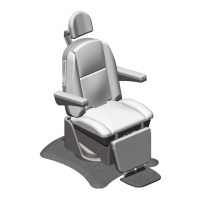

 To Next Page