

EasyManua.ls Logo

Globalsat BU-353N - User Manual

Globalsat BU-353N
17 pages
Print Icon
To Next Page IconTo Next Page
Loading...
GPS Mouse User’s Manual
GPS
Mouse Users
BU-353N
(10Hz)
© 2022
GlobalSat WorldCom Corporation/USGlobalSat, Inc. All rights reserved. The GlobalSat logo is
a trademark of
GlobalSat WorldCom Corporation. Windows is a register trademark of Microsoft
Corporation. Acrobat is a registered trademark of Adobe Systems Incorporated. Mac is a registered
trademark of the Apple Corporation. All other trademarks or registered trademark
as the exclusive property of their respective owners.
All rights reserved. No part of this manual may be reproduced, transmitted, copied, or stored in any
storage medium, for any purpose, without prior written consent from GlobalSat Worl
or USGlobalSat, Inc. GlobalSat/USGlobalSat hereby grants the right to download one (1) copy of this
manual onto a hard drive for personal use. This manual is copyrighted and may contain proprietary
information that is subject to change wit
USB G
PS
RS-232
G
1
Mouse User’s
Manual for
and BR-355N(10Hz)
V1.
GlobalSat WorldCom Corporation/USGlobalSat, Inc. All rights reserved. The GlobalSat logo is
GlobalSat WorldCom Corporation. Windows is a register trademark of Microsoft
Corporation. Acrobat is a registered trademark of Adobe Systems Incorporated. Mac is a registered
trademark of the Apple Corporation. All other trademarks or registered trademark
s are acknowledged
as the exclusive property of their respective owners.
All rights reserved. No part of this manual may be reproduced, transmitted, copied, or stored in any
storage medium, for any purpose, without prior written consent from GlobalSat Worl
dCom Corporation
or USGlobalSat, Inc. GlobalSat/USGlobalSat hereby grants the right to download one (1) copy of this
manual onto a hard drive for personal use. This manual is copyrighted and may contain proprietary
information that is subject to change wit
hout notice.
PS
Receiver: BU-353N(10Hz)
G
PS Receiver: BR-355N(10Hz)
V1.
0
GlobalSat WorldCom Corporation/USGlobalSat, Inc. All rights reserved. The GlobalSat logo is
GlobalSat WorldCom Corporation. Windows is a register trademark of Microsoft
Corporation. Acrobat is a registered trademark of Adobe Systems Incorporated. Mac is a registered
s are acknowledged
All rights reserved. No part of this manual may be reproduced, transmitted, copied, or stored in any
dCom Corporation
or USGlobalSat, Inc. GlobalSat/USGlobalSat hereby grants the right to download one (1) copy of this
manual onto a hard drive for personal use. This manual is copyrighted and may contain proprietary
Question and Answer IconNeed help?

Do you have a question about the Globalsat BU-353N and is the answer not in the manual?

Summary

Package Contents and System Requirements

Included Accessories

Lists the GPS Receiver, Simple Guide, and Suction Cup included with the product.

System Requirements

Specifies the necessary hardware and software, such as a Windows or Macintosh laptop with a USB port and NMEA software.

Welcome and Getting Started

Provides a welcome message and initial steps including driver download and COM port configuration.

Installing the USB Driver

Initiate Driver Installation

Instructs users to run the PL-2303 Windows DriverInstaller program to begin the process.

InstallShield Wizard Prompt

Describes the initial screen of the InstallShield Wizard for the USB-to-Serial driver.

Driver Installation Process

Illustrates the setup status during the installation of the PL-2303 USB-to-Serial drivers.

Completing Driver Installation

Guides on finishing the wizard and ensuring the system detects the device after installation.

COM Port Verification and Initialization

Verifying COM Port Assignment

Explains how to confirm the assigned COM port for the GPS receiver using Device Manager.

Using GPSinfo Utility for Testing

Recommends the GPSinfo utility to test the receiver and confirm COM port settings.

Initializing Your GPS Receiver

Guides on obtaining a GPS fix by taking the device to an open area with a clear sky view.

Understanding Initialization Status

Explains what zero coordinates and LED flashing indicate during the GPS initialization process.

Using and Testing the GPS Receiver

GPS Test Utility (GPSinfo)

Introduces the GPSinfo utility for verifying installation and configuration.

LED Status Indicator

Details the meaning of the LED states: OFF, ON (solid), and FLASHING.

Recommended Installation Location

Advises on securely mounting the unit in a vehicle for optimal signal reception.

GPS Information Function Test

Provides steps to test communication between the GPS device and the GPSinfo software.

GPSinfo User Interface

Describes the interface elements and functions within the GPSinfo application.

Troubleshooting and FAQs

Uninstalling the USB Driver

Instructions for removing the PL-2303 USB GPS driver from the system.

Troubleshooting No GPS Data

Steps to resolve issues where the application is not receiving GPS data.

Mapping Software Compatibility

Discusses compatibility of GlobalSat receivers with NMEA-compliant mapping software.

GPS Accuracy and Signal Issues

Explains GPS accuracy, WAAS/EGNOS, and signal visibility near obstructions.

Contact Information

Provides contact details for GlobalSat and USGlobalSat for sales and technical support.

Safety, Legal Notices, and Warranty

Safety and Legal Precautions

Emphasizes user judgment, traffic rules, and safe operation of the GPS device.

Secure Mounting and Cable Management

Warns to secure the unit and route cables to avoid driving interference or injury.

Driving Safety and Distraction Avoidance

Advises drivers to remain focused on the road and avoid distraction from the navigation equipment.

Environmental and Repair Warnings

Warns against exposing the product to moisture and performing unauthorized repairs.

Limited Warranty Terms

Details the warranty period, coverage, exclusions, and return procedures for the product.

Product Specifications

BU-353 N(10 Hz) Specifications

Provides detailed electrical, accuracy, acquisition, dynamic, environmental, power, and physical specs.

BR-355 N(10 Hz) Specifications

Details electrical, accuracy, acquisition, dynamic, environmental, power, and physical specs for this model.

Product Pin Description

Describes the pinouts and functions for both BU-353N and BR-355N GPS receivers.

Overview

The GlobalSat GPS Mouse User's Manual describes two GPS receiver models: the BU-353N(10Hz) (USB) and the BR-355N(10Hz) (RS-232), both operating at a 10Hz update rate. These devices are designed to provide real-time street navigation capabilities when connected to a laptop with compatible mapping software.

Function Description:

These GPS receivers enable a laptop to perform real-time street navigation by acquiring GPS satellite signals and outputting NMEA compatible data. The BU-353N(10Hz) connects via a USB port, while the BR-355N(10Hz) uses an RS-232 serial port. Both models are designed for easy integration with third-party mapping and navigation software that supports NMEA data. They provide position, velocity, altitude, status, and control information derived from GPS and SBAS (Satellite-Based Augmentation System) signals. The 10Hz update rate indicates that the device provides position updates ten times per second, which is beneficial for applications requiring more frequent and smoother tracking, such as fast-moving vehicles.
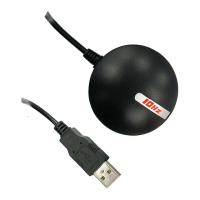
Important Technical Specifications:

General for both BU-353N(10Hz) and BR-355N(10Hz):

  • GPS Chipset: High performance chipset.
  • Frequency: GPS, SBAS: L1, 1575.42 MHz.
  • C/A Code: 1.023 MHz chip rate.
  • Channels: 75.
  • Sensitivity: -165dBm.
  • Position Horizontal Accuracy: <2.5m 2D RMS SBAS Enable.
  • Velocity Accuracy: 0.1m/sec 95% (SA off).
  • Time Accuracy: 1 micro-second synchronized to GPS time.
  • WAAS: Enabled for North America products (USGlobalSat, Inc).
  • Datum: WGS-84.
  • Hot Start Acquisition: 1 sec., average (with ephemeris and almanac valid).
  • Warm Start Acquisition: 24 sec., average (with almanac but not ephemeris).
  • Cold Start Acquisition: 33 sec., average (neither almanac nor ephemeris).
  • Reacquisition: 0.1 sec. average (interruption recovery time).
  • GPS Protocol: Default: NMEA 0183 (Secondary: AIROHA proprietary PAIR Commands > position, velocity, altitude, status and control).
  • GPS Output Data: NMEA 0183 V3.01 protocol supports, Command: GGA 10Hz, GSA 1Hz, GSV 1Hz, RMC 10Hz.
  • GPS Transfer Rate: Software command setting (Default: 115200, n, 8, 1 for NMEA).
  • Acceleration Limit: Less than 4g.
  • Altitude Limit: 18,000 meters (60,000 feet) max.
  • Velocity Limit: 515 meters/sec. (1,000 knots) max.
  • Jerk Limit: 20 m/sec.
  • Operating Temperature: -40°C to 85°C.
  • Storage Temperature: -40°C to 85°C.
  • Humidity: Up to 95% non-condensing.
  • Dimension: 2.08" diameter x 0.75" (53mm dia. x 19.2mm).
  • Cable Length: 59" (150 cm).

Specific to BU-353N(10Hz) (USB):

  • Power Voltage: 5V ±5%.
  • Current: 42mA typical.
  • Pin Description:
    • Pin 1 (Vin): Main power supply.
    • Pins 2,3 (USB IF): Transmits channel for outputting navigation and measurement data.
    • Pin 4 (GND): Ground.
  • Baud Rate: 115200.

Specific to BR-355N(10Hz) (RS-232):

  • Power Voltage: 5V ±5%.
  • Current: 35mA typical.
  • Pin Description (MD-6 Male-type):
    • Pin 1 (GND): Ground.
    • Pin 2 (VCC): Main power supply.
    • Pins 3,6 (NC): Reverse PIN.
    • Pin 4 (RX): Main receive channel for receiving software commands.
    • Pin 5 (TX): Main transmits channel for outputting navigation and measurement data.
    • LED (RED): Status indicator.
  • Baud Rate: 115200.

Usage Features:

  • Easy Installation: The device requires a simple driver installation on Windows or Macintosh laptops. The manual provides a step-by-step guide for installing the PL-2303 USB-to-Serial driver.
  • COM Port Verification: Users need to identify the assigned COM port in Device Manager to configure their mapping software correctly. The manual emphasizes the importance of closing previous GPS applications before switching to new ones to avoid port conflicts.
  • Initialization: For first-time use, the GPS receiver needs to obtain a local GPS fix in an open area with a clear view of the sky. This initialization process can take a few minutes depending on environmental factors.
  • LED Status Indicator: Both models feature an LED to indicate operational status:
    • LED OFF: GPS receiver is off (no power).
    • LED ON (solid): No fix, searching for GPS signals.
    • LED FLASHING: Position fix established and GPS signals are being received.
  • GPSinfo Utility: A "GPSinfo" utility is provided (downloadable from the GlobalSat website) to test the GPS receiver's functionality and verify COM port settings and data reception. This utility displays NMEA message output and satellite signal strength.
  • Recommended Placement: The receiver should be placed in a secure location within the vehicle that does not obstruct driving visibility or safety, while maintaining a clear "view to the sky" for optimal satellite data reception.
  • NMEA Compatibility: The receivers provide standard NMEA data, ensuring compatibility with a wide range of mapping software.
  • High Baud Rate: The default Baud rate of 115200 is set to support NMEA data from GPS systems, with other satellite systems' data potentially hidden due to the large data volume.
  • WAAS/EGNOS Capability: Units sold in North America are WAAS/EGNOS enabled, enhancing accuracy.

Maintenance Features:

  • Driver Updates: Users are advised to download the latest drivers and user manuals from the GlobalSat website for optimal performance and compatibility.
  • Troubleshooting: The manual includes an FAQ section to address common issues such as not receiving GPS data. It suggests checking COM port configuration, Baud rate settings, rebooting the computer, and reinserting the USB GPS.
  • Technical Support: GlobalSat provides technical support, but pre-registration and creation of a "Trouble Ticket" through their website are required for assistance.
  • Limited Warranty: A one-year limited warranty covers manufacturing defects in material and workmanship under normal use, provided the product is purchased from an authorized dealer. The warranty outlines procedures for product repair, replacement, or refund, and specifies conditions that void the warranty (e.g., abuse, improper installation, unauthorized repairs).
  • Safety Guidelines: The manual emphasizes critical safety precautions, including securing the GPS receiver to avoid obstructing driving, observing traffic rules, and avoiding distraction while driving. It also warns against exposing the product to rain or moisture and opening the housing, indicating that there are no user-serviceable parts inside. Servicing should only be performed by qualified personnel.
  • Product Improvements: The manufacturer reserves the right to change product specifications, functions, and features without notice due to continuous product improvements.

Globalsat BU-353N Specifications

General IconGeneral
BrandGlobalsat
ModelBU-353N
CategoryMouse
LanguageEnglish