EasyManua.ls Logo

Glomex DISCOVERY S460S - User Manual

Glomex DISCOVERY S460S
28 pages
Print Icon
To Next Page IconTo Next Page
Loading...
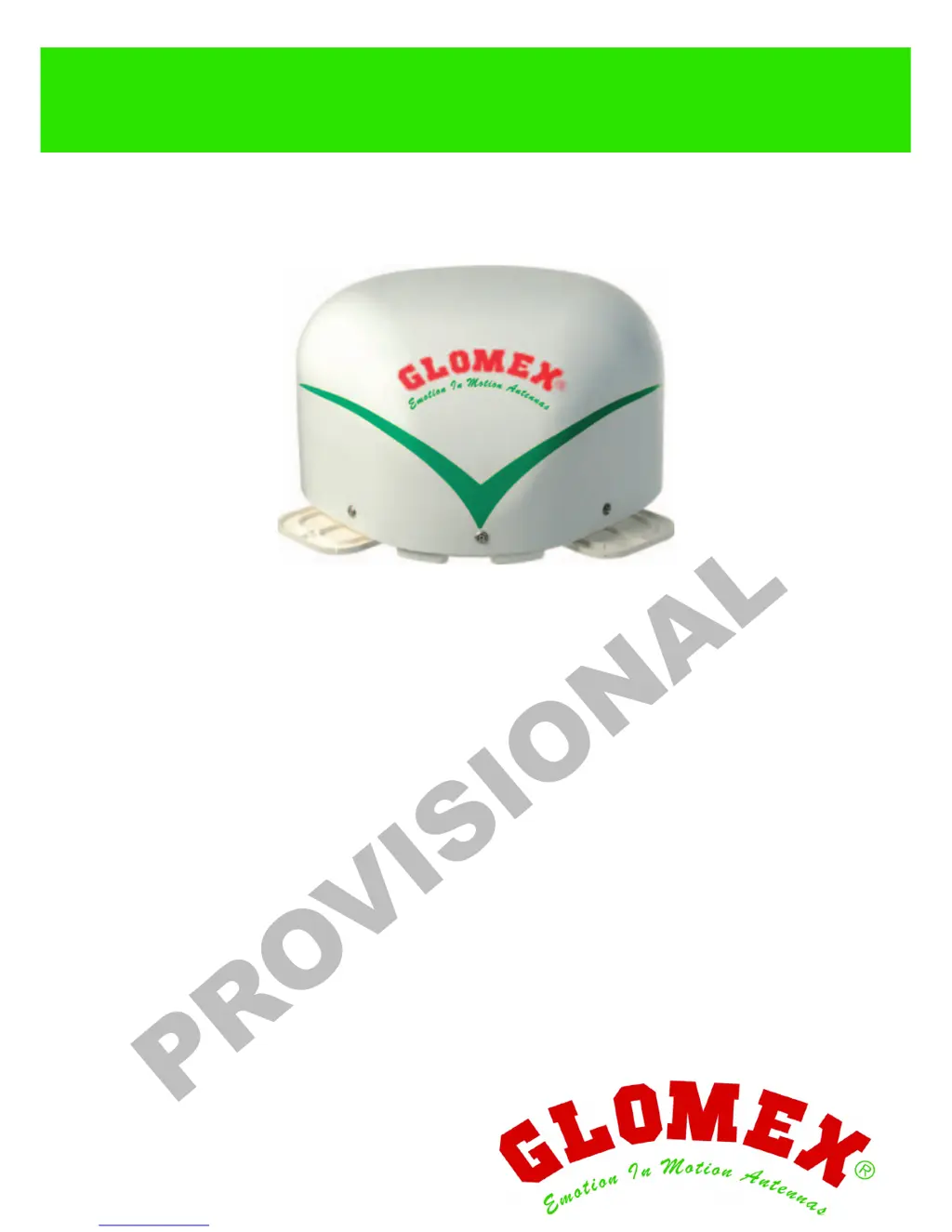
DISCOVERY S460S
EXPLORER S460M
SATELLITE TV ANTENNAS
FOR
MOBILE VEHICLES
USER AND INSTALLATION MANUAL

Questions and Answers

  • T
    Tracy RodriguezAug 15, 2025
    Why Glomex TV Antenna equipment does not find the satellite (red led)?
    • A
      Andrew ParkAug 15, 2025
      If your Glomex TV Antenna equipment isn't finding the satellite and the control unit's LED is red, it might be due to obstructions like trees, buildings, or roof attachments blocking the satellite signals. Try moving your vehicle to a location with a clearer view. Also, ensure your vehicle is within the signal coverage area. If you have an S460M model, turn off the equipment for 10 seconds, turn it on again, and ensure the vehicle remains still or moves in a straight line for the first 60 seconds. Bad weather could also be a factor.
  • R
    robert22Aug 18, 2025
    What to do if Glomex DISCOVERY S460S TV Antenna has intermittent images?
    • J
      James AguilarAug 18, 2025
      If you're experiencing intermittent images on your Glomex TV Antenna, it could be because satellite signals are being blocked by trees, buildings, overpasses, or mountains. Try moving your vehicle to a spot with an unobstructed view. It could also be that you're at the edge of the coverage area, so consider moving back within the coverage zone. Bad weather can also cause this issue.
  • S
    Sarah WelchAug 21, 2025
    What to do if Glomex DISCOVERY S460S equipment does not find the satellite (red and orange led)?
    • M
      marshallmikaylaAug 21, 2025
      If your Glomex TV Antenna isn't finding the satellite and the LED flashes alternately red and orange, obstructions like trees or buildings may be blocking the signal. Try moving your vehicle to allow a clearer view for the antenna.
  • K
    Kathleen PotterAug 26, 2025
    How to fix Glomex TV Antenna when it does not operate (led does not turn on)?
    • J
      Jonathan JacksonAug 26, 2025
      If your Glomex TV Antenna isn't working and the control unit LED doesn't turn on, it could be due to a blown fuse. Replace the fuse with a new one. Also, check the power supply cable connection for correct polarity and ensure the coaxial cables are correctly mounted.
  • N
    Nicole FrazierAug 28, 2025
    What to do if no image on the TV (Glomex DISCOVERY S460S TV Antenna, green led)?
    • J
      James DawsonAug 28, 2025
      If you have no image on the TV but the LED on the Glomex TV Antenna control unit is green, first turn off the control unit, then turn on the receiver, and turn the control unit back on. Check that the TV is on and tuned to the AV channel. Also, verify that the SCART socket between the TV and the receiver is correctly connected.
  • H
    Holly HaynesAug 31, 2025
    Why Glomex TV Antenna equipment does not find the satellite (orange led)?
    • J
      Jennifer SchwartzAug 31, 2025
      If your Glomex TV Antenna isn't finding the satellite and the LED is orange (remaining orange when moving), it means the satellite communication parameters have changed.
  • R
    Richard GarciaSep 4, 2025
    How to troubleshoot Glomex TV Antenna when it does not operate (red and green led)?
    • H
      Holly MorrisSep 4, 2025
      If your Glomex TV Antenna isn't working and the LED on the control unit flashes alternately red and green, check the connection of the coaxial cables.
  • J
    Jonathan WilliamsSep 7, 2025
    How to fix confused images on Glomex DISCOVERY S460S?
    • T
      Troy OrtizSep 7, 2025
      If you are experiencing confused, incomplete, and obstructed images with your Glomex TV Antenna, it could be due to condensation or rain on the radome. Remove any condensate deposits with a fresh water jet (not under pressure). Periodically apply a liquid detergent suitable for dishes (no alcohol-based detergent) to the radome surface and let dry up.
  • M
    Mary ChapmanSep 12, 2025
    Why Glomex TV Antenna operates with still vehicle but not with moving vehicle?
    • E
      Ethan BrownSep 12, 2025
      If the Glomex TV Antenna equipment operates when the vehicle is still but not when it's moving (S460M), it could be due to obstructions blocking the satellite signal. Try moving away from any obstacles. Also, check the antenna model to ensure it's suitable for mobile use.

Summary

1. FOREWORD

1.4 GENERAL SAFETY INSTRUCTIONS

Crucial safety precautions to prevent hazards during installation and operation, marked by WARNING/DANGER symbols.

5. INSTALLATION

6. ASSEMBLY

6.1 ASSEMBLY STEPS AND OPTIONAL FASTENING

Steps for securely mounting the antenna base, sealing, and optionally fastening with screws.

7. CONTROL UNIT INTERNAL SETUP

7.1 COAXIAL CABLE CONNECTION AND HOLE SEALING

Procedure for connecting the coaxial cable and sealing any drilled holes to prevent water ingress into the vehicle.

8. CABLE CONNECTIONS AND POWER SUPPLY

8.1 ANTENNA AND RECEIVER CABLE WIRING

How to connect the antenna coaxial cable and the 1.5m coaxial cable to the control unit's ports.

8.2 POWER SUPPLY CONNECTION TO BATTERY

Instructions for connecting the power supply cable to the vehicle battery, including required cable specifications.

8. ANTENNA USAGE INSTRUCTIONS

8.1 SATELLITE SELECTION AND SIGNAL LOCK

Step-by-step guide to selecting a satellite and acquiring a signal, indicated by LED status changes.

15. MAINTENANCE AND SPARE PARTS

16. SOFTWARE UPDATE PROCEDURE

18. REPLACING THE POWER SUPPLY FUSE

19. TROUBLESHOOTING GUIDE

20. ADVANCED TROUBLESHOOTING STEPS

23. TECHNICAL SPECIFICATIONS SUMMARY

24. TECHNICAL ASSISTANCE CONTACT

Glomex DISCOVERY S460S Specifications

General IconGeneral
Frequency Range10.7 - 12.75 GHz
PolarizationLinear
Impedance75 ohm
Connector TypeF-Type
TypeSatellite Antenna
Diameter45 cm
Power Supply12 V
Gain34.5 dB

Related product manuals