4
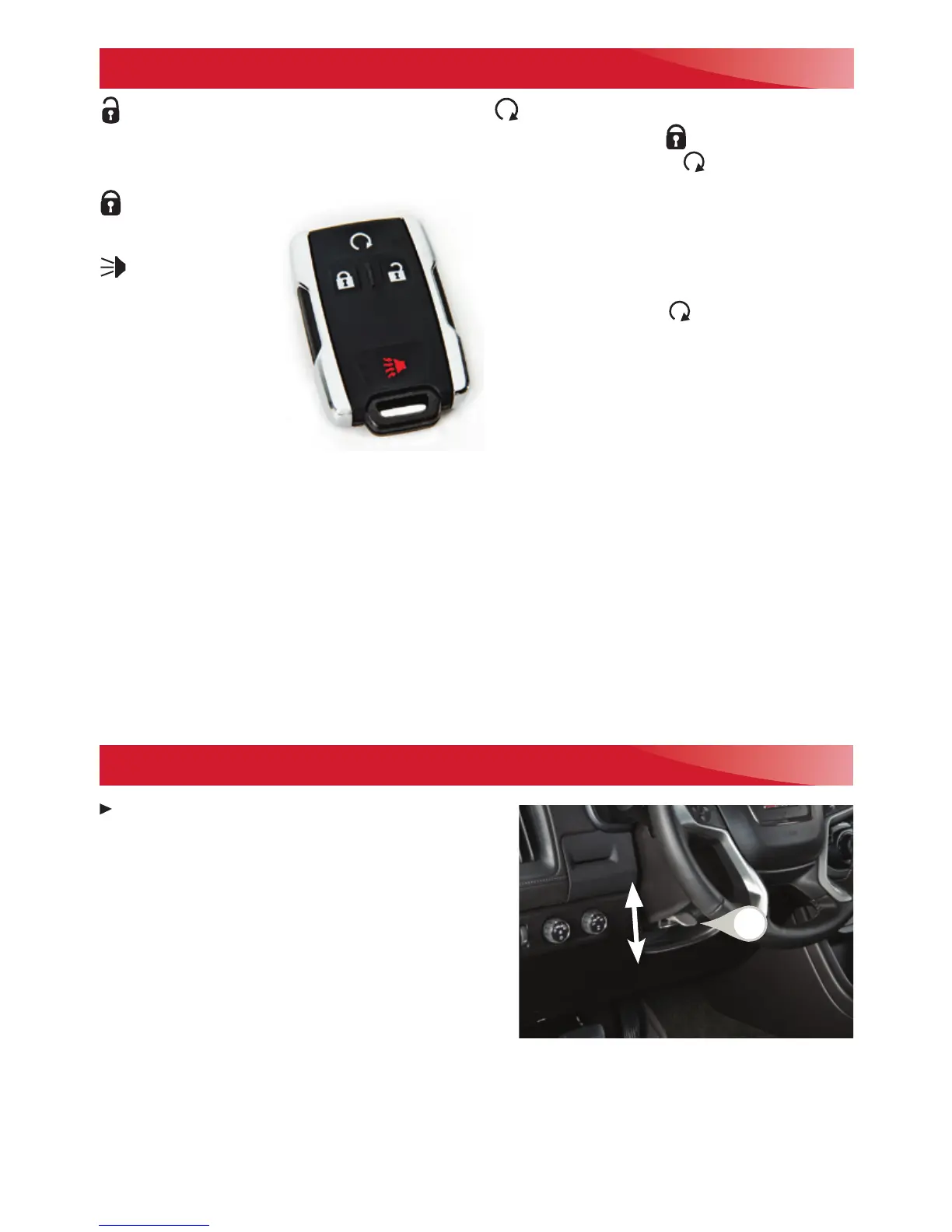
REMOTE KEYLESS ENTRY TRANSMITTER (KEY FOB)
F
TILT/TELESCOPING
F
STEERING WHEEL
With the vehicle in Park, push down the lever (A)
on the left side of the steering column to adjust
the position of the steering wheel. The steering
wheel can then be moved up or down and in or
out
F
. Pull up the lever to lock the steering wheel
in place.
See Instruments and Controls in your Owner’s Manual.
A
F
Optional equipment
Unlock
Press to unlock the driver’s door.
Press again to unlock all doors.
Lock
Press to lock all doors.
Vehicle Locator/
Panic Alarm
Press and release to
locate your vehicle.
The turn signal lamps
will flash and the horn
will sound.
Press and hold to
activate the alarm. The
turn signal lamps will flash and the horn will
sound for 30 seconds or until the ignition is
turned on.
Remote Vehicle Start
F
Press and release the Lock button and
then press and hold the button until the
turn signal lamps flash to start the engine
from outside the vehicle. After entering the
vehicle, turn on the ignition.
• During a remote start, the engine will run
for 10 minutes.
• Press and hold the
button until the
parking lamps turn off to cancel a remote
start.
Remote Start Auto Heated Seats
Select the Remote Start Auto Heat Seats
option in the Vehicle Settings to have the
heated seats turn on during a remote start. The
seat button indicators do not illuminate and the
temperature performance of the unoccupied
seats may be reduced during a remote start.
The heated seats turn off when the ignition is
turned on.
Note: To change the remote lock, unlock, and
remote start settings, go to Settings > Vehicle >
Remote Lock, Unlock, Start.
See Keys, Doors and Windows in your Owner’s Manual.






 To Next Page