In Brief 1-19
[ : Press to disengage cruise
control without erasing the set
speed from memory.
See Cruise Control on page 9‑34.
Navigation System
For vehicles with this feature,
the vehicle's navigation system
provides detailed maps of
most major freeways and roads
throughout the United States
and Canada. After a destination
has been set, the system provides
turn-by-turn instructions for reaching
the destination. In addition, the
system can help locate a variety
of points of interest (POI), such
as banks, airports, restaurants,
and more.
See the vehicle's Navigation System
manual for more information.
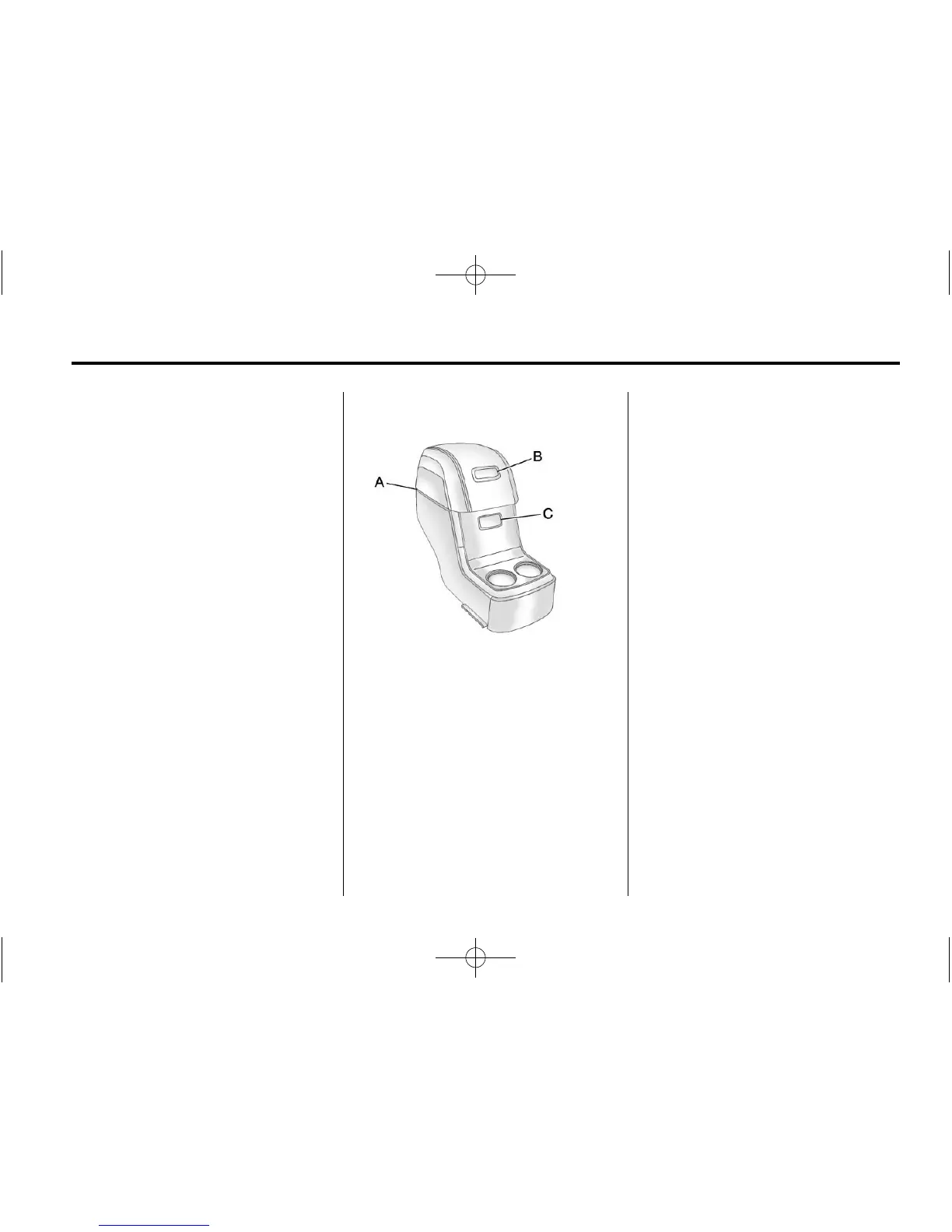
Storage Compartments
For vehicles with a second
row center console, press the
buttons (B) or (C) to access
storage areas.
Lift up on (A) for additional
storage area.
See Floor Console Storage
on
page 4‑2
.
Power Outlets
The vehicle has three 12‐volt
accessory power outlets which
can be used to plug in electrical
equipment, such as a cell phone
or MP3 player.
The power outlets are located:
.
On the instrument panel below
the climate controls.
.
At the rear of the center floor
console.
.
In the rear cargo area.
To use the outlets, remove the
cover.
See Power Outlets on page 5‑9.














 To Next Page