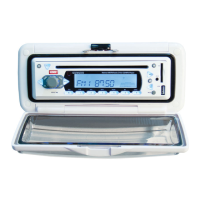
Need help?
Do you have a question about the GME GR9020W and is the answer not in the manual?
Details on different GR9000 models and their intended use.
Identifies and explains the function of each control on the unit.
Specific instructions for safely handling and cleaning CDs.
Covers initial precautions, moisture, and mounting location advice.
Details on flush and bracket mounting for different GR9000 models.
Instructions for removing/refitting panels and electrical wiring connections.
Explains basic operations like power, volume, and mode selection.
How to adjust radio reception for optimal performance.
Steps for tuning, selecting bands, and managing radio stations.
Instructions for controlling track playback, pause, repeat, and random modes.
Details on MP3 file format, search, and disc compatibility.
Details on USB and SD card inputs on the front panel.
Explanation of buttons and features on the remote control.
 General
| Bluetooth | Yes |
|---|---|
| USB Input | Yes |
| AUX Input | Yes |
| Display Type | LCD |
| Display | LCD |

 To Next Page