1 2
3
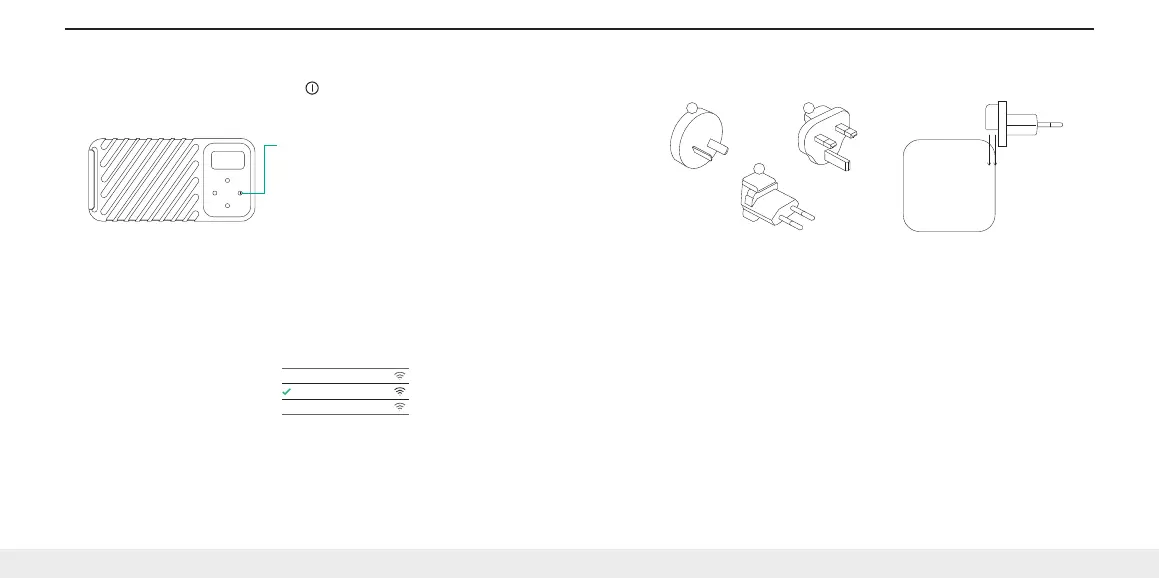
ATTACHING THE INTERNATIONAL ADAPTERS
1. Type I
2. Type G
3. Type C
MAINTAINING YOUR GNARBOX
GNARBOX Basic Care
1. Avoid dropping GNARBOX from heights exceeding 3 feet (1 meter)
2. Only insert compatible cards and cables into GNARBOX ports
3. Do not insert wet or dirty cards or cables into GNARBOX ports
4. Only charge your GNARBOX with the supplied USB-C to C cable and 40.5W Power Adapter
5. Never use third party batteries with the GNARBOX
6. Avoid long periods without charging your lithium polymer batteries
7. Avoid frequently overcharging your batteries
8. When ports are not in use, close doors to protect GNARBOX electronics from dust and moisture
9. Only allow GNARBOX authorized service providers to perform repairs on your GNARBOX
10. Do not connect non-GNARBOX international adapters to the Power Adapter
11. Keep out of direct sunlight while in use
12. Keep your GNARBOX and apps completely up to date
Visit www.gnarbox.com for walkthroughs and tutorials. You may be prompted to update your GNARBOX
upon first connecting. Learn more about the latest firmware and software versions at www.gnarbox.com.
You may also download the full user manual at gnarbox.com/userguide.
Need help? Email us at support@gnarbox.com or live chat with us on www.gnarbox.com.
3. Power on GNARBOX
a. Power your GNARBOX on by holding the < > button for 1 second.
b. It will take about 15-30 seconds to power up.
c. The GNARBOX screen will welcome you when fully booted.
4. Connect
a. Open the WiFi settings on your iOS or Android device
b. Connect to the GNARBOX WiFi network and enter the password (defaults listed below)
c. A checkmark will appear when WiFi connection is successful
d. Open the GNARBOX Safekeep app to finalize your connection
Default WiFi SSID:
GNARBOX 2.0 SSD
Default WiFi Password:
gnarbox!
Power button
Alan’s Home WiFi
Mobile Device Wi-Fi
GNARBOX 2.0 SSD
Jane’s WiFi
4 / Head to www.gnarbox.com/userguide for the complete user manual


 To Next Page
 Loading...