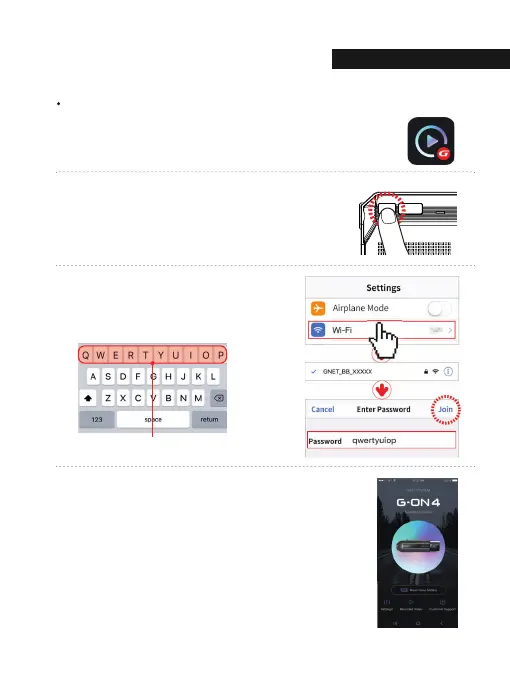
How to connect an Apple iOS smartphone
* If the connection fails due to a weak Wi-Fi signal,
please carefully unplug and immediately re-insert the
Wi-Fi dongle back into the camera. Proceed to try the
connection again by pressing the Wi-Fi button to enter
standby mode.
2
3
Press the Wi-Fi® button on the dash camera to enter
standby mode with the voice message. (last 2 minutes)
Enter the Settings menu and proceed to locate
and connect to the dash camera’s Wi-Fi network
(begins with GNET_BB_).
4
The registration of the dash camera is complete.
Install the GNET application on the smartphone.
* G-net application is not available while cloud mode is on.
1
The password is as follows: qwertyuiop
03. APPLICATION
SMARTPHONE CONNECTION
30



 To Next Page