f
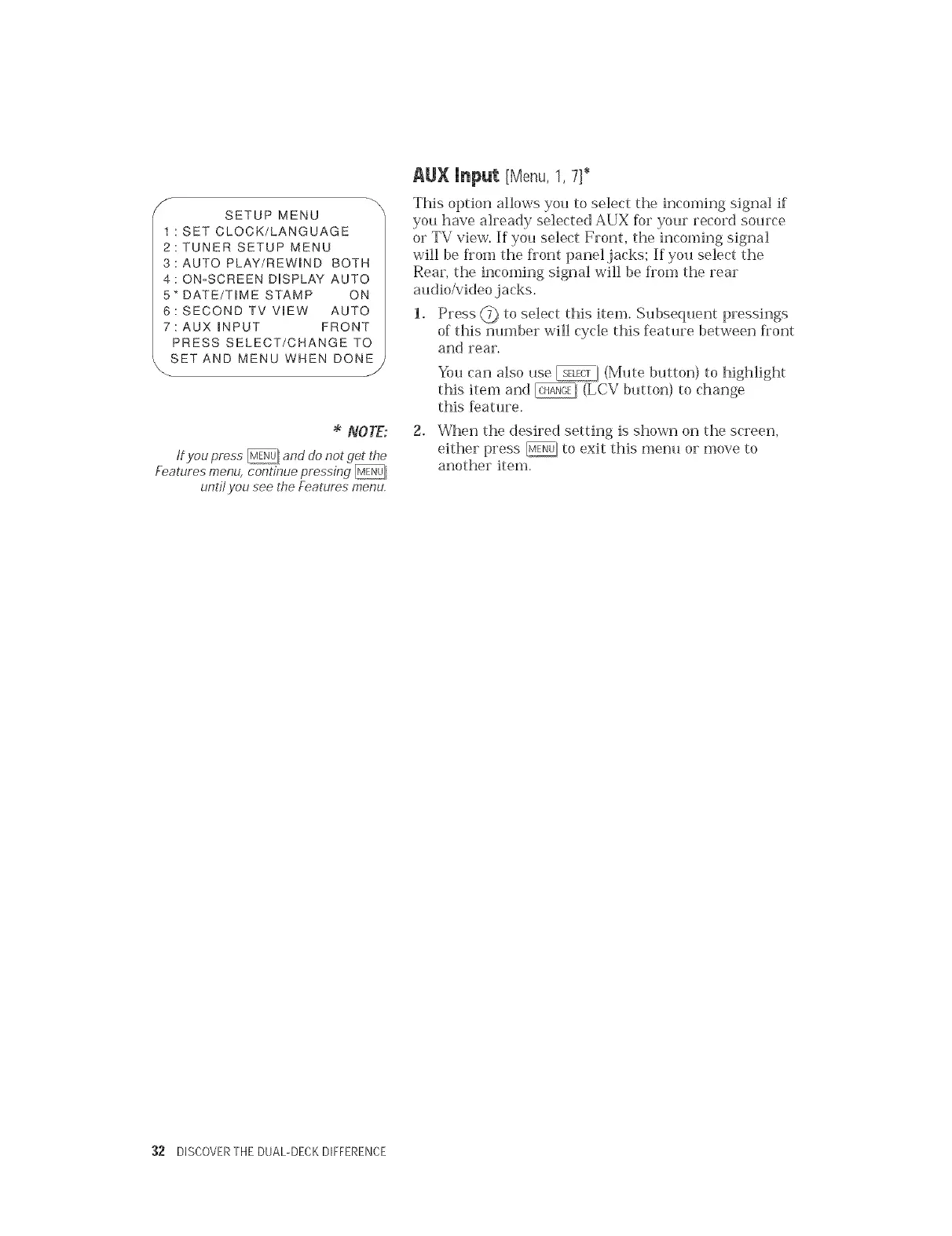
SETUP MENU
: SET CLOCK/LANGUAGE
2:TUNER SETUP MENU
3:AUTO PLAY/REWIND BOTH
4: ON-SCREEN DUSPLAY AUTO
5" DATE/T_ME STAMP ON
6: SECOND TV V_EW AUTO
7: AUX _NPUT FRONT
PRESS SELECT/CHANGE TO
SET AND MENU WHEN DONE
J
NOTE:
tf you press _ and do not get the
Features menu, continue pressing
untit you see the Features menu,
AUX Input [Menu, 1, 7]*
This option allows you to select the incoming signal if
you have already selected AUX for your record source
or TV view. If you select Front, the incoming signal
will be from the flont panel jacks; If you select the
Rear, the incoming signal will be fiom the rear
audio/video ,jacks.
1. Press @ to select this item. Subsequent pressings
of this number will cycle this feature between front
and rear.
You can also use _/(Mute button) to highlight
this item and _, (LCV button) to change
this feature.
2. When the desired setting is shown on the screen,
either press @. to exit this menu or move to
another item.
:32 DISCOVERTHE DUAL-DECKDIFFERENCE


 To Next Page