f
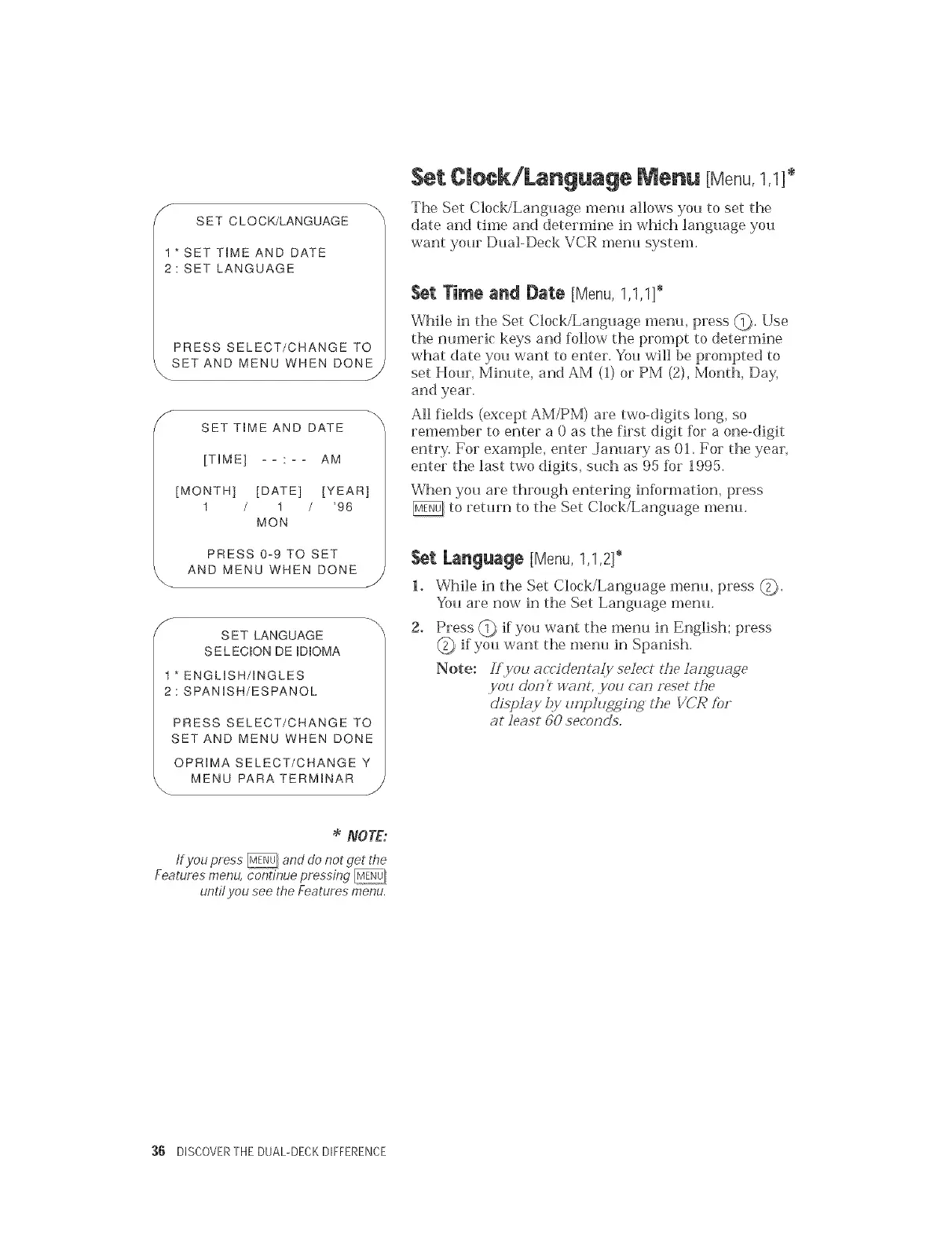
SET CLOCK/LANGUAGE
1*SET TIME AND DATE
2: SET LANGUAGE
PRESS SELECT/CHANGE TO
_.SETAND MENU WHEN DONE
J
f _
SET T_ME AND DATE
[TIME] : AM
[MONTH] [DATE] [YEAR]
1 / 1 / '96
MON
PRESS 0-9 TO SET
AND MENU WHEN DONE --
/
f
SET LANGUAGE
SELEC_ON DE ID_OMA
1" ENGLISH/INGLES
2: SPANISH/ESPANOL
PRESS SELECT/CHANGE TO
SET AND MENU WHEN DONE
OPRIMA SELECT/CHANGE Y
MENU PARA TERM_NAR --
/
Set C|eek/Language Menu [Menu,1,1]*
The Set Clock/Language menu alk>ws you to set the
date an(] time and determine in which language you
want your Dual-Deck VCR menu system.
Set Time and Date [Menu,1,1,1]_
While in the Set Clock/Language menu, press @. Use
the numeric keys and follow the prompt to determine
what date you want to enter. You will be prompted to
set Hour, Minute, and AM (1) or PM (2), Month, Day,
and year.
All fields (except AM/PM) are two-digits long, so
remember to enter a 0 as the first digit for a one-digit
entry. For example, enter .January as 01. For the year,
enter the last two digits, such as 95 for 1995.
When you are through entering information, press
to return to the Set Clock/Language menu.
Set, [.anguage [Menu, 1,1,2] _
1. While in the Set Clock/Language menu, press _.
You are now in the Set Language menu.
g° Press _ if you want the menu in English; press
if you want the menu in Spanish.
Note: Lf_you acr'idezff _@/select tL,e }aiJgu_ge
,you doll? w_wlt, ,you cazJ reset the
ciispi_.y ,!)y uHpIug_/zJg the VCR f_)r
at least 60 sed_)zJ(}5,
NOTE:
If you press _ and do not get the
Features menu, continue pressing
undl you see the Features menu.
:36 DISCOVERTHE DUAL-DECKDIFFERENCE


 To Next Page