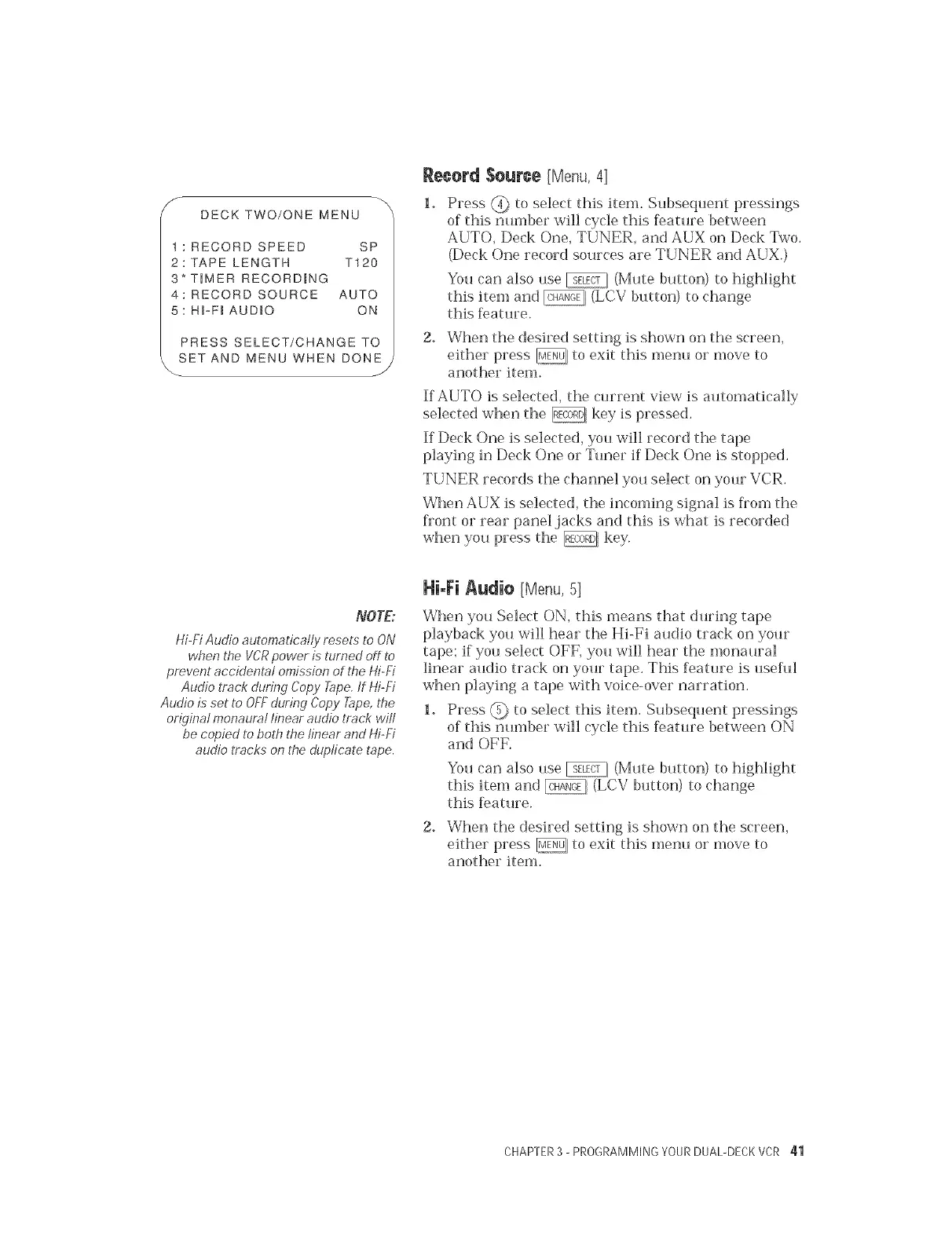
DECKTWO/ONEMENU
t :RECORDSPEED SP
2:TAPELENGTH T120
3*TIMERRECORDRNG
4:RECORDSOURCEAUTO
5:HFF_AUDIO ON
PRESSSELECT/CHANGETO
SETANDMENUWHENDONE
Reeerd $euree [Menu,4]
Press @ to select this item. Subseqtmnt pressings
of this number will cycle this feature between
AUTO, Deck One, TUNER, and AUX on Deck Two.
(Deck One record sources are TUNER and AUX.)
You can also use _ (Mute button) to highlight
this item and _ (LCV button) to change
this f>ature.
2. When the desired setting is shown on the screen,
either press _, to exit this menu or move to
another Rein.
If AUTO is selected, the current view is automatically
selected when the _ key is pressed.
ff Deck One is selected, you will record the tape
playing in Deck One or Tuner if Deck One is stopped.
TUNER records the channel you select on your VCR.
When AUX is selected, the incoming signal is fiom the
kont or rear panel jacks and this is what is recorded
when you press the @ key.
NOTE:
Hi-Fi Audio automatically resets to ON
when the W'R power is turned off to
prevent accidental omission of the Hi-Fi
Audio track during Copy _pe. tf Hi-Fi
Audio is set to OFF during Copy Tape, the
original monaural linear audio track will
be copied to both t,be linear and Hi-Fi
audio tracks on the duplicate tape.
Hi-Fi Audi@ [Menu, 5]
When you Select ON, this means that during tape
playback you will hear the Hi-Fi audio track on your
tape; if you select OFF, you will hear the monaural
linear audio track on your tape. This feature is usehfl
when playing a tape with voice-over narration.
1. Press @ to select this item. Subsequent pressings
of this nmnber will cycle this feature between ON
and OFF.
You can also use _ (Mute button) to highlight
this Rein and @ (LCV button) to change
this feature.
2. When the desired setting is shown on the screen,
either press _, to exit this menu or move to
another item.
CHAPTER3 - PROGRAMMING YOURDUAL-DECKVCR 41


 To Next Page
 Loading...