CABLE
OUTLET
Coaxial CaNe
TV BACK PANEL
VCR Cable
(supphed)
CaNe Converter Box
@
.................. <3© ©
WO[_T COt4'rRot
mT
DUAL-DECK VCR BACK PANEL
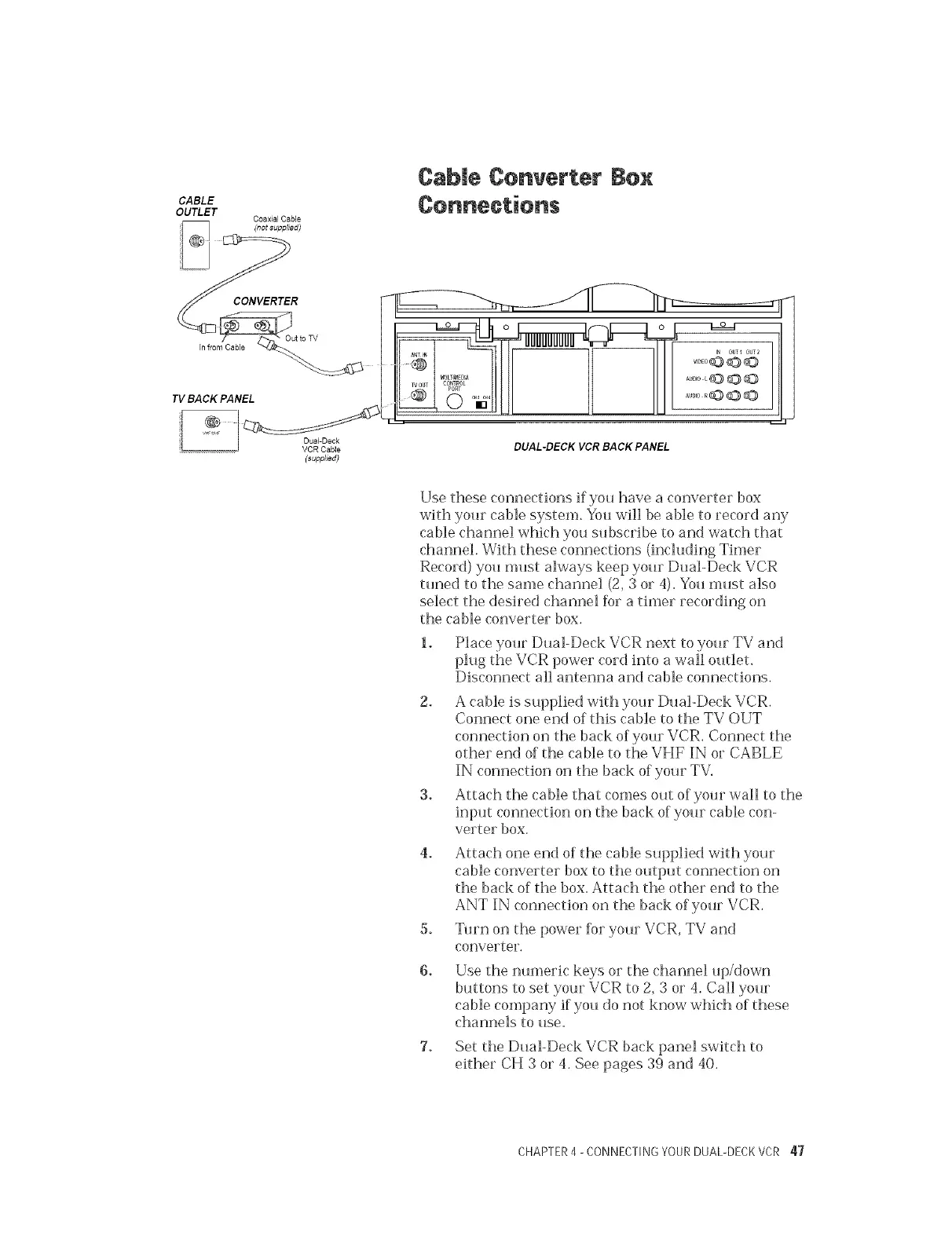
Use these connections if you have a converter box
with your cable system. You will be able to record any
cable channel which you subscribe to and watch that
channel. With these connections (including Timer
Record) you must always keep your Dual-Deck VCR
tuned to the same channel (2, 3 or 4). You must also
select the desired channel Dr a timer recording on
the cable converter box.
1. Place your Dual-Deck VCR next to your TV and
plug the VCR power cord into a wall outlet.
Disconnect all antenna and cable connections.
2. A cable is supplied with your Dual-Deck VCR.
Connect one end of this cable to the TV OUT
connection on the back of your VCR. Connect the
other end of the cable to the VHF IN or CABLE
IN connection on the back of your TV.
3. Attach the cable that comes out of your wall to the
_nput connection on the back of your cable con-
verter box.
4. Attach one end of the cable supplied with your
cable converter box to the output connection on
the back of the box. Attach the other end to the
ANT IN connection on the back of your VCR.
5. Turn on the power R_r your VCR, TV and
converter.
Use the numeric keys or the channel up/down
buttons to set your VCR to 2, 3 or 4. Call your
cable company if you do not know which of these
channels to use.
7. Set the Dual-Deck VCR back panel switch to
either CH 3 or 4. See pages 39 and 40.
CHAPTER4 - CONNECTINGYOURDUAL-DECKVCR 47



 To Next Page