EasyManua.ls Logo

Go-Video Dual Deck - Page 73

Default Icon
83 pages
Print Icon
To Next Page IconTo Next Page
To Previous Page IconTo Previous Page
Loading...
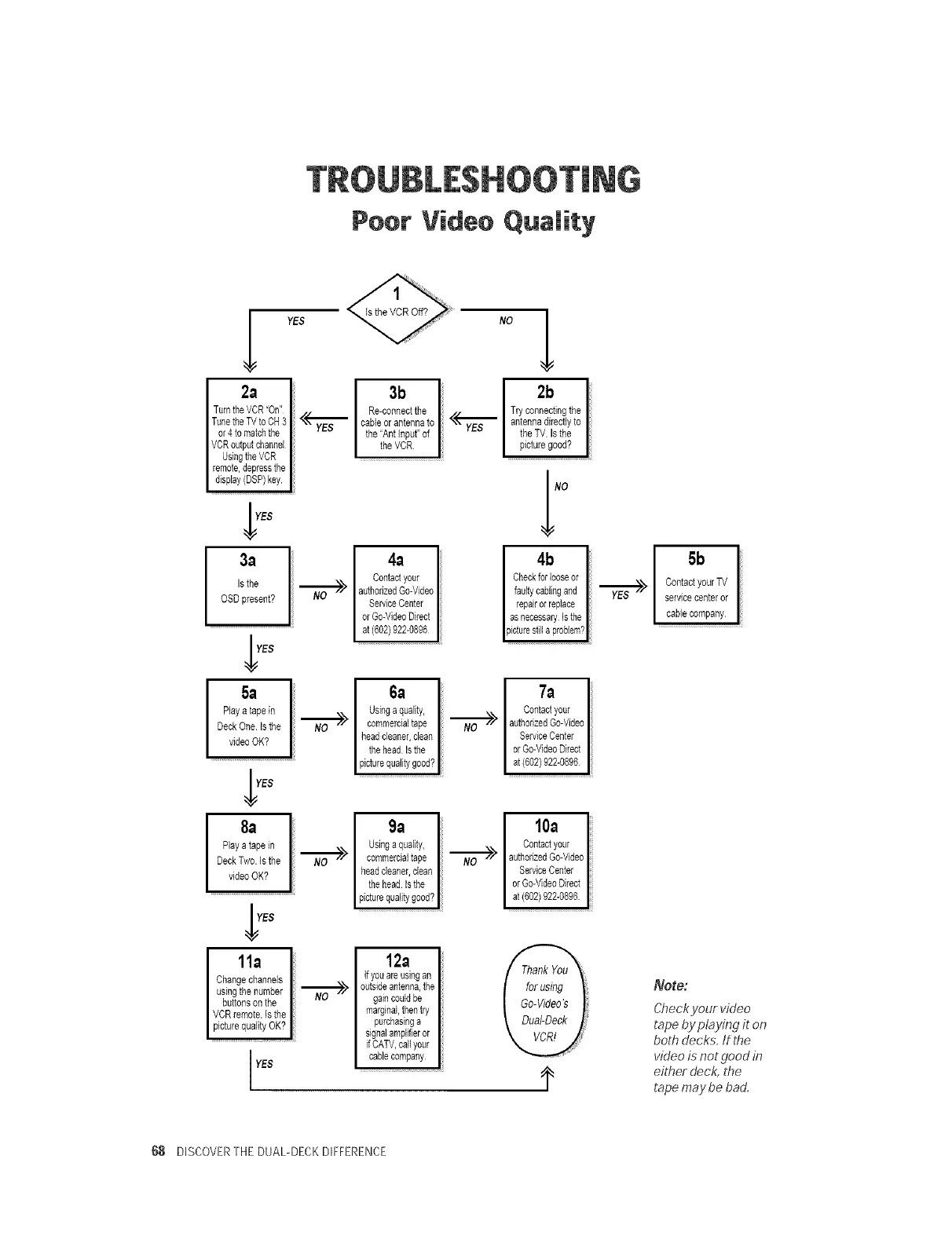
Poor Video Quality
YES
2a
TurntheVCR"On"
TunetheTVtoCH3 <_,,_"_'_'_
or4 to matchthe
VCRoutputchannel
UsingtheVCR
remote,depressthe
display(DSP)key
YES
3a
,sthe --._.O>
OSDpresent?
YES
5a
Playatapein
DeckOne.Is the _/
videoOK?
8a
Playa tapein
DeckTwo. Isthe _z-
videoOK?
11a
Changechannels
usingthenumber "_'--7/"
buttonson the
VCRremote,is the
pic urequaiiy OK?
YES
3b
Re-connectthe
cableorantennato
the'Ant Input'of
the VCR
4a
Contactyour
authorizedGo-Video
ServiceCenter
orGo-VideoDirect
at(602)922-0896
6a
Usinga quality,
commercialtape
headcleaner,dean
thehead Bthe
picturequalitygood?
9a
Usingaquality,
commerdaltape
headcleaner,dean
thehead Bthe
picturequalitygood?
12a
ffyouareusingan
outsideantenna,the
gaincouldbe
marginal,thentry
purchasinga
signalamplifieror
ifCATV,callyour
cablecompany
Nol
Try connectingthe
"<yE<"_S antennadirectlyto I
the TV Isthe
picturegood? I
4b
Checkforlooseor
faultycaningand
repairorreplace
asnecessaryIsthe
picturesill aproblems
7;I
Contactyour
N'_O _> authorizedGo-Video
ServiceCenter
orGo-VideoDirect
at(602)922-0896
lOa
Contactyour
N'_'_O _> authorizedGo-Video
ServiceCenter
orGo-VideoDirect
at(602)922-0896
5b
,,_/ ContactyourTV
YES--
servicecenteror
cablecompany
Note:
Checkyour video
tape by playing it on
both decks. If the
video is not good in
ei@er deck, the
tape maybe bad.
68 DISCOVERTHE DUAL-DECKDIFFERENCE

Related product manuals