EasyManua.ls Logo

Go-Video Dual Deck - Dual-Deck VCR Limited Warranty

Default Icon
83 pages
Print Icon
To Next Page IconTo Next Page
To Previous Page IconTo Previous Page
Loading...
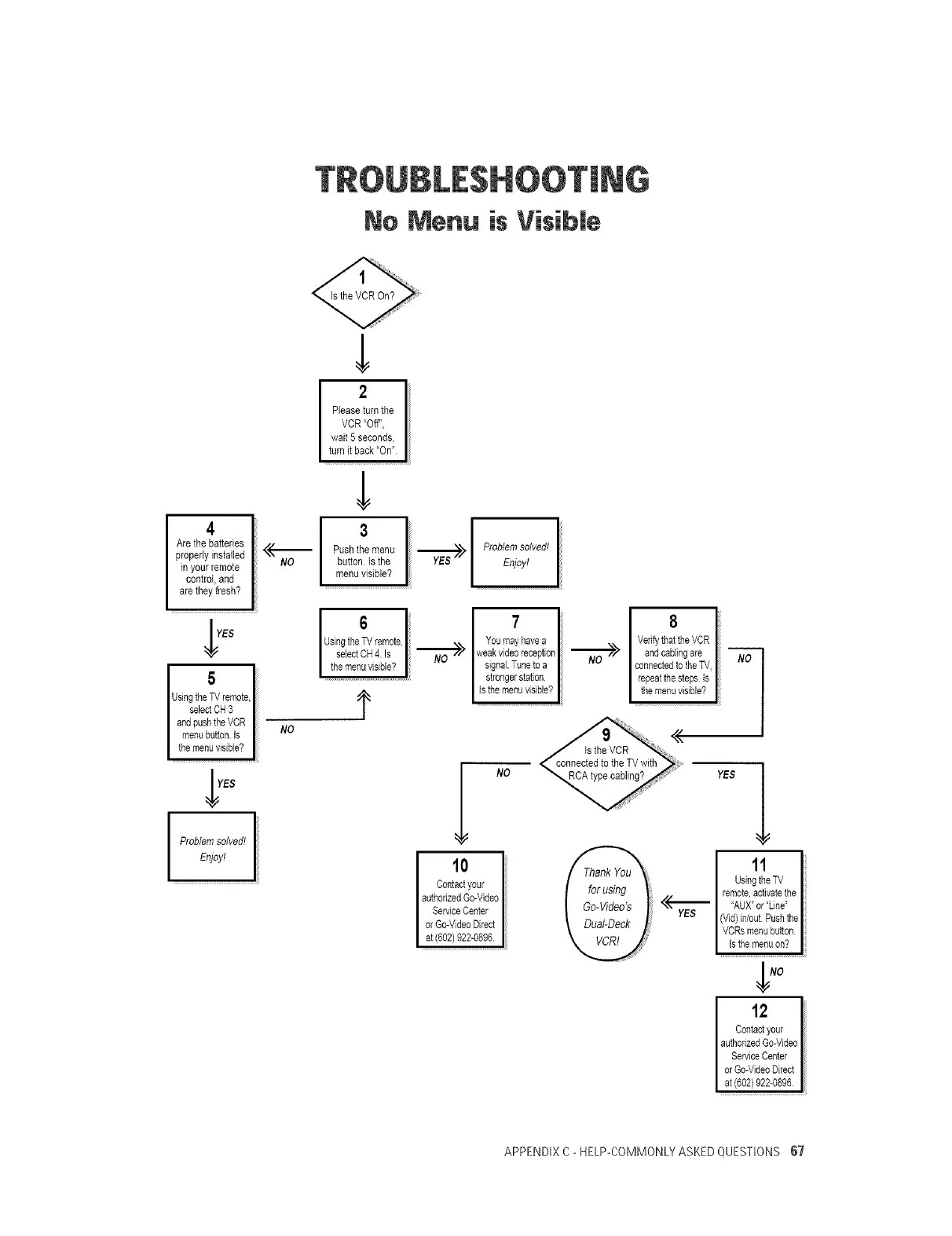
No Menu is Visibme
Is the VCR On?
4
Arethe batteries
properlyinstalled
in your remote
control, and
are they fresh?
YES
5
UsingtheTVremote,
selectCH3
andpushtheVCR
menubutton.Is
themenuvisible?
]YES
Problemsolved!
Enjoy!
NO
NO
2
Pleaseturn the
VCR "Off",
wait 5 seconds,
turn itback "On"
3
Pushthe menu
button Is the
menu visible?
r.--_-_Es>
Problemsolved!
Enjoy!
6
UsingtheTVremote,
selectOH4 Is I _>
themenuvisible? I
t
T
Youmayhavea
weakvideereception_>
signal.Tuneto a
strongerstation
Isthemenavisible?I
8
Verifythat theVCR
andcablingare
connectedto theTV
repeatthesteps Is
the menuvisible?
I NO
10
Contactyour
authorizedGo-Video
ServiceCenter
or Go-VideoDirect
at(602)922-0896.
YES
i1'
UsingtheTV
remote,activatethe
_"_ 'AUX_or"Line'
YES (Vid)in/out Pushthe
VCRsmenubutton
Isthemenuon?
12
Contactyour
authorizedGo-Video
ServiceCenter
orGo-VideoDirect
at(602)922-0896
APPENDIX C- HELP-COMMONLYASKED QUESTIONS 67

Related product manuals