If you receive a new remote control, you can trigger the Simple
Remote Wizard by going to Settings > Device Preferences >
Remotes an Accessories > then select your remote control from the
list and chose “Simple Setup”.
When the Simple Remote Wizard completes, the TV/AUX POWER
/ TV INPUT / VOL+ / VOL- / MUTE buttons will control your TV
set. You can chose to switch the VOL+ / VOL- / MUTE buttons to
control the STB device instead of TV set by using the following key
combination:
Volume buttons control STB device: Apps and 4 - hold for 3 seconds.
Volume buttons control TV set: Apps and 3 - hold for 3 seconds.
BOM 99-709852-08 Rev. 01-00 AM-011354-DS v1
What if my TV/Aux device cannot be found? (IR Learning)
How do I return my remote to Factory Settings?
4. Controlling the STB (pairing the remote control)
5. Controlling the TV
The Maxi remote control with Android TV supports a “Simple Remote
Wizard” which will automatically detect the TV your STB is connected to
via HDMI, and then program the remote control to control that device. The
remote wizard will walk you through the steps to confirm the remote is able
to control your TV. Below is the first screen of the Simple Remote Wizard.
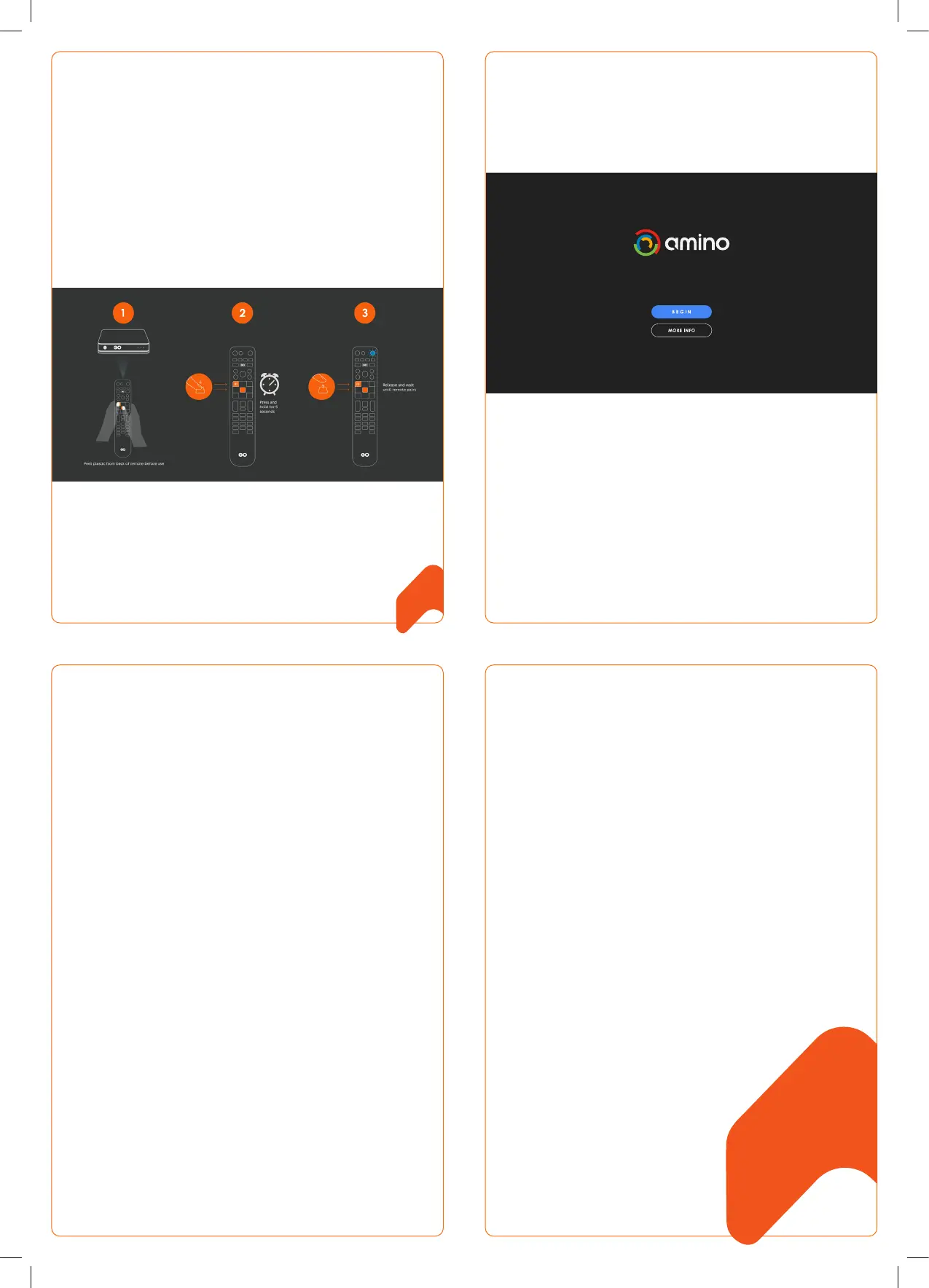
During initial setup of the STB device, you will be guided through the
process of pairing the remote control to your STB. Make sure to remove the
transparent plastic strip from the remote control before initiating the setup
process.
The below screen is what you can expect to see giving visual instructions of
how to pair the remote control.
1. Press and hold the OK and APPS buttons simultaneously for 5 seconds or
until the STB button blinks twice.
2. Release the buttons
3. The STB button should be illuminated Blue.
Once the pairing is successful, you will see a short blink and the pairing
screen will be hidden.
Note: The remote is in “pairing mode” when the STB button is illuminated
blue. During pairing mode, no remote control keys will work except the
BACK key. You must press BACK to stop pairing or to use another function.
1. Press 1 and 6 for at least three seconds until the TV/AUX POWER key
flashes twice then stays on.
2. Enter the key sequence 9 8 1. After completing the sequence the STB
key will flash twice. The TV settings are now deleted from the remote
control and it returns to factory settings: Bluetooth mode, and unpaired.
The Maxi ATV remote control can learn a key function from another ‘source’
remote control.
1. Choose your ‘target key’ on the remote control. It must be one of the
following keys: TV/AUX POWER / TV INPUT / VOL+ / VOL- / MUTE. This
key will learn a function from the source remote control.
2. Press 4 and 6 for at least three seconds. The TV/AUX POWER key will
flash twice and remain on.
3. Press your target key within 30 seconds:
• if valid, the TV/AUX POWER key will give a confirmation flash
and remain on.
• if invalid, or you do not press within 30 seconds, the TV/AUX
POWER key will give a long flash and return to user mode.
4. Hold the Maxi ATV remote control 3 - 6 cm from the source remote
control with the IR windows facing each other, then press your target
key on the source remote control (e.g. if your target key on the Maxi
ATV remote control is mute, press mute on the source remote control).
5. If the IR signal is received correctly, the TV/AUX POWER key will turn
off and the remote control will return to normal mode (note: this can
overwrite a previously learned code).
6. If the IR signal is not received correctly, or is received after 30
seconds, the Maxi ATV remote control will not store the code from
the source remote control: it will give a long flash and return to user
mode.
7. If the Back key is pressed on the remote control while it is waiting for
an IR signal, the TV/AUX POWER key will give a long flash and return
to user mode. (If the target key is pressed, any learned code on it is
cleared.)
8. To clear the target key, press 4 and 6 for at least three seconds. The
TV/AUX POWER key will flash twice and remain on. Then press your
<target key> twice. The TV/AUX POWER key will flash to confirm the
target key is cleared.
SIMPLE REMOTE WIZARD


 To Previous Page
 Loading...