1. Remote control layout
Maxi Remote Control
User Guide
1
TV input source select
2 TV/AUX power/standby
3 Colour navigation
4 ‘A’ button - (for future use)
5 Video trick-play function
6 Apps
7
Navigation and OK
8
Back
9 Volume up and down
10 Channel select and text entry
11
Information
12 Search
13 Infra-red (IR) window
14 Microphone
15 STB (GO Android TV Box)
power/standby
16 ‘GO TV’ button
17 ‘B’ button - (for future use)
18 Electronic Program Guide
19 Google home page
20 Voice control
21 Channel/Page up and down
22
Mute
23 Subtitles/closed captions
24 Last channel recall
25 Low battery warning LED
Note: Some functionality may depend on the service you are subscribed to.
2. Inserting batteries
Slide the battery
housing cover
downwards to
remove
1
Insert 2 x
AAA batteries
observing the
correct polarity
2
Refit the
battery
housing
cover
3
3. Operation
Battery information
• Do not mix different types of battery or old and new batteries.
• Do not use rechargeable batteries.
• Remove the batteries from the remote control if you are not going to
use it for several weeks, to avoid the risk of leakage.
• Please respect your environment and any local regulations and dispose
of old batteries in a responsible manner.
• Do not attempt to recharge the batteries.
• Immediately remove any leaking batteries.
• Take care when handling leaking batteries as they may cause burns to
the skin or eyes, or other physical injuries.
When you press a key, point the remote control towards the front of the
STB to ensure correct operation. Do not cover the infra-red (IR) window
at the front of the remote control and at the front of the STB.
When a key is pressed, either the STB key will flash or, if a TV brand has
been entered, the TV/AUX POWER key will flash, depending on which
product is being controlled by the remote control.
If you press a key for more than 30 seconds the remote control will stop
transmitting commands to preserve battery life.

 Need help?
 General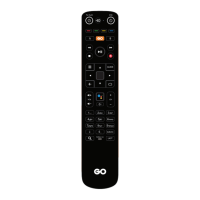

 To Next Page