EasyManua.ls Logo

GOAL ZERO GUIDE10 - User Manual

GOAL ZERO GUIDE10
2 pages
Print Icon
To Next Page IconTo Next Page
Loading...
Power portable electronic devices
directly from the USB output port.
1. Be sure to ACTIVATE YOUR WARRANTY at www.GOALZERO.com/warranty
2. Install batteries in correct orientation.
3. Turn on and use.
4. Recharge from any GOAL ZERO NOMAD solar panel or USB power source.
Get to know your gear
Technical Specs
How to use your gear
Getting Started
HANG IT
PROTECT IT
LIGHT IT
Sturdy hanging wire provides
convenient storage options.
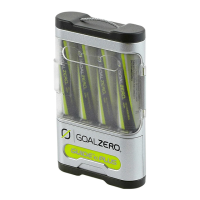
Batteries are housed securely
behind a transparent door.
Equipped with a bright LED flashlight
which never needs replacing.
Mini-USB port 5V, 0.5A max (2.5W)
Inputs
Usage
Outputs
General
Weight w/ batteries 0.4 lbs (0.18 kg)
Dimensions 2.5x4x0.75 in (6x10x2 cm)
Warranty 12 months
Certifications FCC and CE
Optimal operating temp. 32-104ºF (0-40ºC)
Charges from the following: Approx. charge time:
Any USB power source 8-10 hours
GOAL ZERO NOMAD 3.5 (solar port) 6-8 hours
GOAL ZERO NOMAD 7 (solar port) 2-4 hours
Batteries 4x AA or AAA** NiMH cells
USB standard port 5.0V, 0.5A max (2.5W)
Flashlight 100mW white LED, 100+ hours*
Battery capacity 10 Wh*, use only NiMH cells
Life-span hundreds of cycles*
Shelf Life 12 months*
*When using GOAL ZERO NiMH rechargeable low self-discharge AA cells.
** AAA cells require an adapter, which is free upon request. Contact GOAL ZERO
directly to request one.
Internal
Power switch
Turn to ‘on’ to enable output; turn to the to turn on flashlight.
See legend below.
Power LED
Indicates power and charging state. See power legend below.
LED power legend: Power switch legend:
USB output port
Accepts any standard USB cable for charging USB devices. To
use, turn GUIDE 10 to ‘on.
LED Flashlight
100+ hours of light per charge. Never needs replacing. Turn on
with power switch.
Solar charging port
Recharge from GOAL ZERO NOMAD 7 or NOMAD 3.5 solar panels.
Mini-USB charging port
Recharge from USB sources, like a computer.
USE IT
GUIDE 10
BATTERY PACK
Question and Answer IconNeed help?

Do you have a question about the GOAL ZERO GUIDE10 and is the answer not in the manual?

Summary

How to Use Your Gear

Power Switch and LED Indicators

Controls device power output, flashlight, and displays power/charging status.

USB Output Port Functionality

Enables charging of USB devices using a standard USB cable.

LED Flashlight Operation

Provides over 100 hours of light per charge, activated by the power switch.

Charging Ports Overview

Details solar and mini-USB ports for recharging the battery pack.

Getting Started Guide

Initial Setup and Activation

Steps include warranty activation, battery installation, and initial use.

Recharging Instructions

Guidance on recharging from solar panels or USB power sources.

Technical Specifications

Usage and Charging Times

Information on charging sources and approximate charge times.

Input and Output Capabilities

Details on input ports and output specifications for batteries and flashlight.

Internal Battery and Lifespan

Specifications for battery capacity, lifespan, and shelf life.

General Product Details

Includes weight, dimensions, warranty, certifications, and operating temperature.

Frequently Asked Questions

Battery Compatibility and Charging

Answers questions about compatible batteries and charging methods.

Water Resistance and Protection

Clarifies the product's weather resistance and built-in protection features.

Included Accessories and Compatibility

Lists what comes with the product and compatible devices/products.

Summary

How to Use Your Gear

Power Switch and LED Indicators

Controls device power output, flashlight, and displays power/charging status.

USB Output Port Functionality

Enables charging of USB devices using a standard USB cable.

LED Flashlight Operation

Provides over 100 hours of light per charge, activated by the power switch.

Charging Ports Overview

Details solar and mini-USB ports for recharging the battery pack.

Getting Started Guide

Initial Setup and Activation

Steps include warranty activation, battery installation, and initial use.

Recharging Instructions

Guidance on recharging from solar panels or USB power sources.

Technical Specifications

Usage and Charging Times

Information on charging sources and approximate charge times.

Input and Output Capabilities

Details on input ports and output specifications for batteries and flashlight.

Internal Battery and Lifespan

Specifications for battery capacity, lifespan, and shelf life.

General Product Details

Includes weight, dimensions, warranty, certifications, and operating temperature.

Frequently Asked Questions

Battery Compatibility and Charging

Answers questions about compatible batteries and charging methods.

Water Resistance and Protection

Clarifies the product's weather resistance and built-in protection features.

Included Accessories and Compatibility

Lists what comes with the product and compatible devices/products.

Overview

The device described in this manual is the GUIDE 10 Battery Pack, a portable power solution designed to charge and power various USB-compatible devices and provide illumination. It's built for convenience and durability, making it suitable for outdoor use or as a reliable backup power source.

Function Description:

The GUIDE 10 Battery Pack primarily functions as a portable power bank for USB-powered devices and a compact LED flashlight. It utilizes AA or AAA NiMH rechargeable batteries (four of the same size must be charged at once) to store energy, which can then be discharged to power external electronics or its integrated light. The device is designed to be user-friendly with a plug-and-play approach, featuring a built-in battery management system that prevents over-charging and over-discharging of the batteries, ensuring their longevity and safe operation. It can be recharged from multiple sources, including solar panels and standard USB power sources like computers or other power packs.

Usage Features:

The GUIDE 10 is designed for ease of use and versatility.

  • Powering Devices: It features a standard USB output port that accepts any standard USB cable, allowing users to charge a wide range of devices such as cell phones, smartphones, GPS units, and MP3 players. To activate the USB output, the power switch must be set to the "ON" position. The device will only supply the amount of power needed by the connected device, ensuring efficient and safe charging.
  • Integrated Flashlight: A bright LED flashlight is built into the unit, offering over 100 hours of light per charge. This flashlight is a convenient feature for emergencies or when extra illumination is needed, and it never requires bulb replacement. The flashlight is activated by setting the power switch to the "LIGHT" position.
  • Recharging Options: The GUIDE 10 offers flexible recharging capabilities:
    • Solar Charging: It includes a dedicated solar charging port, compatible with GOAL ZERO NOMAD 7 or NOMAD 3.5 solar panels, providing an eco-friendly and off-grid charging solution.
    • Mini-USB Charging: A mini-USB charging port allows the device to be recharged from any standard USB power source, such as a computer, wall adapter, or another power pack.
  • Battery Management: The device is designed to work with NiMH AA or AAA batteries. It's crucial that four batteries of the same size are charged simultaneously. The internal battery management system protects against over-charging and over-discharging, contributing to the batteries' lifespan.
  • Indicator Lights: An LED power indicator provides clear feedback on the device's status. During charging, it shows a slow red blinking light, then a solid yellow light, and finally a solid green light when fully charged. When in use, a solid green light indicates power available, a slow green blinking light signals low power, and a fast green blinking light warns of very low power. A solid red light indicates no power available.
  • Portability and Design: The GUIDE 10 is compact and lightweight, making it easy to carry. It features a sturdy hanging wire, which provides convenient storage options, allowing it to be hung in tents, on backpacks, or in other suitable locations. The batteries are housed securely behind a transparent door, protecting them while allowing for easy inspection.
  • Weather Resistance: While not fully waterproof, the device is weather-resistant. Users are advised to shield it from direct sunlight and the elements, though unexpected rain storms are unlikely to cause harm. This makes it suitable for various outdoor activities.
  • Compatibility with GOAL ZERO Ecosystem: The GUIDE 10 is designed to integrate seamlessly with other GOAL ZERO products, such as NOMAD solar panels and various lights (LUNA, BOLT, BLAZE), expanding its utility within a broader portable power system.

Maintenance Features:

The GUIDE 10 is designed for minimal maintenance, focusing on user convenience and product longevity.

  • Battery Installation: Users must ensure batteries are installed in the correct orientation. The device is specifically designed for NiMH AA or AAA batteries, and it's recommended not to use other types. For AAA cells, an adapter is required, which can be requested directly from GOAL ZERO.
  • Battery Protection: The built-in battery management system actively prevents over-charging and over-discharging, which are common causes of battery degradation. This feature extends the lifespan of the NiMH cells, reducing the need for frequent battery replacement.
  • LED Flashlight Durability: The integrated LED flashlight is designed for long-term use, offering over 100 hours of light per charge and never requiring bulb replacement. This eliminates a common maintenance task associated with traditional flashlights.
  • Cleaning: As a weather-resistant device, it can withstand some exposure to the elements. However, keeping the ports clean and free of debris will ensure optimal charging and output performance.
  • Storage: When not in use, it is recommended to store the device with the power switch in the "OFF" position. This helps conserve battery life and prevents accidental activation. The device can be charged in any switch position, offering flexibility.
  • Warranty: Users are encouraged to activate their warranty online at www.GOALZERO.com/warranty, which provides support and service for the device. This ensures that any potential issues can be addressed by the manufacturer.
  • User Resources: GOAL ZERO provides various resources, including a demo video and a downloadable manual, to assist users with understanding and maintaining their device. Customer support is also available via a toll-free number for any inquiries or assistance.

GOAL ZERO GUIDE10 Specifications

General IconGeneral
Charging Time (USB)4-6 hours
USB Output5V/1A
Battery TypeLi-ion
Charging Time (Solar)10-20 hours
Solar ChargingYes
Output PortsUSB

Related product manuals