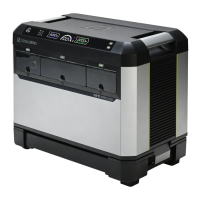
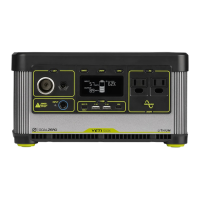
The Goal Zero Sherpa 100AC is a versatile power bank designed for portable power needs, offering a range of charging options and outputs for various electronic devices. It is intended for users who require reliable power on the go, whether for outdoor adventures, travel, or as a backup power source.
Function Description
The Sherpa 100AC serves as a portable power bank, capable of storing electrical energy and delivering it to other devices through multiple output ports. Its primary function is to recharge and power a wide array of electronics, from smartphones and tablets to laptops and cameras. The device features a built-in AC inverter, allowing it to provide standard household AC power, similar to a wall outlet, for devices that require it. Additionally, it incorporates wireless charging capabilities, offering a convenient way to power compatible smartphones without the need for cables. The power bank itself can be recharged using various methods, including USB-C, solar panels, or traditional AC and 12V car chargers, providing flexibility in how it obtains power.
Usage Features
The Sherpa 100AC is designed for ease of use with several intuitive features.
Charging the Sherpa 100AC:
Before initial use, it is crucial to fully charge the Sherpa 100AC. This ensures optimal performance and battery longevity. The device can be charged via:
- USB-C: Using the included USB-C to USB-C cable, connect the Sherpa to a USB-C Power Delivery (PD) port. For faster charging, a 65W USB-C charger (sold separately) can fully recharge the unit in approximately 2 hours.
- Solar: The Sherpa 100AC is compatible with Goal Zero Nomad or Boulder Solar Panels. Connect the solar panel to the 8mm input port on the Sherpa. For best results, the Goal Zero Nomad 50 Solar Panel is recommended.
- AC or 12V: An 8mm port allows for charging with an accessory 12V Car Charging Cable or the Sherpa Power Supply (both sold separately).
Powering Devices with the Sherpa 100AC:
The Sherpa 100AC offers multiple output options:
- USB-A Ports: Two USB-A ports provide standard 5V, up to 2.4A (12W max) output for charging smaller devices like phones and action cameras.
- USB-C Power Delivery (PD) Ports: Two bidirectional USB-C PD ports are available. These ports can function as either input (to charge the Sherpa) or output (to charge other devices). One port supports up to 60W input/output, while the other supports up to 100W output. A selector switch on the back of the Sherpa allows users to toggle between "Input," "Auto," and "Output" modes for these ports. When charging a laptop, it is recommended to set the switch to "OUTPUT" to prevent the Sherpa from attempting to draw power from the laptop's internal battery.
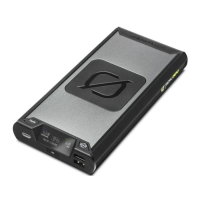
- Wireless Charging: A 15W wireless charging pad is integrated into the device. To activate, press the wireless charging button. The button light will turn white when active and green when a device is successfully connected and charging. Place a compatible smartphone on the black charging square to begin. Ensure the phone is centered on the pad for optimal charging.
- AC Inverter: The Sherpa 100AC includes a 100W modified-sine wave AC inverter (with a 150W surge capability), providing a standard wall outlet for devices requiring AC power. This is particularly useful for laptops or other small appliances.
Display and Controls:
The device features an LCD display screen that shows important information such as input/output wattage, battery percentage, and estimated time to full or empty.
- Display Button: Pressing this button turns the display on or off. Holding it for two seconds while the display is on activates "blackout mode," which turns off all lights while ports continue to output power. Pressing any button will exit blackout mode.
- Wireless Charging Button: Toggles wireless charging on/off.
- USB Button: Toggles the USB-A ports on/off.
- AC Button: Toggles the AC port on/off.
- USB-C Selector Switch: Located on the back, this switch controls the function of the USB-C PD ports, allowing users to select between "Input," "Auto," or "Output" modes.
Passthrough Charging:
The Sherpa 100AC supports passthrough charging, meaning it can be charged itself while simultaneously recharging other devices. However, users should be mindful that if the total output power exceeds the input power, the Sherpa's battery will drain, and the device may eventually turn off. To avoid this, ensure the Sherpa is connected to a power source and remains powered on while passthrough charging.
Troubleshooting Tips:
- USB-C Port Not Outputting 100W: Verify that both the cable and the connected device are capable of 100W. Use licensed and certified cables.
- Wireless Charging Not Reaching 15W: Ensure the phone supports 15W wireless charging and is centered on the charging pad. Battery temperature can also affect charging speed.
- Red Port Light: A red light indicates an error. Try resetting the port by pressing its corresponding on/off button. If the issue persists, contact customer support.
- USB-C Port Not Charging Device: Check the USB-C selector switch on the back of the Sherpa and set it to "Output" if it's in "Auto" and not charging. Also, ensure you are using the cable included with the device or a certified alternative.
Maintenance Features
To ensure the longevity and safe operation of the Sherpa 100AC, certain maintenance practices are recommended:
- Regular Charging: Keep the Sherpa 100AC charged, especially when storing it. It is advised to charge the unit every 3-6 months to maintain battery health.
- Ventilation: Always use the Sherpa in a well-ventilated area. Do not obstruct the fan openings, as inadequate ventilation can lead to damage. When storing, avoid stacking anything on top of the unit.
- Cleanliness: Keep the unit clean and dry. Regularly inspect for dirt, dust, or moisture.
- Avoid Wet Conditions: Do not operate the Sherpa in wet conditions to prevent short circuits or electric shock. If the unit gets wet, allow it to dry completely before use.
- Safety Precautions: The AC output generates potentially lethal power, similar to a household wall outlet. Use it with caution. Do not insert foreign objects into outputs or ventilation holes.
- Warranty: Any unauthorized manipulation of the unit or its components will void all warranties. It is recommended to activate the product warranty on the Goal Zero website.

 Need help?
 General

 To Next Page