2
3
GET TO KNOW YOUR GEAR
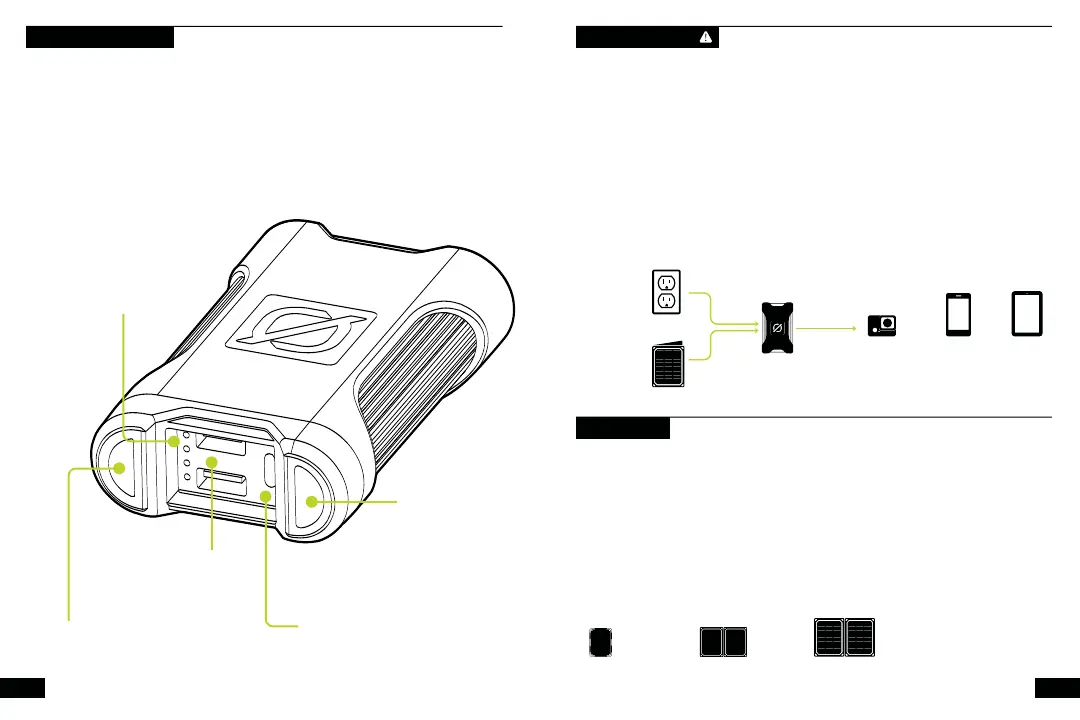
Flashlight On/Off | Indicator
Flashlight & battery level indicator
Battery Indicator Lights
1: 25% charge
2: 50% charge
3: 75% charge
4: 100% charge
Flashlight
50 lumen flashlight
USB-C Input/Output Port
5-12V, up to 3A (18W max), regulated
The Venture 35 is designed with increased protection against the elements and more
power than its predecessor. Equipped with an upgraded IP67 rating, the 9600 mAh power
bank is now dustproof and waterproof, giving you the confidence to power through any
adventure, rain or shine. Charge up the Venture 35 in only three hours using the new 18W
USB-C Power Delivery port and power multiple devices at once with the addition of two
USB output ports. The fresh Venture design features a protective rubber sleeve, integrated
50 lumen flashlight, and a waterproof plug that protects your ports against the elements
when not in use.
CHARGE BEFORE USE
Use the included USB-C cable to charge up Venture 35 from a live USB source. A
new Venture 35 comes in a protective mode to prevent self-discharge, potentially
caused by long periods of inactivity, like shipping.
The Venture 35 will not charge your gear until it is plugged into a live USB source.
1. Connect the USB-C cable into the input and plug it into a live USB port.
2. You will know it’s charging when blue indicator lights on the front illuminate and
flash. Each blue indicator light represents 25% battery capacity. As the battery
fills the charge state will flash blue.
3. Venture 35 is full and ready to go when all lights are solid.
SOLAR READY™
Venture 35 is engineered to charge quickly from Goal Zero Nomad
®
Solar Panels.
1. Connect the USB-C end of the included cable into the Venture 35 and plug the
USB-A end into the USB port on the back of the Nomad panel.
2. You will know it’s charging when blue indicator lights illuminate and flash. Each
blue indicator light represents 25% battery capacity.
3. The Venture 35 is full and ready to go when all lights are solid together.
4. Blue indicator lights will flash according to the battery level. When charging from
solar, use the built-in kickstand to angle your panel toward the sun.
NOMAD
HOURS
NOMAD
HOURS
NOMAD
HOURS
2x USB-A Output Ports
5V, up to 3A each (15W max),
regulated
NOMAD
SOLAR PANEL
HOURS
FULL SUN
WALL OUTLET
USBC
HOURS
VENTURE
POWER BANK
POV CAMERA
6 RECHARGES
PHONE
3 RECHARGES
TABLET
1 RECHARGE
COLLECT STORE POWER


 To Next Page
 Loading...