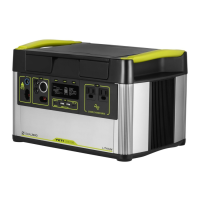
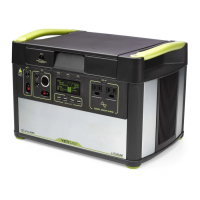
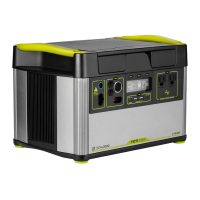
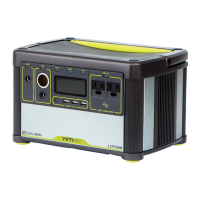
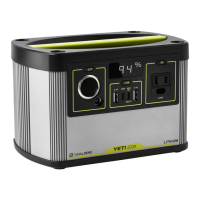
The Goal Zero Yeti 1000 Lithium is a portable power station designed to provide reliable power for various devices, whether you're off-grid, experiencing a power outage, or simply need portable energy. Its primary function is to store electrical energy in its internal lithium-ion battery and then deliver that power through multiple output ports, allowing you to charge and run a wide range of electronics and small appliances.
Function Description
At its core, the Yeti 1000 Lithium acts as a central hub for your power needs. It collects energy from external sources, primarily solar panels or an AC wall outlet, and stores it in its high-capacity battery. Once charged, it can then distribute this stored energy through various output ports, including USB, 12V (car outlet style and 6mm), and 120V AC (standard wall outlets). This versatility makes it suitable for powering everything from smartphones and laptops to mini-fridges and lights. The device is engineered to provide a pure sine wave AC output, which is crucial for sensitive electronics, ensuring they receive clean and stable power, similar to what you'd get from a household outlet. The integrated battery management system (BMS) plays a vital role in protecting the battery from overcharge, over-discharge, and excessive temperatures, thereby extending its lifespan and ensuring safe operation.
Usage Features
The Goal Zero Yeti 1000 Lithium is designed for user-friendly operation with several key features that enhance its utility:
- Multiple Charging Inputs: The Yeti 1000 Lithium offers flexible charging options. It can be recharged from solar panels via dedicated 8mm input ports or an Anderson Power Pole port, allowing you to harness renewable energy. Additionally, it can be charged from a standard AC wall outlet using the included wall charger. The ability to charge from both solar and AC simultaneously further reduces recharge times. An important note for solar charging is the voltage limitation; individual solar panels or series chains exceeding 22V should not be used to prevent damage to the unit.
- Diverse Output Ports: To accommodate a wide array of devices, the power station features multiple output types. It includes USB ports (5V, 2.4A) for charging mobile devices, 12V ports (6mm and car outlet style) for DC-powered accessories like lights or mini-fridges, and 120V AC outlets (pure sine wave) for standard household electronics. Each output port has a dedicated power button, allowing users to turn off unused ports to conserve battery life, indicated by a green LED when active.
- Interactive LCD Display: A central LCD screen provides critical information about the power station's status. This display shows the input power (watts) coming into the unit, the output power (watts) being drawn by connected devices, and an estimated time to empty or full charge. It also features a battery level indicator with five segments, approximating the charge level (20%, 40%, 60%, 80%, 100%). The display backlight can be activated by pressing the "LIGHT" button.
- Unit and Info Buttons: The "UNIT" button allows users to scroll through different output and power consumption settings on the LCD. Pressing and holding this button resets the Watt-Hour output counter, which can be useful for tracking energy usage. The "INFO" button toggles the display between the detailed battery state of charge percentage and the estimated time to empty/full, providing comprehensive insights into the battery's condition.
- Overload and Reserve Mode Indicators: The system incorporates visual warnings to protect both the power station and connected devices. If a port's power draw exceeds its maximum allowance, a red light will illuminate on that port's button, and "OVERLOAD" will appear on the LCD. Similarly, if the battery level drops to a critical point, "RESERVE MODE" will blink on the display, and the AC or 12V button light will blink, indicating that the inverter or 12V port will soon shut off to protect the battery.
- Best-Use Strategy Guidance: The manual emphasizes a "Best-Use Strategy" to maximize the Yeti's performance. It advises users to be mindful of high-power-requirement devices, as they can deplete the battery quickly. It also explains that energy conversion, especially from DC to AC, involves some loss, meaning the full rated capacity might not be delivered to AC devices. This guidance helps users understand how to optimize their power usage.
- Cold Weather Usage Recommendations: For optimal performance in freezing temperatures, the manual suggests keeping the Goal Zero Yeti in an insulated cooler while connected to a power source (like solar panels) and charging devices. The natural heat generated by the unit, combined with insulation, helps maintain battery capacity at its highest, as cold can negatively impact lithium-ion battery performance.
Maintenance Features
Proper maintenance is crucial for ensuring the longevity and optimal performance of the Goal Zero Yeti 1000 Lithium. The device incorporates features and recommendations to facilitate this:
- Battery Health and Storage Recommendations: The manual strongly advises keeping the Yeti plugged into a power source (solar or wall) when not in use or during storage. This practice helps maintain battery health and keeps it topped off, prolonging its overall lifespan. If continuous connection to a power source isn't possible, users are instructed to fully charge the Yeti every three months and store it in a cool, dry place. Failure to follow these storage guidelines can lead to battery damage and void the product warranty.
- Battery Protection Circuitry: The integrated battery management system (BMS) is a key maintenance feature. It actively monitors and protects the lithium-ion battery cells from conditions that could cause damage, such as overcharging, over-discharging, and excessive current draw. This internal protection helps ensure the battery operates within safe parameters, contributing to its durability.
- Troubleshooting Guidance: The manual provides clear troubleshooting steps for common issues, such as devices not recharging. These steps include checking if output ports are turned on (green LED), verifying battery charge level (above 20%), looking for warning icons on the LCD (OVERLOAD, RESERVE MODE), and confirming device compatibility with the Yeti's output capacities. This empowers users to diagnose and resolve minor issues independently.
- Customer Support Access: For more complex issues or when troubleshooting steps don't resolve the problem, the manual provides contact information for Goal Zero's Customer Solutions Center (phone and email). This ensures users have access to expert assistance for warranty claims or technical support.
- Educational Content (Batteries 101 & Solar 101): Beyond basic operation, the manual includes educational sections on "Batteries 101" and "Solar 101." These sections offer valuable insights into battery care, debunking myths like "battery memory" (not applicable to lithium-ion), and explaining concepts like the "stadium effect" during charging. The "Solar 101" section provides tips for maximizing solar charging efficiency, such as proper panel alignment, avoiding shade, and understanding that solar panels collect, rather than store, power. This educational content helps users understand the underlying technology and best practices for long-term device health.
- Warranty Information: A comprehensive warranty section outlines the terms and conditions, including the warranty period (180 days for battery cells, 1 year for other components), exclusions (misuse, water damage, online auction purchases), and the process for obtaining service. This transparency ensures users are aware of their rights and responsibilities regarding product maintenance and repair. An option for a free extended warranty is also highlighted, encouraging product registration for an additional year of coverage.

 Need help?
 General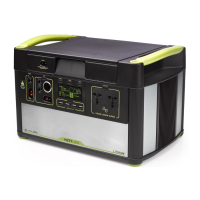

 To Next Page