
 Need help?
Do you have a question about the GoBible VOYAGER and is the answer not in the manual?
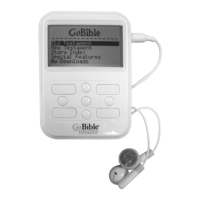
Identifies and lists all physical buttons and ports on the GoBible Voyager device, including front, side, and rear views.
Instructions for charging the battery before initial use and a caution against removing the battery after use.
Details on how to turn the Voyager on and off using the power button.
Instructions for using the Stop, Play/Pause, and Next buttons for navigation and playback.
Guide to using the MODE and Back buttons for menu navigation and selection.
Information regarding FCC compliance, radio frequency energy, and methods to mitigate interference.
Usage of Volume Up/Down buttons for audio adjustment and menu scrolling.
Functionality for locking the keyboard and creating or deleting bookmarks for specific verses.
Procedures for manually and automatically powering off the GoBible Voyager.
Guidelines for battery removal during extended periods and initial battery setup.
Procedure for resetting the Voyager if it malfunctions, without data loss.
Information on the player's Li-ion battery and the on-screen power indicator.
Methods for charging the GoBible via wall adapter or PC USB connection.
Guide to navigating and playing audio content from the Old and New Testaments.
Instructions to begin playback at the start of a book or a specific verse.
How to add MP3 files to favorites and play them from the 'My Downloads' section.
Instructions for playing downloaded music or MP3 audio files from 'My Downloads'.
How to navigate menus while audio is playing without interrupting playback.
Guide to accessing and playing stories from the Story Index.
Accessing and playing passages related to specific emotions or circumstances via the Topic Index.
How to turn the voice menu feature on or off for navigation assistance.
Connecting to a PC to download MP3 audio files and manage storage space.
How to set, play, and manage bookmarks for specific Bible verses.
Finding and playing Bible passages relevant to special days and holidays.
Listening to the entire Bible over 365 days with daily chapter selections.
Instructions for bookmarking a verse while the device is playing.
 General
| Display | LCD |
|---|---|
| Storage | MicroSD card (up to 32GB) |
| Audio Formats Supported | MP3 |
| Battery Life | Up to 18 hours |
| Weight | 2.4 oz |
| Playback Formats | MP3 |

 To Next Page