The Godox GM6S is a 5.5-inch 4K HDMI Ultra Bright Camera Monitor designed for onsite monitoring and recording in photography, compatible with DSLR cameras and camcorders. It offers multiple professional auxiliary functions to ensure optimal operation.
Main Features:
- Display: 5.5 inches wide view angle IPS HD ultra-bright touch screen.
- Connectivity: HDMI@1.4 Output or Input, 3.5mm audio jack port for real-time audio monitoring, USB-C Port, and Camera Control Port.
- Camera Control: Supports touch operation for shooting, recording, auto focus, focusing, ISO, aperture, and shutter control functions.
- LUT Support: Compatible with 17/32/33/64/65 cubic files and supports LUT lead-in with SD card.
- Power Supply: Versatile power options including DC power supply, Type-C power supply, and lithium battery power supply.
- Shortcut Keys: Five customizable shortcut keys (F1-F5) for functions like Camera Control, LUT Switch, Focus Assist, False Color, Center Marker, Safety Marker, Grid Line, Marker Mat, etc.
- Touch Operation: Double-click to call out/hide the main menu, slide leftwards from the right screen edge to call out the camera control menu, and slide the waveform display area up/down to show/hide it.
Function Description:
Focus Assist:
Helps to quickly focus images by displaying edge lines on the sharpest areas of the image. Users can choose from four colors: Red, Green, Blue, or Yellow.
Zebra:
Designed to check and set exposure levels. It displays diagonal lines over areas of the video that exceed the user-defined zebra level, aiding in achieving optimum exposure.
Offers four waveform choices: Y, YUV, RGB, Y Histogram, and Vector. The "All Waveform" function displays all waveforms simultaneously for intuitive image analysis.
LUT (Look-Up Table):
- LUT Manage: Stores up to 25 LUT files and supports SD cards formatted in NTFS or FAT32.
- Import: Automatically reads and displays folders and .cube files from the SD card. Users select .cube files to import.
- Delete: Automatically reads and displays stored LUT files. Users select files to delete.
- LUT Load: Selects LUT files to transform the color gamut, restore, and stylize colors.
- LUT Compare: Displays differences between the applied LUT interface and the original video interface.
Assist Functions:
- Video Aspect: Adjusts the display scale of the monitor.
- Center Marker: Displays a cross marker on the panel.
- Safety Marker: Provides several safety markers to meet different shooting safety requirements.
- Marker Mat: Offers various marker ratios and transparency adjustments (50 by default) for post-production cutting needs.
- Grid Line: Provides different grid line options to assist with shooting composition.
- Marker Color: Six color choices for Center Marker, Safety Marker, Marker Mat, and Grid Line to achieve high contrast for any image.
Basics Functions:
- Audio Meter: Monitors audio safety by displaying the peak and slow fall of audio levels.
- False Color: Two false color choices help users observe exposure in different areas of the image.
- Monochrome: Allows users to switch pixels to red, green, blue, or gray for quick adjustment of image hue saturation.
- Pixel to Pixel: Realizes pixel-to-pixel corresponding display of the video on the screen.
- Zoom: Zoomable in double, quadruple, and customed times.
Display Functions:
- Color Space: Provides standard REC.709 color space and origin color space.
- Brightness: Adjusts video and image brightness (50 by default).
- Contrast: Adjusts video and image contrast (50 by default).
- Saturation: Adjusts video and image saturation (50 by default).
- Sharpness: Adjusts video and image sharpness (0 by default). Decreasing sharpness makes the image softer, while increasing it makes it clearer.
- RGB: Manually adjusts the white balance by color offsetting Red, Green, and Blue (all 128 by default).
- Reset: Resets current user color settings to the default state.
System Functions:
- User Setting: Three custom user modes.
- Language: English, Chinese, German, Japanese, French, Italian, Spanish, and Korean language options.
- Battery Tip: Displays the current battery level.
- Volume: Adjusts monitoring volume (50 by default).
- Backlight: Adjusts monitor backlight (80 by default).
- Shortcut: Five shortcut keys with 18 options for user customization.
- Camera Control: Enables camera control via the monitor when connected with a compatible camera control cable (sold separately). Functions include shooting, recording, auto focus, focusing, ISO, aperture, and shutter.
- Image Flip: Provides left-right mirror flip, up-down mirror flip, auto (sensor), and up-down flip modes for suitable monitoring angles.
- Restore Factory Settings: Clears all current user settings and restores to factory defaults.
- Upgrade: Firmware upgrade via SD card (FAT32 or NTFS file system). Users copy the xxxx.bin file to the root directory of the SD card, insert it into the monitor, and click "upgrade." The monitor will automatically boot up after the upgrade.
- Power Down: Shuts down the device.
Technical Specifications:
- Model: GM6S
- Screen: 5.5" IPS HD ultra-bright touch screen
- Screen Ratio: 16:9
- Resolution: 1920x1080
- Contrast Ratio: 1000:1
- Color Depth: 8bit
- Visual Angle: 160°H/160°V
- Brightness: 1200nit±10%
- Power: 9W
- Power Supply:
- DC Input: 7-24V, φ5.5mm*2.1 plug
- DC Output: 7.8±0.3V/1.5A, φ5.5mm*2.1 plug
- Type-C: power supply above 18W
- Lithium Battery: F550/F750/F970 lithium battery, 7.2V (sold separately)
- Material: Plastic frame & metal shell
- Video Format:
- 480i&576i@50/60Hz
- 480p&576p@50/60Hz
- 1280x720p@50/60Hz
- 1920x1080i@50/60Hz
- 1920x1080p@23.98/24/25/29.97/30/50/59/59.94/60Hz
- 3840x2160p@23.98/24/25/29.97/30Hz
- 4096x2160p@23.98/24/25/29.97/30Hz
- Audio Output: 3.5mm Earphone dual-channel output
- SD Card Slot: Supports importing .cube files and firmware upgrade by SD card. Supports 17/32/33/64/65 cube.
- Working Temperature: -10~50℃
- Dimension: 14.5x8.7x2.8cm
- Net Weight: 273g
Included Items:
- Monitor x1
- Hood x1
- Cold Shoe Mount x1
- Standard HDMI to Mini Cable x1
- Standard HDMI to Micro Cable x1
- Standard HDMI to Standard HDMI Cable x1
- Dustless Cloth x1
- Instruction Manual x1
Optional Accessories:
- L-Mount
- Camera Control Cable (purchased separately based on camera model):
- GMC-S2 (Multi)
- GMC-U4 (Micro USB)
- GMC-U5 (Mini USB)
- GMC-U6 (USB Type-C)
(More camera control cable information is available on the Godox website.)
Installation and Detaching the Battery:
- Installation: Slide the lithium battery into the battery compartment in the direction of the arrow.
- Disassembly: Push down the self-lock battery remove button, then slide out the lithium battery.
- Compatible with F550/F750/F970 lithium batteries (sold separately).
Maintenance:
- Avoid Drops: Prevent sudden drops, strong shocks, impacts, or excess stress to avoid malfunction.
- Keep Dry: The product is not waterproof. Malfunction, rust, and corrosion can occur if soaked in water or exposed to high humidity.
- Temperature Changes: Sudden temperature changes may cause product condensation.
- Magnetic Fields: Keep away from strong magnetic fields, as strong static or magnetic fields can cause malfunction.
- Unauthorized Service: Unauthorized service or artificial damage will void the warranty. Maintenance fees will be charged in such situations.
- Product Failures: If the product fails or gets wet, do not use it until repaired by professionals.
- Manual Updates: Changes to specifications or designs may not be reflected in this manual.
- Warranty Period: Calculated from the purchase date registered on the warranty card.
- Product Main Body: 12 months
- Battery: 3 months
- Charger, Power Cable, Sync Cable, Electrical Parts etc.: 12 months
- Other Items (Battery Case, Windscreen Foam, Wind Cap, Locking Device, Lanyard, Tie, Velcro Tape, Clip, Bag, Package etc.): No warranty
- Service Type: Customer sends the product to the designated site for all warrantied parts.
- Obtaining Service: Contact the product distributor, authorized service institutions, or Godox after-sale service. Provide a valid warranty card. If a valid card cannot be provided, service may still be offered if the product is confirmed to be within the maintenance scope, but this is not an obligation.
Inapplicable Cases for Warranty:
- Product or accessory has expired its warranty period.
- Breakage or damage caused by inappropriate usage, maintenance, or preservation (e.g., improper packing, plugging in/out external equipment, falling, squeezing, exposure to improper temperature, solvents, acids, bases, flooding, damp environments).
- Breakage or damage caused by non-authorized installation, maintenance, alteration, addition, or detachment.
- Original identifying information of product or accessory is modified, alternated, or removed.
- No valid warranty card.
- Breakage or damage caused by using illegally authorized, nonstandard, or non-publicly released software.
- Breakage or damage caused by force majeure or accident.
- Breakage or damage not attributable to the product itself.
- Damage caused by parts, accessories, and software beyond the warranty period or scope.
- Normal discoloration, abrasion, and consumption during product use are not considered breakage.

 Need help?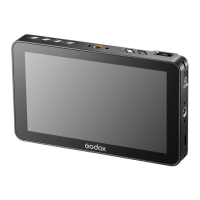

 To Next Page
 General